License Migration Between Devices
Prerequisites
The license file of the device has been revoked and the license revocation code has been obtained.

You can run the display license revoke-ticket command in any view to obtain the license revocation code.
Context
License replacement of a spare part: ESNs of two activated NEs are exchanged. Typically, a customer buys one more device, the device has a license, but the license is original. After a device operates on the network for a period of time, the license of the device may need to be updated. Therefore, if the device on the network becomes faulty, you cannot directly replace the device with the spare part. Instead, you need to perform license replacement of the spare part on the ESDP to make the spare part obtain the latest license.
ESN change with a revocation code: An incorrect ESN is bound to the license file, and no record about binding a correct ESN to the license exists on the ESDP system. (If a license binding record exists on the ESDP system, you need to refer to Rolling Back a License), apply for the license file corresponding to the new device ESN again.
ESN change without a revocation code: The ESN of the license file is incorrect and no revocation code can be obtained for the original license file because of a misoperation. You need to apply for the license file corresponding to the correct ESN again.
The ESN change operation can be performed only on permanent licenses, not on temporary or fixed-term licenses.
Channel partners and final users do not have the permission for license replacement of a spare part and ESN change without a revocation code. If needed, contact Huawei technical support personnel. This section describes only procedures for changing the ESN with a revocation code.
Procedure
- Log in to the ESDP system at http://app.huawei.com/isdp.
- Choose from the left navigation tree to enter the ESN Change page.
- Select With Revocation Code for ESN Change type, enter the revocation code of the license file in which the ESN
needs to be changed, and click Verify.
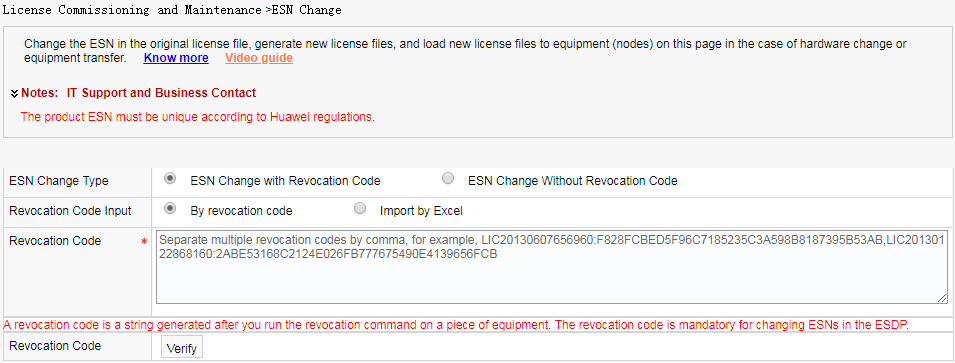
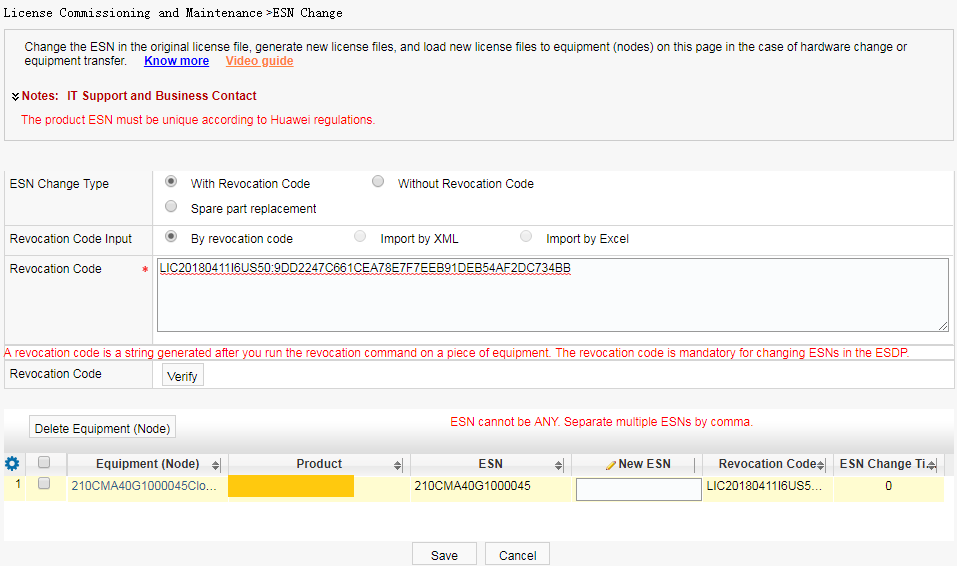
- After verifying the revocation code, the system automatically
displays device information of the original ESN. Enter the new ESN
to start the ESN change task. Click Save.
- Choose to check ESN change tasks on the displayed page. Click the link under Download to download the .zip package to the local device.