Obtaining COMM Licenses for Capacity Expansion Projects
Prerequisites
- The entitlement ID (LAC) and capacity expansion contract ID have been obtained.
- The device ESNs have been obtained.
- The product name and ESN in the contract are the same as those on the live network.
- The license for capacity expansion is in Ready state.
Context
At a site with a capacity expansion contract, you can directly select the license entitlement for activation. The ESDP system then automatically combines all license items on the device to generate an overall license file. Note that the version of the device must be no earlier than that of onsite products.
Procedure
- Log in to the ESDP system at http://app.huawei.com/isdp.
- Verify that the capacity expansion conditions are met.
- Click Equipment(Node) Management in the navigation tree on the left.
On the Equipment(Node) Management page, enter the ESN of a specified device and click Search to verify that authorization information about this device exists in the ESDP system and the ESN of the device is correct.
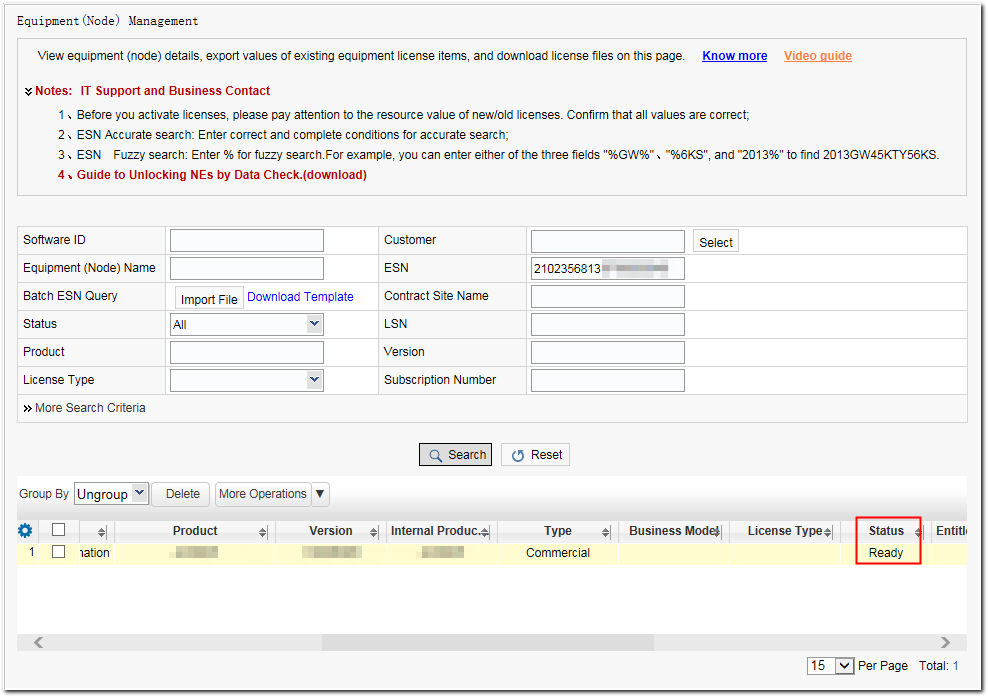
- Verify the delivery status of the license in the search result.
- If the status is Activated, roll back the license status to Ready by referring to Rolling Back a License and continue with Step 3.
- If the status is Ready, go to Step 3.
- If any other status is displayed, contact Huawei technical support personnel.
- For subsequent operations, see Obtaining COMM Licenses for New Site Projects.