Configuring ESP NAT
This section describes the process for configuring ESP NAT.
Context
In the deployment of an IPSec VPN, if the initiator resides on a LAN, the remote end resides on another LAN, and the initiator requires an IPSec tunnel be established directly with the remote end, the IPSec NAT traversal function can be used, as shown in Figure 1. For configurations of IPSec NAT traversal, see (Optional) Configuring NAT Traversal.
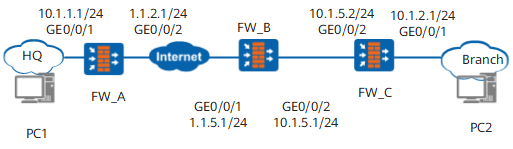
However, the initiator or remote device does not support NAT traversal. To guarantee that the IPSec service is normal, you need to configure the ESP NAT function on the FW. ESP is a Layer-3 protocol that has no port. Therefore, ESP cannot apply to NAT that allows port translation. ESP NAT allocates SPI values to ESP packets as port numbers to differentiate various ESP packets. The ESP NAT function can be configured in source NAT and destination NAT scenarios. For the ESP NAT mechanism, see About ESP NAT.
Procedure
- Run the system-view command to access the system view.
- Run the firewall esp nat enable command to configure the ESP NAT function.
By default, the ESP NAT function is disabled.
In the ESP NAT configuration, ensure that devices at both ends of the IPSec tunnel have the NAT traversal function disabled.
- Choose to configure source NAT or NAT Server based on the actual scenario.
- For details on configuring source NAT, see Configuring Source NAT.
- For details on configuring NAT Server, see Configuration NAT Server.
- Run the quit command to return to the system view.