Understanding ACLs
This section describes the ACL rule matching order and ACL operating process.
ACL Types
The FW supports basic ACLs and advanced ACLs:
Basic ACLs
Basic ACLs are numbered from 2000 to 2999. Such ACLs can only be defined by the source IP addresses of packets.
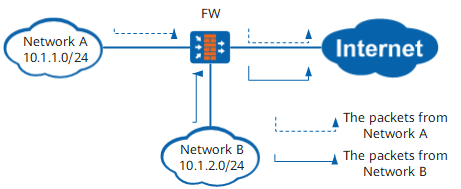
As shown in Figure 1, if a basic ACL on the FW is defined for the packets whose source IP addresses are in Network A, all the packets sent from Network A to the Internet can be identified. These packets are processed through functions configured on the FW.
Advanced ACLs
Advanced ACLs are numbered from 3000 to 3999. Such ACLs can be defined by the combination of multiple elements, including the source IP address, destination IP address, source port number, destination port number, and upper layer protocol information (such as the type and code of the ICMP protocol message).
Advanced ACLs offer more accurate, diversified, and flexible rules than basic ACLs.
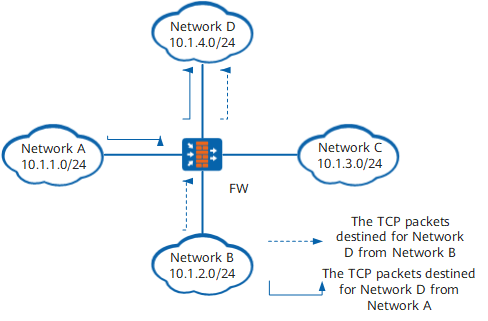
As shown in Figure 2, on the FW, the advanced ACLs can be used to identify all (Transmission Control Protocol) TCP packets sent from Network B to Network D. Packets are processed through functions configured on the FW.
Matching Order
An ACL is composed of multiple permit or deny statements. The statements describe different rules, which may be repeated or inconsistent.
You need to match data flows with ACL rules based on the following rules:
- In the same ACL rule group, the ACL rule with the smaller rule-id is matched first.
- In the different ACL rule group, the matching is based on the sequence of ACLs configured by the user.
Once a data flow is successfully matched with a rule, the matching of this data flow does not continue. The FW performs subsequent operations to this data flow according to the rule.
Step
If the rules of an ACL are matched in ascending order of their IDs, it is difficult to manually adjust the matching order of the rules. Once created, the ID of a rule cannot be changed. For example, if an ACL has three rules with the IDs 1, 2, and 3 respectively and the difference between every two rule IDs is 1, the matching orders of the rules cannot be manually adjusted.
To resolve this problem, configure a step for the ACL rules. A step is the difference between two automatically allocated ACL rule IDs. For example, if the step is 5, the system automatically allocates a rule ID, 5, for the first rule, 10 for the second rule, and 15 for the third rule. The matching order of the rules is rules 5, 10, and 15. If you want to add an ACL rule and require that the priority of the rule be higher than that of rule 15, you can set the ID to 12 for the rule.
If you change the step, the IDs of the rules in the ACL group are re-allocated automatically. For example, the original IDs of ACL rules are 5, 10, 15, and 20. If the step is changed from 5 to 2, the IDs of ACL rules are changed to 2, 4, 6, and 8.
Operating Process of an ACL
An ACL must be referenced to take effect. The operating process of an ACL on the FW is as follows:
- After a packet related to a feature that references an ACL arrives the FW, the FW checks whether the referenced ACL exists. If the ACL exists, the FW performs the next step. If the ACL does not exist, the FW discards the packet.
- The FW searches the rules of the ACL. If a match is found, the rest of the rules are skipped, and the packet is permitted or denied as determined by the matched rule.