Configuring an Address Object and Address Group Using the Web UI
This section describes how to use the Web UI to configure an address and address group.
Configuring an Address Object
- Choose .
- Click Add and set the following parameters.
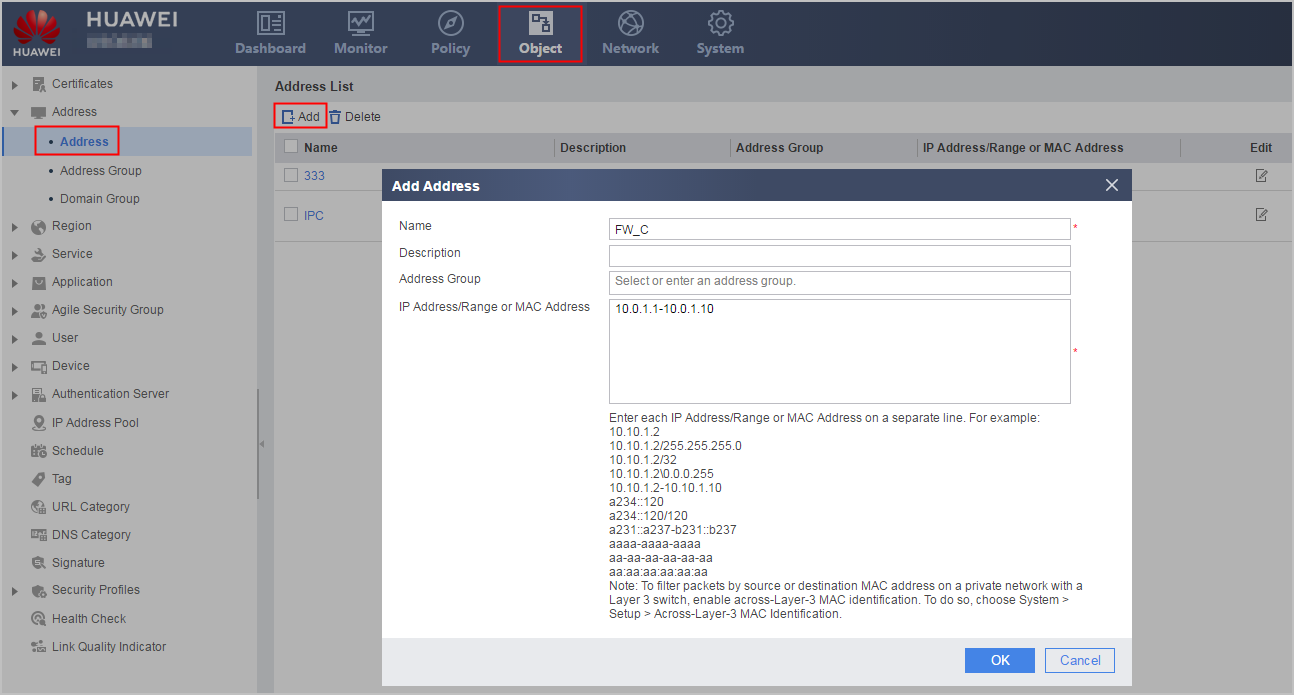
Parameter
Description
Name
Name of an address object. If the name contains special characters, only special characters on the keyboard are supported.
Description
Description of an address object
Address Group
Address group of an address
IP Address/Range or MAC Address
You can add MAC addresses, IPv4 addresses and IPv6 addresses to an address object.
- An IPv4 address is similar to 10.1.1.2, 10.1.1.2/24, 10.1.1.2/255.255.255.0, 10.1.1.2\0.0.0.255, or 10.1.1.2-10.1.1.10.
If a single host IPv4 address is entered, the system automatically adds a 32-bit mask when delivering the address.
- An IPv6 address is similar to a234::120, 3::3/64, or a234::120-b234::120.
If a single host IPv6 address is entered, the system automatically adds a 128-bit prefix length when delivering the address.
- A MAC address to be added can be in one of the following formats: XXXX-XXXX-XXXX, XX:XX:XX:XX:XX:XX, and XX-XX-XX-XX-XX-XX (each X indicates a 1-digit hexadecimal number).
- An IPv4 address is similar to 10.1.1.2, 10.1.1.2/24, 10.1.1.2/255.255.255.0, 10.1.1.2\0.0.0.255, or 10.1.1.2-10.1.1.10.
- Click to view the created address object.
Configuring an Address Group
- Choose .
- Click Add and set the following parameters.
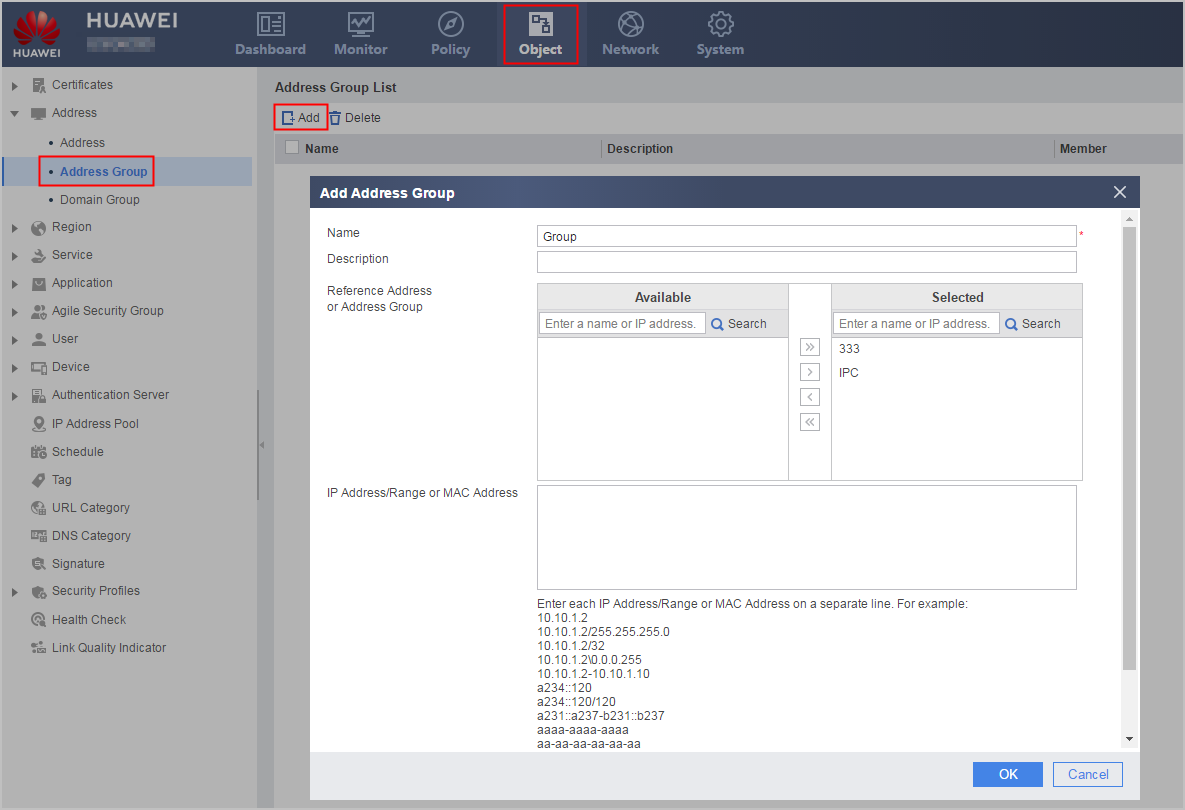
Parameter
Description
Name
Name of an address group. If the name contains special characters, only special characters on the keyboard are supported.
Description
Description of an address group
Reference Address or Address Group
You can add the address object or address group in the Available box to the Selected box.
You can enter the name or IP address in the search box to query the address or address group in the Available or Selected box.
The query methods of various content in the search box are as follows:- Name: The name is case-insensitive, and the address or address group name query is performed.
- IP address: The IP address can be an individual IPv4 or IPv6 address or an IP network segment, such as 10.10.10.1 to 10.10.10.100, 10.10.10.1/24, or 10.10.10.1 255.255.255.0. You can also query the addresses or network segments contained in the address groups.
IP Address/Range or MAC Address
You can add MAC addresses, IPv4 addresses and IPv6 addresses to an address group.
- An IPv4 address is similar to 10.1.1.2, 10.1.1.2/24, 10.1.1.2/255.255.255.0, 10.1.1.2\0.0.0.255, or 10.1.1.2-10.1.1.10.
If a single host IPv4 address is entered, the system automatically adds a 32-bit mask when delivering the address.
- An IPv6 address is similar to a234::120, 3::3/64, or a234::120-b234::120.
If a single host IPv6 address is entered, the system automatically adds a 128-bit prefix length when delivering the address.
- A MAC address to be added can be in one of the following formats: XXXX-XXXX-XXXX, XX:XX:XX:XX:XX:XX, and XX-XX-XX-XX-XX-XX (X indicates a 1-bit hexadecimal number).
- Click to view the created address group.
Address Object/Address Group Query
An address object or address group can be queried by name, IP address, or MAC address. Fuzzy query and exact query are supported. The precautions are as follows:
If you enter a complete IP address (such as 2.3.4.5) for exact query, you can obtain the address objects or address groups of the network segments and IP address ranges that contain this IP address. In addition, nested query is supported. For example, if the queried IP address is in address object aaa and address group ddd references aaa, both aaa and ddd can be queried. For example:
- Under the address object, enter 192.168.2.8 and click Search.

- Under the address group, enter 2.3.4.5 and click Search.

- Under the address object, enter 192.168.2.8 and click Search.
If you enter an incomplete IP address (such as 2.3.4) for fuzzy query, you cannot obtain the address objects or address groups of the network segments and IP address ranges that contain this IP address. In addition, nested query is not supported. For example:
- Under the address object, enter 192.168.2 and click Search.

- Under the address group, enter 2.3.4 and click Search.

- Under the address object, enter 192.168.2 and click Search.
If you enter a complete MAC address for exact query, nested query is not supported.