< Home

CLI: Example for Configuring the FW as a Client to Log In to Other Devices

This section provides an example for configuring FW as the STelnet or Telnet client.

Prerequisites

  • The FW between the STelnet or Telnet server is routable.

  • The STelnet server has been enabled on the server.
  • The STelnet or Telnet user information configured on the STelnet or Telnet server has been obtained.

Networking Requirements

The FW logs in to the server using STelnet or Telnet, as shown in Figure 1.

During Telnet login, data and passwords are transmitted in plaintext mode, causing security risks. To secure data transmission, use STelnet instead.

VPN instance default is bound to the management port (MEth 0/0/0 or GigabitEthernet 0/0/0) by default. If the management port is used to ping, STelnet, Telnet, FTP, or SFTP other PCs or devices, the vpn-instance default parameter must be specified, such as telnet vpn-instance default 10.2.2.1.
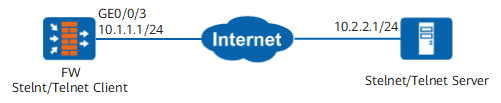
Figure 1 Networking diagram of configuring FW as a client to log in to other devices

Procedure

  • Configure the FW to access the server using Telnet.
    1. Enable the Telnet service on the server.
    2. Use the FW to log in to the server using Telnet.

      <FW> telnet 10.2.2.1

  • Configure the FW to access the server using STelnet.
    1. Enable first-time authentication.

      <FW> system-view
      [FW] ssh client first-time enable
      

    2. If the STelnet server uses RSA or PASSWORD-RSA authentication method, you must bind the FW STelnet account to the RSA key on the server.

      1. Generate a local RSA key pair.
        [FW] rsa local-key-pair create
        The key name will be: FW_Host     
        
        The range of public key size is (2048 ~ 2048). 
        NOTES: If the key modulus is greater than 512, 
                it will take a few minutes.
        Input the bits in the modulus[default = 2048]:2048
        Generating keys...
        .+++++
        ........................++
        ....++++
        ...........++
      2. Copy the RSA keys. The information in bold is the RSA keys generated by the client. Copy the keys and save them.
        [FW] display rsa local-key-pair public
        =====================================================                           
        Time of Key pair created: 18:34:19  2013/1/17    
        Key name: FW_Host       
        Key type: RSA encryption Key                     
        =====================================================  
        Key code:         
        308188    
          028180          
            CB35ED46 660B55CC 80EAAFD7 78DDFBF7 467A1C13 
            5D29865C 63509D5D E25E423A DB11A00F 77CDBBB4 
            D93436EA D50E4261 AC476E56 7AC6344A B0ECE377 
            EA2E6912 4EC32710 FC4B5D2D 61E358B1 E8EA739F 
            A0338BE0 ED72A9A0 EDFE49FD 071623A4 96A0A45B 
            4EAD2641 A8D7A39F 567B02B9 90DE5722 980072B4 
            B320FDA0 10F18DF9                            
          0203            
            010001                  
                          
         Host public key for PEM format code:            
        ---- BEGIN SSH2 PUBLIC KEY ----                  
        AAAAB3NzaC1yc2EAAAADAQABAAAAgQDLNe1GZgtVzIDqr9d43fv3RnocE10phlxj 
        UJ1d4l5COtsRoA93zbu02TQ26tUOQmGsR25WesY0SrDs43fqLmkSTsMnEPxLXS1h  
        41ix6Opzn6Azi+Dtcqmg7f5J/QcWI6SWoKRbTq0mQajXo59WewK5kN5XIpgAcrSz   
        IP2gEPGN+Q==      
        ---- END SSH2 PUBLIC KEY ----                    
                          
        Public key code for pasting into OpenSSH authorized_keys file : 
        ssh-rsa AAAAB3NzaC1yc2EAAAADAQABAAAAgQDLNe1GZgtVzIDqr9d43fv3RnocE10phlxjUJ1d4l5C
        OtsRoA93zbu02TQ26tUOQmGsR25WesY0SrDs43fqLmkSTsMnEPxLXS1h41ix6Opzn6Azi+Dtcqmg7f5J
        /QcWI6SWoKRbTq0mQajXo59WewK5kN5XIpgAcrSzIP2gEPGN+Q== rsa-key                    
                          
                          
        =====================================================  
        Time of Key pair created: 11:43:19  2013/9/17          
        Key name: FW_Server 
        Key type: RSA encryption Key   
        =====================================================  
        Key code:    
        3067           
          0260         
            EC20AA8E 967145ED 186D85B4 3B928A81 C312F0E2
            EF34E96C 944FDE4F 6215B98A C046FB51 A195AA9E 
            D926DE1B 59C6B87E 024C12D1 078DE2CE E9F9C5E6 
            C5C2E32D CDD74D33 78E70E64 C6CF46E3 A91F8C87
            5354BDDD A1A2C9BB 21112D5E 0D2CB44B
          0203         
            010001  

    3. Use the FW to log in to the server in STelnet mode.

      <FW> system-view
      [FW] stelnet 10.2.2.1
      

Copyright © Huawei Technologies Co., Ltd.
< Previous topic Next topic >