Web: Example for Configuring HTTPS Web Login (RADIUS Server Authentication+Administrator Account Not on the Local Device)
This section provides an example for configuring HTTPS web login on the web UI. The administrator account is stored on the RADIUS server, and the FW authenticates the administrator through the RADIUS server.
Networking Requirements
As shown in Figure 1, the FW connects to the RADIUS server to authenticate and authorize the administrator.
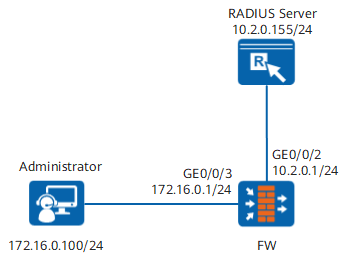
Data Planning
Item |
Data |
Description |
|---|---|---|
Administrator |
|
The account name and password should be easy to remember. |
RADIUS server |
|
Ensure that the configuration on the RADIUS server is consistent with that on the RADIUS server. |
Port: |
|
Interface for communicating with the RADIUS server |
|
Interface for communicating with the administrator's PC. |
Configuration Roadmap
- Configure FW interfaces and security policies.
- Configure the web service on the device and enable the HTTPS service on interfaces so that the administrator can log in to the web UI through HTTPS.
- Configure the RADIUS server, authentication domain, and authorization scheme.
- Create an administrator on the RADIUS server and specify the administrator level.
Procedure
- Configure the FW.
- Configure interfaces.
- Choose .
- On the Interface List tab, click
 in the line of GE0/0/2. Configure parameters as follows.
Security Zone
dmz
IPv4
Connection Type
Static IP
IP Address
10.2.0.1/24
- Click OK.
- Repeat the preceding steps to configure GE0/0/3.

If the default configuration of the management interface is used for login, skip this step.
The default IP address of the management interface is 192.168.0.1. The interface is assigned to the Trust zone. The administrator is allowed to log in the FW through HTTPS.
Zone
trust
IPv4
Connection Type
Static IP
IP Address
172.16.0.1/24
Management Access
HTTPS
- Enable the HTTPS service and set the service port and timeout period of the web service.
By default, the HTTPS service is enabled, and the default port number of the HTTPS service is 8443.
- Choose .
- Select HTTPS Service and set the service port.
- Set Web Service Timeout to 10 minutes.
- Click Apply.
- Configure the RADIUS server.
- Choose .
- Click Add and set RADIUS server parameters.
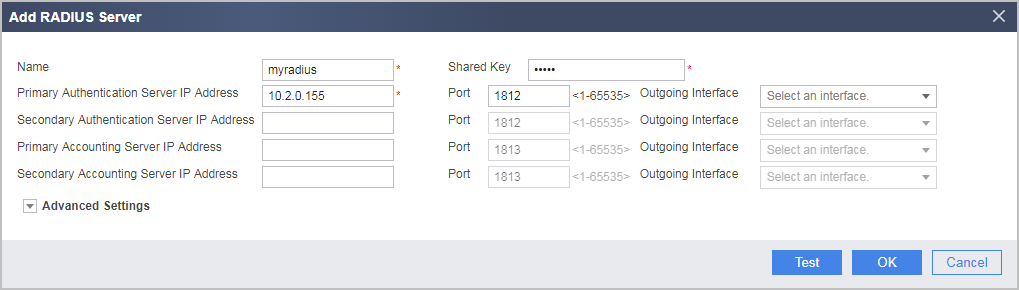
- Click Test and then OK in the dialog box that is displayed. Then enter the account name and password obtained from the RADIUS server. Then click Start Checking to check the connectivity to the RADIUS server.
If the connectivity check succeeds, click Cancel.
- Click OK.
- Configure an authentication domain, reference the RADIUS server template, and allow administrator access.
- Choose .
- Click Add to create an authentication domain.
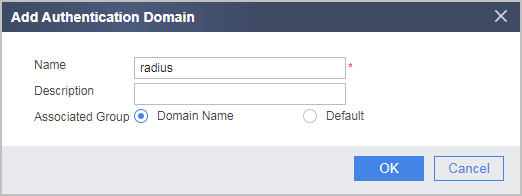
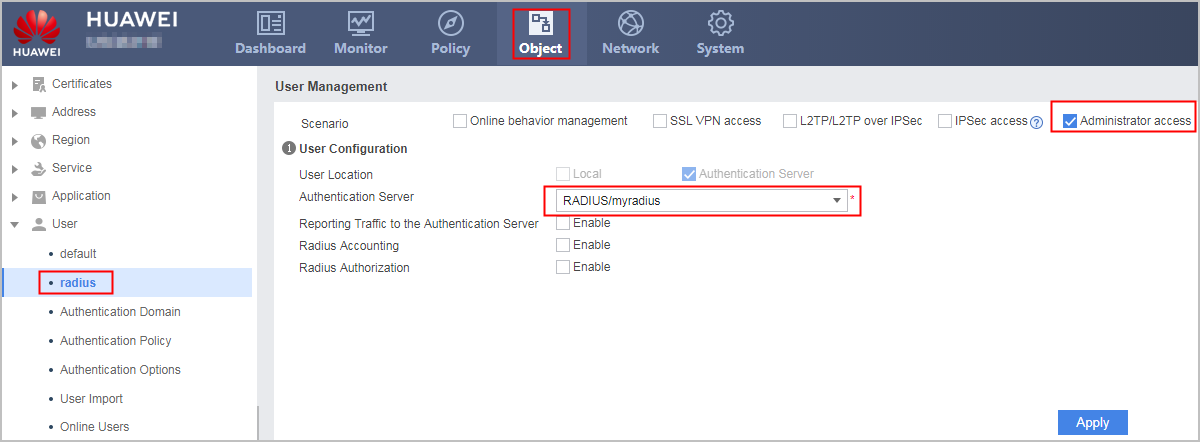
- Click radius and set parameters as follows:
- Configure interfaces.
- Configure the RADIUS server. For the configuration methods of the RADIUS server you use, refer to related documents.
Verification
- User administrator password/password radiusadmin@radius/Admin@123 to log in to the FW through HTTPS. The login succeeds.
- Run the display manager-user online-user command on the FW. The command output shows the administrator information is correct.
<FW> display manager-user online-user
 ----------------------------------------------------------------------------
  UserID            : 26
  Username          : radiusadmin@radius
  IP address        : 172.16.0.100
  Access-type       : web
  User-level        : 3
  Authen method     : RADIUS
  Author method     : RADIUS
  Login time        : 2017/03/27 09:55
 ----------------------------------------------------------------------------
Configuration Scripts
Only the configuration scripts related to the FW are provided.
#
web-manager security version tlsv1 tlsv1.1 tlsv1.2
 web-manager enable
 web-manager security enable
 web-manager timeout 10
#
radius-server template myradius
 radius-server shared-key cipher %^%#o5p{1IGxT2jTqPVB}16AdbG@.7x>a@l>k+E%^%
#
 radius-server authentication 10.2.0.155 1812 weight 100
 radius-server group-filter class
#
aaa
 authentication-scheme admin_radius
  authentication-mode radius
 authorization-scheme radius
  authorization-mode radius
 domain radius
  authentication-scheme admin_radius
  authorization-scheme radius
  radius-server myradius
  service-type administrator-access
  internet-access mode password
#
interface GigabitEthernet0/0/2
 ip address 10.2.0.1 255.255.255.0
#
interface GigabitEthernet 0/0/3
 ip address 172.16.0.1 255.255.255.0
 service-manage https permit
#
firewall zone trust
 set priority 85
 add interface GigabitEthernet 0/0/3
#
firewall zone dmz
 set priority 50
 add interface GigabitEthernet0/0/2
#
security-policy
  rule name policy02
  source-zone local
  destination-zone dmz
  destination-address 10.2.0.155 mask 255.255.255.0
  action permit
#