CLI: Example for Configuring the FW to Output Alarms to the NMS
This section provides a configuration example for outputting alarms to the NMS.
Networking Requirements
As shown in Figure 1, the FW connects to the NMS. The administrator wants to view the alarms generated on the FW on the NMS to monitor the operation of the FW and locate faults.
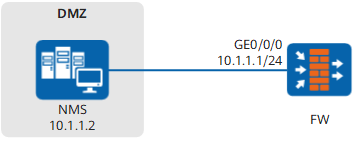
Configuration Roadmap
- Set IP addresses to interfaces on the FW, assign the interfaces to security zones, and configure security policies.
- Enable the information center on the FW.
- Configure the information channel through which alarms are output and the alarm output rule.
- Configure SNMP on the FW.
- Configure the NMS.
Procedure
- Set an IP address for GE 1/0/0 on the FW, add the interface to a security zone, and configure a security policy.
# Set an IP address for GE0/0/0.
<FW> system-view
[FW] interface GigabitEthernet 0/0/0
[FW] ip address 10.1.1.1 24
[FW] quit
# Add GE0/0/0 to a security zone.
[FW] firewall zone dmz
[FW-zone-dmz] add interface GigabitEthernet 0/0/0
[FW-zone-dmz] quit
# Configure a security policy.
[FW] security-policy
[FW-policy-security] rule name local_dmz
[FW-policy-security-rule-local_dmz] source-zone local
[FW-policy-security-rule-local_dmz] destination-zone dmz
[FW-policy-security-rule-local_dmz] source-address 10.1.1.1 32
[FW-policy-security-rule-local_dmz] service snmptrap
[FW-policy-security-rule-local_dmz] action permit
[FW-policy-security-rule-local_dmz] quit
[FW-policy-security] rule name dmz_local
[FW-policy-security-rule-dmz_local] source-zone dmz
[FW-policy-security-rule-dmz_local] destination-zone local
[FW-policy-security-rule-dmz_local] destination-address 10.1.1.1 32
[FW-policy-security-rule-dmz_local] service snmp
[FW-policy-security-rule-dmz_local] action permit
[FW-policy-security-rule-dmz_local] quit
[FW-policy-security] quit
- Enable the information center on the FW.
[FW] info-center enable - Configure the information channel through which alarms are output and the alarm output rule.
# Configure the information channel through which alarms are output to the SNMP agent.
[FW] info-center snmp channel channel7# Configure the rule according to which the FW outputs alarms to the SNMP agent.
[FW] info-center source ip channel channel7 trap level informational state on
By default, the FW outputs alarms for all modules through the SNMP agent.
- Configure SNMP on the FW.
# Configure the SNMP version.
[FW] snmp-agent sys-info version v2c
Warning: SNMPv1/SNMPv2c is not secure, and it is recommended to use SNMPv3.
# Configure the SNMP write community.
[FW] snmp-agent community write cipher private@123# Configure the SNMP alarm function.
[FW] snmp-agent trap enable
Warning: All switches of SNMP trap/notification will be open. Continue? [Y/N]:y
[FW] snmp-agent target-host trap address udp-domain 10.1.1.2 params securityname Admin123 v2c
- Configure the NMS.
You need to refer to the configuration guide of the NMS that is deployed. The NMS authentication parameters must be consistent with those on the FW. Otherwise, the NMS may fail to manage the FW.
Configuration Script
#
 sysname FW
#
 info-center source IP channel 7 trap level informational
 info-center snmp channel 7
#
interface GigabitEthernet0/0/0
 ip address 10.1.1.1 255.255.255.0
#
snmp-agent trap type base-trap
#
firewall zone dmz
 set priority 50
 add interface GigabitEthernet0/0/0
#
 snmp-agent
 snmp-agent local-engineid 000007DB7F00000100003598
 snmp-agent community write cipher %$%$z=UX9vmQgCHS/E2xC5IPIZQH%$%$
 snmp-agent sys-info version v2c v3
 snmp-agent target-host trap address udp-domain 10.1.1.2  params securityname %$%$\d\R0yX`|T+ZwqXUB}o&,kbY%$%$ v2c
 snmp-agent trap enable
#
security-policy
 rule name local_dmz
  source-zone local
  destination-zone dmz
  source-address 10.1.1.1 32
  service snmptrap
  action permit
 rule name dmz_local
  source-zone dmz
  destination-zone local
  destination-address 10.1.1.1 32
  service snmp
  action permit
#
return