Overview of HiSec Insight Interworking
The FW can interwork with the HiSec Insight to identify and block malicious sessions.
The FW can cooperate with the HiSec Insight. After the HiSec Insight detects a malicious session based on analysis and delivers a blocking command to the FW, the FW deletes the session and blocks the traffic matching the session. Service traffic can be mirrored to the HiSec Insight in different ways. The specific scenarios are as follows:
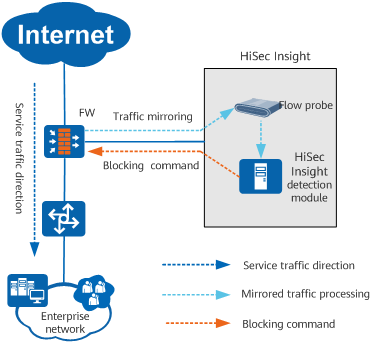
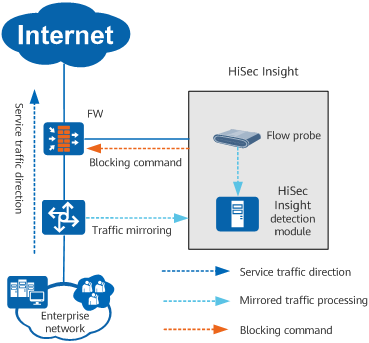
The flow probe of the HiSec Insight is deployed on the network egress to obtain the mirrored traffic of the FW.
- Service traffic is mirrored to the HiSec Insight through the FW or switch.
After the HiSec Insight receives the traffic, the flow probe parses the application-layer protocol of the traffic and sends the parsed traffic to the HiSec Insight detection module to check whether it matches any malicious session.
If the HiSec Insight detection module detects a malicious session threat event, it matches the event to an interworking policy. If the action in the matched interworking policy is block, the HiSec Insight establishes an interworking connection with the northbound RESTCONF interface of the FW and delivers a blocking command. The blocking command includes the source IP address, destination IP address, and protocol of the malicious session.
- After receiving a blocking instruction from the HiSec Insight, the FW creates a dynamic blacklist entry based on the destination address in the instruction. The addflag flag in the blocking instruction determines the type of the generated dynamic blacklist entry, namely, the source address type or destination address type. During the session table update, the FW deletes the sessions whose source IP address or destination IP address are the same as that in a blacklist entry. The FW directly blocks the blacklisted traffic, denying the traffic from or destined for a malicious IP address.
- The FW periodically sends logs to the HiSec Insight to report statistics on blocked malicious traffic. The HiSec Insight displays information about malicious traffic blocked by the FW.
If the local port mirroring function of the FW is used for traffic mirroring, the observing port cannot operate other services. Otherwise, traffic mirroring fails.

HiSec Insight V100R003C30 and later versions support encrypted traffic analysis. Encrypted service traffic (such as HTTPS, POP3S, IMAPS, and SMTPS traffic encrypted based on SSL) can be directly mirrored to the HiSec Insight through the FW or switch. For versions earlier than HiSec Insight V100R003C30, you need to configure SSL encrypted traffic detection on the FW to decrypt the traffic and then mirror the traffic to the HiSec Insight through the FW.