CLI: Example for Configuring the FW to Interwork with the HiSec Insight (Mirroring Traffic Through the Switch)
Networking Requirements
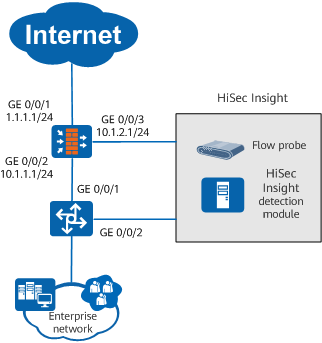
The FW can interwork with the HiSec Insight to identify and block malicious sessions. As shown in Figure 1, the FW acts as the RESTCONF server, and the HiSec Insight as the RESTCONF client. The FW and HiSec Insight are reachable, and the FW uses the RESTCONF NBI to communicate with the HiSec Insight.
Service traffic is mirrored by the downstream switch to the HiSec Insight.
Figure 1 Interworking between the FW and HiSec Insight
Configuration Roadmap
- Configure an API administrator for authentication for communication between the HiSec Insight and the FW.
- Configure northbound RESTCONF interface.
- Enable interworking with the HiSec Insight.
- Configure the port mirroring function on the switch to mirror service traffic to the HiSec Insight.
Procedure
- Set interface IP addresses and assign the interfaces to security zones.
- Configure security policies to ensure that users in the enterprise network, HiSec Insight, and FW can communicate.
- Create an API administrator and use local authentication. The user name and password can be customized. After this administrator account is created, remember the user name and password. When the HiSec Insight communicates with the FW, the administrator account is used for authentication.
[sysname] aaa
[sysname-aaa] manager-user restconf-admin
[sysname-aaa-manager-user-restconf-admin] service-type api
[sysname-aaa-manager-user-restconf-admin] password cipher Hello@123
[sysname-aaa-manager-user-restconf-admin] quit
[sysname-aaa] quit
- Configure a RESTCONF NBI.
[sysname] api
[sysname-api] api https port 8447 enable
[sysname-api] undo security server-certificate
[sysname-api] quit
- Enable the blacklist function.
[sysname] firewall blacklist enable
- Configure the HiSec Insight interworking function.
[sysname] apt-cis
[sysname-apt-cis] linkage enable
[sysname-apt-cis] blacklist aging-time 30
[sysname-apt-cis] log interval 1
[sysname-apt-cis] quit
- Configure the port mirroring function on the switch.
This example uses Huawei S9700 to describe how to configure the port mirroring function. For the configurations of other functions, refer to the product documents of the S9700.
Verification
- Run the display firewall blacklist item type apt-cis command to check the blacklists generated when the HiSec Insight delivers blocking instructions.
<sysname> display firewall blacklist item type apt-cis
IP/port/protocol/user                              Reason                         Insert Time            Age Time  HitTimes
  ----------------------------------------------------------------------------------------------------------------------------
 1.1.1.1 /any (src) /any/                           Apt-cis                       2017/02/16 16:59:55    Permanent 2
- Run the display apt-cis statistics log command to check threat log statistics sent to the HiSec Insight.
<sysname> system-view
[sysname] diagnose
[sysname-diagnose] display apt-cis statistics log destination 10.1.1.1
Configuration Scripts
#
aaa
  manager-user restconf-admin
  password cipher @%@%r"4+){k0COFQte$ymxOMEk80.\ACNlhJgDNfvyN*CqfSk83E@%@%
  service-type api
#
interface GigabitEthernet0/0/1
 undo shutdown
 ip address 1.1.1.1 255.255.255.0
#
interface GigabitEthernet0/0/2
 undo shutdown
 ip address 10.1.1.1 255.255.255.0
 #
interface GigabitEthernet0/0/3
 undo shutdown
 ip address 10.1.2.1 255.255.255.0
#
 firewall zone trust
 set priority 85
 add interface GigabitEthernet0/0/2
#
firewall zone untrust
 set priority 5
 add interface GigabitEthernet0/0/1
#
firewall zone dmz
 set priority 50
 add interface GigabitEthernet0/0/3
#
api
 api https enable
#
security-policy
 default action permit
 rule name policy_to_cis
  source-zone local
  destination-zone dmz
  action permit
 rule name policy_to_Internet
  source-zone trust
  destination-zone untrust
  action permit
 group name https
#
apt-cis
 linkage enable
#
return