Configuring ASPF/ALG for User-Defined Protocols
Context
In the TCP/IP protocol suite, the protocol types of packets are determined based on port numbers. If certain application protocols are not supported, the device cannot resolve the application-layer data. In this case, you can define the traffic through ACLs to automatically create the server map entries of the STUN type using the user-defined ASPF/ALG function if you know the mechanisms of such protocols, thereby ensuring packet forwarding.
User-defined protocol detection is a special ASPF/ALG application. You can use this function to create a 3-tuple server map entry based on the source IP address and source port for multi-channel applications whose control channel and data channel use the same client port. A typical application is TFTP.
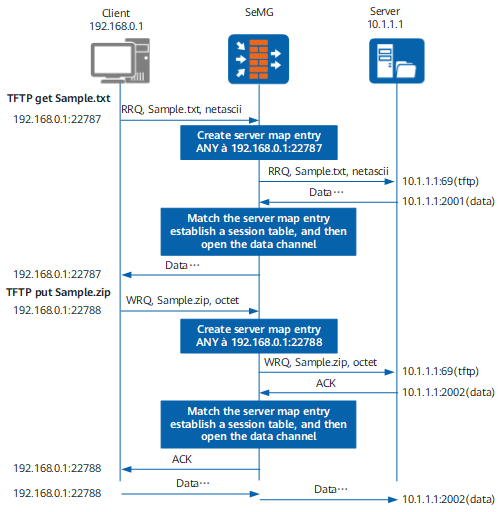
For example, intranet user A at 192.168.0.1 initiates a TFTP connection to port 69 on extranet server B using a randomly-selected port 22787. Then extranet server B randomly selects a port to initiate a connection to port 22787 of intranet user A.
When ASPF/ALG is disabled, the action of the default interzone security policy is deny, and the security policy allows the connection between intranet user A and port 69 on extranet server B, the FW establishes a session entry to ensure data transmission between the two ports. However, the connection between the port randomly selected by extranet server B and intranet user A cannot be predicted, and therefore there is no corresponding policy that allows the connection. As a result, the connection fails.
- When intranet user A initiates a connection, the FW automatically identifies the port from which the connection is initiated and creates a server map entry of the STUN type to allow any IP address and port to access port 22787 of intranet user A.
<sysname> display firewall server-map
Type: STUN, ANY -> 192.168.0.1:22787, Zone: ---
   Protocol: udp(Appro: stun-derived), Left-Time: 00:00:57
   VPN: public -> public
If source NAT is configured on the FW to translate the client IP address and port, the following server map entry is generated:<sysname> display firewall server-map Type: STUN, ANY -> 10.1.1.2:28[192.168.0.1:22787], Zone: --- Protocol: udp(Appro: stun-derived), Left-Time: 00:00:57 VPN: public -> public
- When a packet sent from extranet server B arrives, the packet matches the server map entry. In this case, the FW reads the IP address and port number of the server and establishes a session entry for the connection.
- After the aging time of a server map entry expires, the FW deletes the server map entry.
Figure 1 shows the procedure for processing packets.

- The priority of user-defined ASPF/ALG is higher than that of predefined ASPF/ALG. When both predefined and user-defined ASPF/ALG functions are configured, packets preferentially enter the user-defined ASPF/ALG process.
- Different from predefined ALG, user-defined ALG cannot translate the IP address and port in the packet payload. Therefore, do not use user-defined ALG when the packet payload requires NAT.
Procedure
- Run the system-view command to enter the system view.
- Run the acl [ number ] acl-number [ vpn-instance vpn-instance-name ] command to create an ACL.
- Create an ACL rule.
Create a basic ACL rule.
rule [ rule-id ] { deny | permit } [ logging | source { source-ip-address { 0 | source-wildcard } | address-set address-set-name | any } | time-range time-name ] * [ description description ]
Create an advanced ACL rule (with the protocol type being TCP).
rule [ rule-id ] { permit | deny } { 6 | tcp } [ source { source-ip-address { 0 | source-wildcard } | address-set address-set-name | any } | destination { destination-ip-address { 0 | destination-wildcard } | address-set address-set-name | any } | source-port operator port [ port2 ] | destination-port operator port [ port2 ] | precedence precedence | tos tos | time-range time-name | logging | dscp dscp-value | tcp-flag { tcp-flag [ mask mask-value ] | established | { ack | fin | psh | rst | syn | urg } * } ] * [ description description ]
Create an advanced ACL rule (with the protocol type being UDP or SCTP).
rule [ rule-id ] { permit | deny } { { 17 | udp } | { 132 | sctp } } [ source { source-ip-address { 0 | source-wildcard } | address-set address-set-name | any } | destination { destination-ip-address { 0 | destination-wildcard } | address-set address-set-name | any } | source-port operator port [ port2 ] | destination-port operator port [ port2 ] | precedence precedence | tos tos | time-range time-name | logging | dscp dscp-value ] * [ description description ]
Create an advanced ACL rule (with the protocol type being ICMP).
rule [ rule-id ] { permit | deny } { 1 | icmp } [ icmp-type { icmp-type-name | icmp-type-number icmp-code } | source { source-ip-address { 0 | source-wildcard } | address-set address-set-name | any } | destination { destination-ip-address { 0 | destination-wildcard } | address-set address-set-name | any } | precedence precedence | tos tos | time-range time-name | logging | dscp dscp-value ] * [ description description ]
Create an advanced ACL rule (with the protocol type being others).
rule [ rule-id ] { permit | deny } { INTEGER<2-5> | INTEGER<7-16> | INTEGER<18-131> | INTEGER<133-255> | 0 | gre | igmp | ip | ipinip | ospf } [ source { source-ip-address { 0 | source-wildcard } | address-set address-set-name | any } | destination { destination-ip-address { 0 | destination-wildcard } | address-set address-set-name | any } | precedence precedence | tos tos | time-range time-name | logging | dscp dscp-value ] * [ description description ]
Create an advanced ACL rule (referencing the service set).
rule [ rule-id ] { permit | deny } service-set service-set-name [ source { source-ip-address { 0 | source-wildcard } | address-set address-set-name | any } | destination { destination-ip-address { 0 | destination-wildcard } | address-set address-set-name | any } | precedence precedence | tos tos | time-range time-name | logging | dscp dscp-value ] * [ description description ]
The ACL rule must be defined as specific as possible to minimize security risks. Therefore, you need to learn protocol mechanisms when using the user-defined ASPF/ALG function. In this example, if the IP address of extranet server B is fixed, that is, 10.1.1.1, the ACL rule can be defined as rule permit tcp source 192.168.0.1 0 destination 10.1.1.1 0. When the action of a rule is set to permit, the FW performs ASPF/ALG processing on the traffic matching the rule to generate a 3-tuple server map. When the action of a rule is set to deny, the FW does not perform ASPF/ALG processing on the traffic matching the rule, and no server map entry is generated.
In a NAT scenario, the source or destination IP address in an ACL rule must be the actual IP address. That is, you must specify the private IP address before source NAT as the source IP address and the private IP address after NAT Server as the destination IP address.
- Run the quit command to return to the system view.
- Run the firewall zone [ name ] zone-name command to enter the intrazone view or the firewall interzone zone-name1 zone-name2 command to enter the interzone view.
- Run the detect user-defined acl-number command to enable user-defined intrazone ASPF/ALG or the detect user-defined acl-number { inbound | outbound } command to enable user-defined interzone ASPF/ALG.
The direction in which user-defined ASPF/ALG is enabled in the interzone shall be the direction of the packet for initiating the connection for the first time.
After the undo detect user-defined command is executed to disable user-defined ASPF/ALG, new server map entries cannot be generated, but existing server map entries cannot be immediately deleted.