Configuring BFD Using the Web UI
This section describes how to configure BFD using the web UI.
Procedure
- Choose .
- On the BFD Global Configuration page, enable BFD, set the default multicast IP address for BFD, and click Apply.
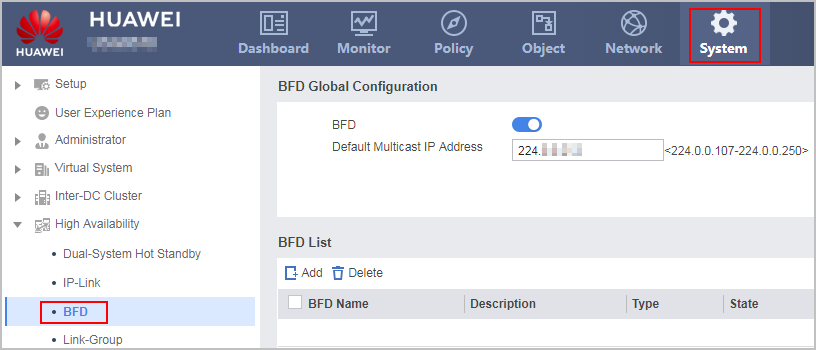
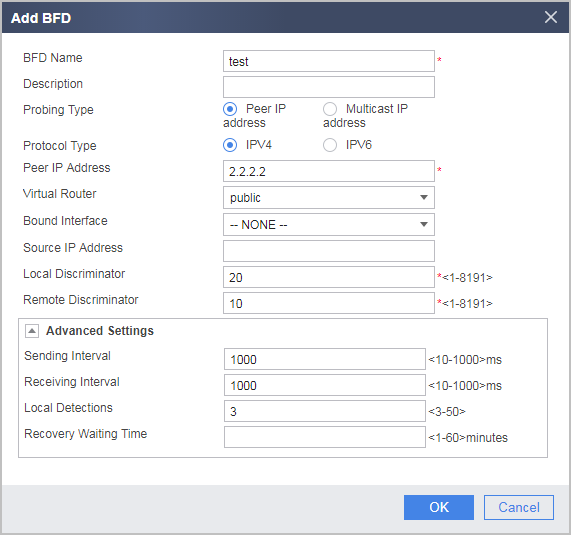
- Click Add. set BFD parameters, and click OK.
Parameter
Description
BFD Name
Indicates the name of a BFD session.
Description
Indicates the description of a BFD session.
Probing Type
Two probing types are available:
- Peer IP address: indicates that the probe type is unicast BFD.
- Multicast IP address: indicates that the probe type is multicast BFD.
Protocol Type
Indicates the protocol type for BFD packets. The value can be IPv4 or IPv6.
Peer IP Address
Indicates the peer IP address bound to a BFD session.
You need to set the peer IP address only when Probing Type is set to Peer IP address.
You do not need to set the peer IP address when Probing Type is set to Multicast IP address.
Virtual Router
Bind the BFD session to a virtual router.
This item is displayed only when the probing type is set to Peer IP address-based probing.
Bound Interface
Indicates the interface bound to a BFD session.
Configuring the outgoing interface is optional when Probing Type is set to Peer IP address.
You must specify the outgoing interface when Probing Type is set to Multicast IP address.
Interface Status Synchronization
Determines whether the BFD status is bound to the interface status.
This item is displayed only when the probing type is set to Multicast IP address.
Source IP Address
Indicates the source IP address of a BFD session.
If Source IP Address is specified, the device uses this IP address as the source IP address of the BFD packet. You must ensure that the specified Source IP Address value is correct in that the system checks only whether the value is legitimate (for example, the value cannot be a multicast or broadcast address) but not whether it is correct.
As for unicast BFD packets, if you do not specify Source IP Address, the device looks for the outgoing interface to the peer IP address in the local routing table and uses the IP address of this interface as the source IP address of the BFD packet sent from the local end.
As for multicast BFD packets, if you do not specify Source IP Address, the device uses the IP address of the outgoing interface bound to the BFD session as the source IP address of the BFD packet. If you have not specified the IP address of this interface, the device sets the source IP address of the BFD packet to 169.254.255.254.
Local Discriminator
Indicates the local discriminator of a BFD session.
Remote Discriminator
Indicates the remote discriminator of a BFD session.
Sending Interval
Indicates the sending interval of a BFD session.
Receiving Interval
Indicates the receiving interval of a BFD session.
Local Detections
Indicates the local detection multiple of a BFD session.
Recovery Waiting Time
Indicates the recovery waiting time of a BFD session.