Traffic Profile
This section describes the traffic profiles and their parameters. A traffic profile defines the availability of bandwidth resources. A FW applies a traffic profile to traffic that matches the traffic policy.
The FW uses traffic profiles to manage bandwidth. Each traffic profile uses multiple parameters to describe and control bandwidth resources, such as overall guaranteed bandwidth and maximum bandwidth, per-IP-address/per-user guaranteed bandwidth and maximum bandwidth, connection limits, DSCP priority re-marking, and bandwidth multiplexing.
Overall Guaranteed and Maximum Bandwidths
The overall guaranteed bandwidth is the minimum available bandwidth assigned by a traffic profile to traffic that matches the traffic profile. Similarly, the overall maximum bandwidth is the maximum available bandwidth assigned by a traffic profile to traffic that matches the traffic profile. After traffic matches a traffic profile, the FW compares the traffic with the guaranteed bandwidth/maximum bandwidth specified in the traffic profile and handles the traffic as follows:
- If the traffic requires bandwidth lower than the guaranteed bandwidth, the outbound interface on the FW can transmit the traffic.
- If the traffic requires bandwidth higher than the maximum bandwidth, the FW discards the excess traffic.
- If traffic requires bandwidth higher than the guaranteed bandwidth, the traffic competes for bandwidth resources with the same type of traffic that is processed using other traffic profiles. Packets with higher priority have a better chance of being forwarded than the packets with lower priority. The FW discards the packets that fail to obtain bandwidth resources.
Per-IP-Address/Per-User Guaranteed Bandwidth and Maximum Bandwidth
In addition to the overall guaranteed bandwidth and maximum bandwidth, the per-IP-address or per-user guaranteed bandwidth and maximum bandwidth can be specified in a traffic profile for refined bandwidth restriction.
After traffic policies reference traffic profiles, the FW collects statistics on traffic matching traffic policies based on IP addresses or users. The function of the per-IP-address/per-user guaranteed bandwidth and maximum bandwidth is similar to that of the overall bandwidth. The difference is that the guaranteed bandwidth and maximum bandwidth is subject to an IP address/user.
In addition, the FW can dynamically and equally distribute bandwidth resources to each IP address/user based on the overall maximum bandwidth and the number of online IP addresses/users, fully utilizing bandwidth resources.
Connection Limit (Concurrent Connection Limit and New Connection Limit)
A FW maps each connection between two endpoints to a session. The FW controls session generation to limit the number of connections. You can set the maximum number of connections on the FW for the following purposes:
- To reduce bandwidth consumption by P2P services.
- To help the FW defend against DDoS attacks on intranet servers.
- To improve the utilization of session resources on the FW.
The maximum number of all connections and the maximum number of source-IP-address-specific or user-specific connections can be set in a traffic profile.
Independent and Global Control of Upstream and Downstream Bandwidths
The maximum bandwidth, guaranteed bandwidth, and connection limit can be separately specified for upstream and downstream directions. In a traffic profile, the upstream and downstream directions have specific mapping relationship with the traffic policy to which the traffic profile is referenced. If the direction is the same as that of the traffic policy, the direction is upstream. If not, the direction is downstream. That is, if a data flow matches the traffic policy, the data flow is upstream traffic. Exchange the source and destination in the traffic policy, the matched traffic is downstream traffic.
For example, you can configure either of the following methods to limit the traffic from the trust zone to the untrust zone:
- When the source zone of the traffic policy is trust and the destination zone is untrust, configure upstream bandwidth control in the traffic profile (same direction as the traffic policy).
- When the source Zone of the traffic policy is untrust and the destination zone is trust, configure downstream bandwidth control in the traffic profile (reverse direction of the traffic policy).
In addition, the FW supports bandwidth control based on the total of upstream and downstream traffic.
DSCP Priority Re-marking
The DSCP priority re-marking function modifies the DSCP values in packets. Network devices distinguish and process packets based on DSCP values carried in the packets. You can configure DSCP priorities to distinguish the traffic of each network device on the packet transmission path to implement differentiated processing on the traffic with different DSCP priorities.
The FW supports the configuration of DSCP as a matching condition and the modification of the DSCP value in packets that match the conditions in the traffic profile. This function helps the upstream and downstream devices of the FW to distinguish traffic based on the modified DSCP priorities.
Traffic Profiles in Exclusive and Shared Modes
After a traffic policy references a traffic profile, the overall maximum bandwidth, guaranteed bandwidth, and maximum number of connections defined in a traffic profile take effect on the traffic that matches the policy. A traffic profile works in either of the following modes:
Exclusive mode
A traffic profile is used by only one policy. Traffic that matches the policy has exclusive use of the maximum bandwidth defined in the traffic profile.
Shared mode
A traffic profile is shared by multiple traffic policies. Traffic that matches these traffic policies shares the maximum bandwidth defined in the traffic profile.
Bandwidth Multiplexing
Bandwidth multiplexing enables a FW to use one traffic profile to dynamically allocate bandwidth resources to multiple flows.
Bandwidth multiplexing is applicable to the following scenarios:
- Multiple flows match the same traffic policy.
- Multiple flows match different traffic policies that share a traffic profile.
- Multiple flows match the specific child policies of one parent policy. For information about the parent and child policies, see Hierarchical Policies.
Traffic Forwarding Priority
The FW supports configuring the traffic forwarding priority for a traffic profile. If the traffic forwarding priority is set to medium (4) in the traffic profile, traffic policing is used for bandwidth limiting by default. If the traffic forwarding priority is not set to medium (4), traffic shaping is used for bandwidth limiting by default. In this case, the forwarding priorities of peak traffic and burst traffic packets exceeding the upper bandwidth threshold are changed, packets with a priority larger than 4 are preferentially sent, and packets with a priority smaller than 4 are sent later. Figure 1 describes the differences between traffic shaping and traffic policing.
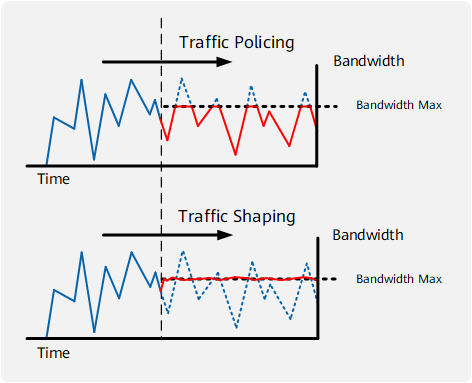
- Based on the CAR mechanism, traffic policing limits the peak traffic and burst traffic. If the traffic over a connection exceeds the upper bandwidth threshold in the traffic profile, the traffic is discarded.
- Based on the queue mechanism, traffic shaping delays the transmission of peak traffic and burst traffic that exceed the upper bandwidth threshold. It adjusts the outgoing packet rate while limiting burst traffic so that packets are sent at an even rate.

When traffic shaping is used, the data volume in the cache and the cache duration are subject to the queue length. Once the data volume in the cache exceeds the threshold of the queue length, data packets will be discarded.