Configuring Bypass Using the Web UI
This section describes how to configure the hardware bypass using the web UI.
Prerequisites
Before configuring the hardware bypass function, complete the following tasks:
- Check whether the bypass interfaces work as electrical interfaces.
- Complete the relevant configuration of the Layer 2 interface, and interconnect the interfaces with the upstream and downstream devices.
Procedure
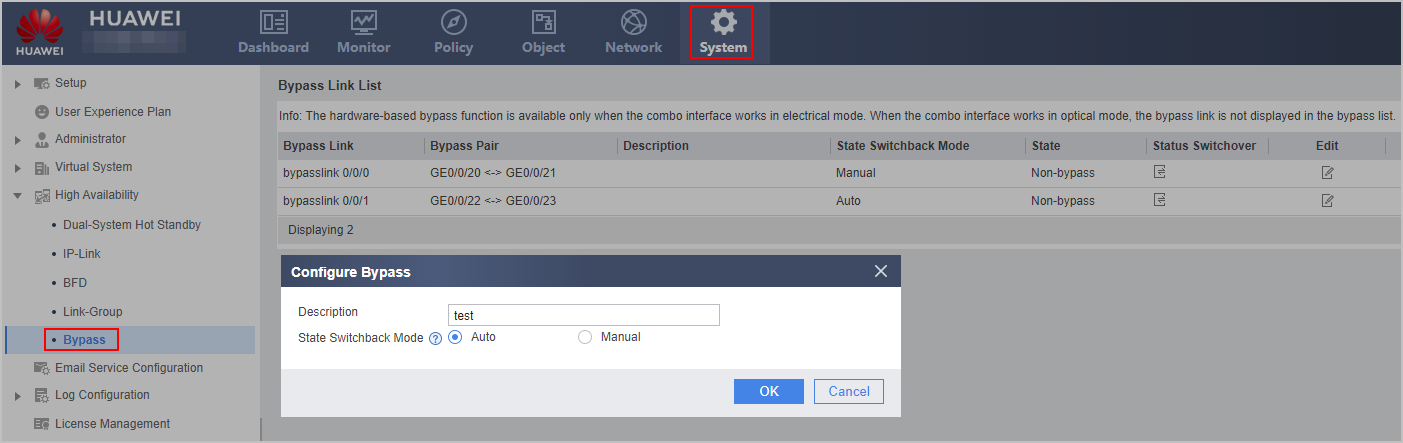
- Choose .
- On the Bypass Link List page, click
 corresponding to a bypass interface pair.
 - Configure the bypass link descrption and state switchback mode, and then click OK.
Parameter
Description
Description
Configure description for the bypass link. The description must clearly indicate the function of each bypass link for easy maintenance.
State Switchback Mode
If the device is powered off or restarted unexpectedly, the interfaces automatically enter the bypass state. When the device recovers, the interfaces decide whether to switch back to the non-bypass state according to the setting of the state switchback mode:
Auto: If manually switching to the bypass state has been performed before the recovery, the interfaces stay in bypass state. Otherwise, the interfaces automatically switch to the non-bypass state.
Manual: The interfaces stay in bypass state. To switch the interfaces to the non-bypass state, click
 in Bypass Link List.
- Click
 to switch the bypass status manually.
When interfaces work in bypass state, services are not interrupted but they are not processed by the FW, which incurs security risks. It is recommended that you rectify the fault immediately and restore interfaces to the non-bypass state.
By default, the interfaces work in non-bypass state.