CLI: Example for Configuring IPv6 Users to Access IPv4 Servers (Static Mapping Mode)
Networking Requirements
As shown in Figure 1, the FW supports the dual stack and connects to both the IPv6 and IPv4 networks. The PC on the IPv6 network must be able to access the server on the IPv4 network through the domain name www.example.com.
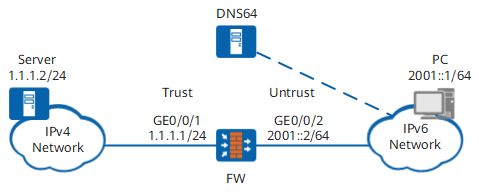

DNS64 is usually deployed on the same device as NAT64. DNS64 performs domain name translation. The NAT64 prefix and prefix length configured for DNS64 are the same as those of the NAT64 device.
Configuration Roadmap
- Configure IP addresses, security zones, and NAT64 on interfaces.
- Enable IPv6 packet forwarding, and configure NAT64 prefixes and NAT64 mappings.
- Configure a security policy that allows IPv6 users to access the IPv4 server.
- Configure the IPv6 address and related routes for the DNS64 device.
- Configure the IPv6 address, DNS server, and default gateway of the PC.
Procedure
- Configure interface addresses of the FW.
- Enable NAT64 on GigabitEthernet0/0/2.
[FW-GigabitEthernet0/0/2] nat64 enable
 [FW-GigabitEthernet0/0/2] quit
- Configure security zones of interfaces.
- Enable the IPv6 packet forwarding function.
[FW] ipv6 - Configure NAT64 prefixes and NAT64 mappings.
The NAT64 prefix 3001:: 96 is used as an example. If the NAT64 prefix is not configured, the well-known prefix is used by default.
[FW] nat64 prefix 3001:: 96
 [FW] nat64 static 2001::1 1.1.1.10 unr-route
- Configure a security policy that allows IPv6 users to access the IPv4 server.
[FW] security-policy
 [FW-policy-security] rule name policy_sec_1
 [FW-policy-security-rule-policy_sec_1] source-zone untrust
 [FW-policy-security-rule-policy_sec_1] destination-zone trust
 [FW-policy-security-rule-policy_sec_1] source-address 2001::1 64
 [FW-policy-security-rule-policy_sec_1] action permit
 [FW-policy-security-rule-policy_sec_1] quit
- Configure the DNS64 device.
# Ensure the same NAT64 prefixes and prefix lengths on the DNS64 and NAT64 devices. Here, set the NAT64 prefix of the DNS64 device to the NAT64 prefix of the FW, which is 3001::/96.
# Set the routes between the DNS64 to the PC and server to ensure reachability.
- Configure the IPv6 address, DNS server, and default gateway of the PC. (The configuration method is related to the PC operating system.)
Set the IPv6 address of the PC to 2001::1/64, default gateway address to 2001::2, and DNS server address to the IPv6 address of the DNS64 device.
Verification
# After the configuration is complete, run the ping www.example.com command on the PC. The following shows that the PC can ping the IPv6 address of the server.
c:\> ping www.example.com
 Pinging 3001::0101:102 with 32 bytes of data:

 Reply from 3001::0101:102: time=23ms
 Reply from 3001::0101:102: time=6ms
 Reply from 3001::0101:102: time=12ms
 Reply from 3001::0101:102: time=33ms

 Ping statistics for 3001::0101:102:
     Packets: Sent = 4, Received = 4, Lost = 0 (0% loss),
 Approximate round trip times in milli-seconds:
     Minimum = 6ms, Maximum = 33ms, Average = 18ms
# In any view of the FW, run the display firewall ipv6 session table command to check the NAT64 session table. According to the NAT64 session table, you can learn the translation mapping between IPv6 addresses and IPv4 addresses.
<FW> display firewall ipv6 session table
 NAT64: icmpv6 VPN: public --> public  2001::1.44152[1.1.1.10:44152] --> 3001::0101:102.2048[1.1.1.2:2048]
Configuration Scripts
Configuration script for the FW:
#
  sysname FW
 #
  ipv6
 #
 interface GigabitEthernet0/0/1
  ip address 1.1.1.1 255.255.255.0
 #
 interface GigabitEthernet0/0/2
  ipv6 enable
  nat64 enable
  ipv6 address 2001::2/64
 #
 firewall zone trust
  set priority 85
  add interface GigabitEthernet0/0/1
 #
 firewall zone untrust
  set priority 5
  add interface GigabitEthernet0/0/2
 #
  nat64 prefix 3001:: 96
  nat64 static 2001::1 1.1.1.10 unr-route
 #
 security-policy
   rule name policy_sec_1
     source-zone untrust
     destination-zone trust
     source-address 2001::1 64
     action permit
 #
 return