CLI: Example for Enabling an IPv6 User to Access an IPv4 Server through the IP address (Dynamic Mapping Mode)
Networking Requirements
As shown in Figure 1, the FW supports the IPv6/IPv4 dual stack and is connected to an IPv6 network and an IPv4 network.
This example assumes that the IPv6 address prefix obtained from the carrier is 2001:db8::/64. The IPv6 address prefix planned for NAT64 is 2001:db8::/96. The administrator combines the IPv6 prefix address with the server IPv4 address and provides the combined IP address (2001:db8::C0A8:2 in this example) to the PC on the IPv6 network. The PC on the IPv6 network must be able to access the server on the IPv4 network through this combined IPv6 address. In addition, the server and PCs on the private network need to access the Internet using public IP addresses, and the server needs to use an IPv4 address to provide IPv4 services for Internet users. These requirements can be met by configuring NAT64, NAT Server, and source NAT. This example describes how to configure NAT64.
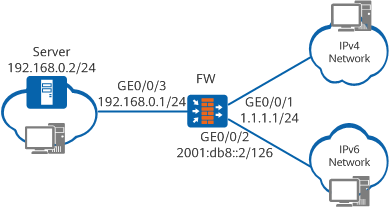
Data Planning
Item |
Data |
Description |
|---|---|---|
Interface |
Interface Number: GE0/0/1 IPv4 address: 1.1.1.1/24 Security zone: Untrust |
Interface connected to the IPv4 Internet. Assume that the public IPv4 address obtained from the carrier is 1.1.1.1/24. |
Interface Number: GE0/0/2 IPv6 address: 2001:db8::2/126 Security zone: Untrust |
Interface connected to the IPv6 Internet. The IP address of this interface resides on the address segment obtained from the carrier. |
|
Interface Number: GE0/0/3 IPv4 address: 192.168.0.1/24 Security zone: Trust |
Interface connected to the IPv4 private network. |
|
Address pool |
addressgroup1: 192.168.1.5 to 192.168.1.10 |
Private IPv4 addresses into which IPv6 addresses will be translated. |
NAT64 |
NAT64 prefix: 2001:db8::/96 |
NAT64 prefix manually planned based on the IPv6 address segment obtained from the carrier. In this example, the NAT64 prefix is 2001:db8::/96. |
Server |
IPv4 private address: 192.168.0.2/24 Public IPv6 address for providing services for Internet users: 2001:db8::C0A8:2 |
This IPv6 address of the server is calculated based on the configured NAT64 prefix and the public IPv4 address of the server. For details about the calculation method, see NAT64 Prefixes. |
Procedure
- Configure FW.
# Set an IPv4 address for GigabitEthernet 0/0/1.
<FW> system-view
[FW] interface GigabitEthernet 0/0/1
[FW-GigabitEthernet0/0/1] ip address 1.1.1.1 24
[FW-GigabitEthernet0/0/1] quit
# Set an IPv4 address for GigabitEthernet 0/0/3.
<FW> system-view
[FW] interface GigabitEthernet 0/0/3
[FW-GigabitEthernet0/0/3] ip address 192.168.0.1 24
[FW-GigabitEthernet0/0/3] quit
# Enable the IPv6 packet forwarding function.
[FW] ipv6# Set an IPv6 address for GigabitEthernet 0/0/2.
[FW] interface GigabitEthernet 0/0/2
[FW-GigabitEthernet0/0/2] ipv6 enable
[FW-GigabitEthernet0/0/2] ipv6 address 2001:db8::2 126
# Enable NAT64 on GigabitEthernet 0/0/2.
[FW-GigabitEthernet0/0/2] nat64 enable
[FW-GigabitEthernet0/0/2] quit
# Assign GigabitEthernet 0/0/3 to the Trust zone.
[FW] firewall zone trust
[FW-zone-trust] add interface GigabitEthernet 0/0/3
[FW-zone-trust] quit
# Assign GigabitEthernet 0/0/1 and GigabitEthernet 0/0/2 to the Untrust zone.
[FW] firewall zone untrust
[FW-zone-untrust] add interface GigabitEthernet 0/0/1
[FW-zone-untrust] add interface GigabitEthernet 0/0/2
[FW-zone-untrust] quit
# Configure a security policy.
[FW] security-policy
[FW-policy-security] rule name policy_sec_1
[FW-policy-security-rule-policy_sec_1] source-zone untrust
[FW-policy-security-rule-policy_sec_1] destination-zone trust
[FW-policy-security-rule-policy_sec_1] source-address 2001:db8::C0A8:2 96
[FW-policy-security-rule-policy_sec_1] action permit
[FW-policy-security-rule-policy_sec_1] quit
# Set the IPv6 prefix to 2001:db8::/96.
[FW] nat64 prefix 2001:db8:: 96
In the following example, the NAT64 prefix is 2001:db8::/96.
# Configure IPv4 NAT address pool addressgroup1 whose addresses range from 192.168.1.5 through 192.168.1.10. The addresses in this NAT address pool are the IPv4 addresses of resulting packets.
[FW] nat address-group addressgroup1
[FW-address-group-addressgroup1] mode pat
[FW-address-group-addressgroup1] section 1 192.168.1.5 192.168.1.10
[FW-address-group-addressgroup1] quit
# Configure a dynamic NAT64 mapping between the Trust and Untrust zones.
[FW] nat-policy
[FW-policy-nat] rule name policy_nat64
[FW-policy-nat-rule-policy_nat64] nat-type nat64
[FW-policy-nat-rule-policy_nat64] source-zone untrust
[FW-policy-nat-rule-policy_nat64] destination-zone trust
[FW-policy-nat-rule-policy_nat64] source-address 2001:db8::C0A8:2 96
[FW-policy-nat-rule-policy_nat64] action source-nat address-group addressgroup1
[FW-policy-nat-rule-policy_nat64] quit
[FW-policy-nat] quit
- Configure default routes from the FW to the IPv4 and IPv6 networks. The configuration process is not provided here.
- Configure the server IPv4 address. (The method of setting IPv4 address varies depending on the operating system of the server. The setting method is omitted here.)
# Set the server IPv4 address to 192.168.0.2/24, which is on the same subnet as GigabitEthernet 0/0/3 of FW.
Verification
# After the configuration is complete, run the ping 2001:db8::C0A8:2 command on the PC.
c:\ ping 2001:db8::C0A8:2
Pinging 2001:db8::C0A8:2 with 32 bytes of data:

Reply from 2001:db8::C0A8:2: time=23ms
Reply from 2001:db8::C0A8:2: time=6ms
Reply from 2001:db8::C0A8:2: time=12ms
Reply from 2001:db8::C0A8:2: time=33ms

Ping statistics for 2001:db8::C0A8:2:
    Packets: Sent = 4, Received = 4, Lost = 0 (0% loss),
Approximate round trip times in milli-seconds:
    Minimum = 6ms, Maximum = 33ms, Average = 18ms
The IPv6 address of the server can be pinged through from the PC.
# In any view of FW, run the display firewall ipv6 session table command to verify information about the NAT64 session table.
<FW> display firewall ipv6 session table
 Slot: 6 CPU: 1
NAT64: icmp6 VPN: public --> public  2001::1.44152[192.168.1.5:10296] --> 2001:db8::C0A8:2.2048[192.168.0.2:2048]
According to the NAT64 session table information, you can obtain the mapping of IPv6 addresses and IPv4 addresses.
Configuration Scripts
Configuration script for the FW:
#
 sysname FW
#
 ipv6
#
interface GigabitEthernet0/0/1
 ip address 1.1.1.1 255.255.255.0
#
interface GigabitEthernet0/0/2
 ipv6 enable
 nat64 enable
 ipv6 address 2001:db8::2/126
#
interface GigabitEthernet0/0/3
  ip address 192.168.0.1 255.255.255.0
#
nat address-group addressgroup1
 mode pat
 section 1 192.168.1.5 192.168.1.10
#
firewall zone trust
 set priority 85
 add interface GigabitEthernet0/0/3
#
firewall zone untrust
 set priority 5
 add interface GigabitEthernet0/0/1
 add interface GigabitEthernet0/0/2
#
 nat64 prefix 2001:db8:: 96
#
security-policy
  rule name policy_sec_1
    source-zone untrust
    destination-zone trust
    source-address 2001:db8::C0A8:2 96
    action permit
#
nat-policy
  rule name policy_nat64
    source-zone untrust
    destination-zone trust
    nat-type nat64
    source-address 2001:db8::C0A8:2 96
    action source-nat address-group addressgroup1
#
return