CLI: Applying Port Pre-Allocation and Incremental Allocation to the NAT64 Scenario
This section provides an example for configuring port pre-allocation and incremental allocation in the NAT64 scenario.
Networking Requirements
A carrier provides single-stack IPv6 users with NAT64 for their access to IPv4 servers. The requirement is as follows:
- PCs on an IPv6 network can access the server on an IPv4 network through the domain name www.example.com.
- Ports are properly allocated.
- Users can be traced based on their addresses.
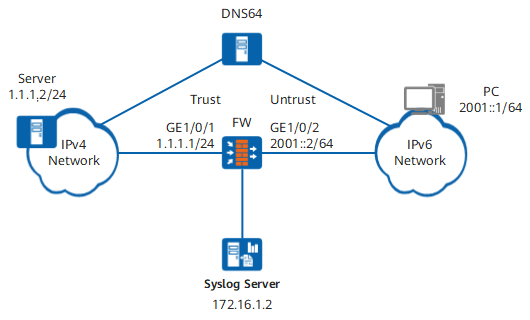
Procedure
- Configure the FW.
# Configure an IPv4 address for GigabitEthernet 0/0/1.
<FW> system-view
[FW] interface GigabitEthernet 0/0/1
[FW-GigabitEthernet 0/0/1] ip address 1.1.1.1 24
[FW-GigabitEthernet 0/0/1] quit
# Enable the IPv6 packet forwarding function.
[FW] ipv6# Configure an IPv6 address for GigabitEthernet 0/0/2.
[FW] interface GigabitEthernet 0/0/2
[FW-GigabitEthernet 0/0/2] ipv6 enable
[FW-GigabitEthernet 0/0/2] ipv6 address 2001::2 64
# Enable the NAT64 function on GigabitEthernet 0/0/2.
[FW-GigabitEthernet 0/0/2] nat64 enable
[FW-GigabitEthernet 0/0/2] quit
# Add GigabitEthernet 0/0/1 to the Trust zone.
[FW] firewall zone trust
[FW-zone-trust] add interface GigabitEthernet 0/0/1
[FW-zone-trust] quit
# Add GigabitEthernet 0/0/2 to the Untrust zone.
[FW] firewall zone untrust
[FW-zone-untrust] add interface GigabitEthernet 0/0/2
[FW-zone-untrust] quit
# Configure a security policy.
[FW] security-policy
[FW-policy-security] rule name policy_sec_1
[FW-policy-security-rule-policy_sec_1] source-zone untrust
[FW-policy-security-rule-policy_sec_1] destination-zone trust
[FW-policy-security-rule-policy_sec_1] source-address 2001:: 64
[FW-policy-security-rule-policy_sec_1] action permit
[FW-policy-security-rule-policy_sec_1] quit
# Set the NAT64 prefix to 3001::/96.
[FW] nat64 prefix 3001:: 96
The NAT64 prefix 3001::/96 is used as an example. If no prefix is specified, a well-known prefix is used by default.
# Configure IPv4 NAT address pool 1 and set the address range to 1.1.1.6 to 1.1.1.10. Use the addresses in the NAT address pool as the IPv4 addresses after the NAT64 processing.
[FW] nat address-group addressgroup1
[FW-address-group-addressgroup1] port-block-size 256
[FW-address-group-addressgroup1] section 1 1.1.1.6 1.1.1.10
[FW-address-group-addressgroup1] quit
# Configure NAT64 dynamic mapping.
[FW] nat-policy
[FW-policy-nat] rule name policy_nat64
[FW-policy-nat-rule-policy_nat64] nat-type nat64
[FW-policy-nat-rule-policy_nat64] source-zone untrust
[FW-policy-nat-rule-policy_nat64] destination-zone trust
[FW-policy-nat-rule-policy_nat64] source-address 2001:: 64
[FW-policy-nat-rule-policy_nat64] action source-nat address-group addressgroup1
[FW-policy-nat-rule-policy_nat64] quit
[FW-policy-nat] quit
- Configure the DNS64 device.
# Set the IPv6 prefix of the DNS64 device to 3001::/96, the same as the NAT64 prefix of the FW.
# Configure the routes from the DNS64 to the PC and to the server.
- Configure the FW to interwork with the syslog server.
[FW] nat port-block assigning syslog enable
[FW] nat port-block syslog host 172.16.1.2 source CGN 172.16.1.1 514
- Configure the IPv6 address, route, and DNS server for the PC. The configuration method varies with the operating system of the PC. The detailed configuration is not described here.
# Set the IPv6 address of the PC to 2001::1/24, in the same network as GigabitEthernet 0/0/2 on the FW.
# Set the route to 2001::2 for the PC to access the network 3001::/96.
# Set the DNS server address of the PC to the IPv6 address of the DNS64 device.
- Set the IPv4 server address. The configuration method is related to the operating system of the server. The detailed configuration is omitted here.
# Set the IPv4 address of the server to 1.1.1.2/24, in the same network as GigabitEthernet 0/0/1 on the FW.
- Configure the syslog server.
The configuration is related to the syslog server model. For details, see the syslog server documentation.
Verification
# After the configuration is complete, run the ping www.example.com command on the PC.
c:\ ping www.example.com
Pinging 3001::0101:102 with 32 bytes of data:

Reply from 3001::0101:102: time=23ms
Reply from 3001::0101:102: time=6ms
Reply from 3001::0101:102: time=12ms
Reply from 3001::0101:102: time=33ms

Ping statistics for 3001::0101:102:
    Packets: Sent = 4, Received = 4, Lost = 0 (0% loss),
Approximate round trip times in milli-seconds:
    Minimum = 6ms, Maximum = 33ms, Average = 18ms
The IPv4 address of the server can be successfully pinged on the PC.
[FW] display cpe-user information cpe-ipv6 2001::1
Scene: NAT64 DstZone: untrust CPEIP: 2001::1
TTL: 40 LeftTime: 1 Increase Count: 0 VPN: public
PoolID: 7 SectionID: 1 PublicIP: 1.1.1.10 StartPort: 2048
PortNumber: 256 PortTotal: 256 Used Port Number:0
As shown in the command output, the source addresses of service flows sent from 2001::1 are translated into 1.1.1.10. The port range is from 2048 to 2303, containing 256 ports.
NAT64userbased - %%01SEC/6/BIND(l): An initial portrange is assigned, in nat64 scene. privateip='2001::1 ' srcvrfid='0' publicip='1.1.1.10' publicportrange='2048~2303' time='2012-05-02 18:24:09'.The server can obtain the user IP address, translated IP address, port range, and timestamp from the log for source tracing.
Configuration Scripts
Configuration script of the FW:
#
 sysname FW
#
 ipv6
#
interface GigabitEthernet 0/0/1
 ip address 1.1.1.1 255.255.255.0
#
interface GigabitEthernet 0/0/2
 ipv6 enable
 nat64 enable
 ipv6 address 2001::2/64
#
 nat address-group addressgroup1
   port-block-size 256
   section 1 1.1.1.6 1.1.1.10
#
firewall zone trust
 set priority 85
 add interface GigabitEthernet 0/0/1
#
firewall zone untrust
 set priority 5
 add interface GigabitEthernet 0/0/2
#
 nat64 prefix 3001:: 96
#
 nat port-block assigning syslog enable
 nat port-block syslog host 172.16.1.2 source  CGN 172.16.1.1 514
#
security-policy
  rule name policy_sec_1
    source-zone untrust
    destination-zone trust
    source-address 2001:: 64
    action permit
#
nat-policy
  rule name policy_nat64
    source-zone untrust
    destination-zone trust
    nat-type nat64
    source-address 2001:: 64
    action source-nat address-group addressgroup1
#
return