User Authentication on the FW in HACA Mode
In the cloud management scenario, access users are mainly authenticated in portal mode. As the authentication server is deployed on the cloud, a NAT device may be deployed between the FW and server. Ordinary portal authentication uses the portal protocol, and the authentication packets cannot traverse the NAT device. In this case, you can use the HACA protocol for authentication.
In the agile cloud solution, the FW uses the HACA protocol for user authentication, as shown in the following figure.
Figure 1 User authentication on the FW in HACA mode
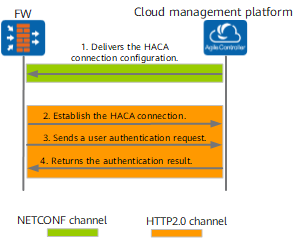
- The cloud management platform delivers HACA interconnection configuration to the FW through NETCONF.
- After receiving the interconnection configuration, the FW establishes an HACA connection with the HACA server.
The HACA server is integrated on the cloud management platform.
- The client initiates an authentication request through HTTP. The FW forwards the authentication request to the HACA server.
- The HACA server returns the authentication result. The authentication succeeds, and the user can log in.