Automatically Connecting the FW to the Cloud Management Platform: Obtaining the IP Address of the Cloud Management Platform Through the Device Registration Center
If the FW starts without any configuration and the DHCP server and DNS server are deployed on the carrier network, the FW obtains the cloud management platform's IP address from the device registration center and then automatically establishes a connection with the cloud management platform. This mode is called the plug-and-play mode in the CloudCampus Solution.
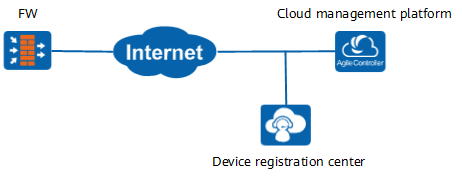
Figure 2 shows the process for the FW to connect to the cloud management platform and to be incorporated into the management of the platform.
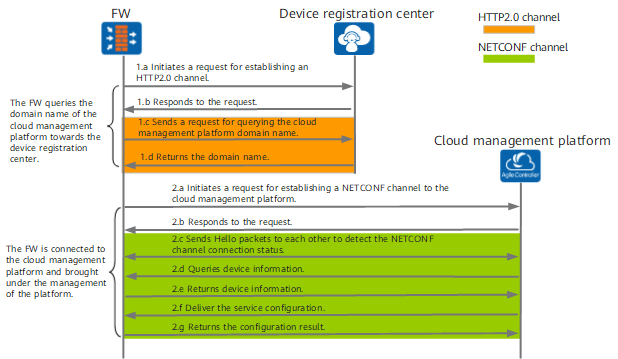
- The FW queries the domain name and port of the cloud management platform towards the device registration center.
- After the FW is connected to the Internet, it automatically sends an HTTP2.0 channel establishment request to the device registration center (default domain name: register.naas.huawei.com).
In a scenario without a specified profile, the FW starts in traditional mode. During the startup, the FW enables the DHCP client and DNS client functions on an interface in up state, assigns this interface to a security zone, and has the security policy to permit interzone traffic so that it can successfully connect to the Internet.

When the FW runs in the traditional mode, administrators are not allowed to log in to the FW. Otherwise, the FW cannot automatically switch to the cloud management mode, leading to the failure in connecting the cloud platform. If an administrator has already logged in to the FW, initialize the configuration file and restart the FW so that the FW can automatically connect to the cloud management platform.
- The device registration center returns an HTTP2.0 channel connection response message to the FW.
The established HTTP2.0 channel transmits the subsequent domain name query request.
- The FW sends a domain name query request to the device registration center.
This message is used to acquire the domain name and port of the cloud management platform to be connected to the FW.
- The device registration center returns the query result to the FW.
The device registration center synchronizes such information as the FW ESN, device type, and cloud management platform domain name and port from the platform, and returns the information to the FW.
After the FW receives the domain name and port of the cloud management platform, it automatically switches its operating mode to cloud management mode. During the switchover to cloud management mode, the FW is restarted once, which is normal.
If the FW receives no query result, the system does not switch the cloud management mode and starts in the traditional mode. After the system starts, the DHCP client function enabled for the upstream interface will be disabled, and the bindings between interfaces and security zones will be canceled, and the default security policy will be restored.
- After the FW is connected to the Internet, it automatically sends an HTTP2.0 channel establishment request to the device registration center (default domain name: register.naas.huawei.com).
- Connect the FW to the cloud management platform and incorporate it into the management of the platform.
- The FW sends a NETCONF channel connection request to the cloud management platform.
The connection request carries the device certificate of the FW for the cloud management platform to authenticate the FW.
- The cloud management platform returns a NETCONF channel connection response message to the FW.
The established NETCONF channel transmits the subsequent query request and service configuration.
- The FW and cloud management platform send Hello packets to each other to detect the connection status of the NETCONF channel.
- The cloud management platform sends a device information query request towards the FW.
- The FW returns its device information to the cloud management platform.
- The cloud management platform delivers the service configuration to the FW based on the device information acquired in the preceding step.
- The FW returns the configuration result to the cloud management platform.
The cloud management platform can properly deliver the service configuration to the FW, indicating that the FW has been incorporated into the management of the cloud management platform. The FW incorporated into the cloud management platform proactively reports NETCONF Notification alarms to the cloud management platform. For alarm details, see NETCONF API Development Guide.
- The FW sends a NETCONF channel connection request to the cloud management platform.