Example for Configuring the FW to Output Debugging Information to the Console
This section provides a configuration example for outputting debugging information to the console.
Networking Requirements
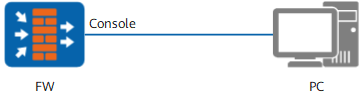
As shown in Figure 1, a PC connects to the console port of the FW. Debugging information generated on the ARP module must be output to the console.
Configuration Roadmap
Enable the information center.
Configure the module that is allowed to output debugging information.
Configure the channel through which the debugging information is output.
Enable the terminal monitor function and display the debugging information.
Procedure
- Enable the information center.
<FW> system-view
[FW] info-center enable
- Allow the debugging on the ARP module to be output to the Console with the severity of the information as debugging.
[FW] info-center console channel console
[FW] info-center source arp channel console debug level debugging
[FW] quit
- Enable the terminal monitor function and display the debugging information.
<FW> terminal monitor
<FW> terminal debugging
- Enable ARP module debugging.
<FW> debugging arp packet