Deploying the DecoySensor
Before deploying the DecoySensor, you need to fully understand the network environment.
Networking Requirements
Figure 1 Networking requirements
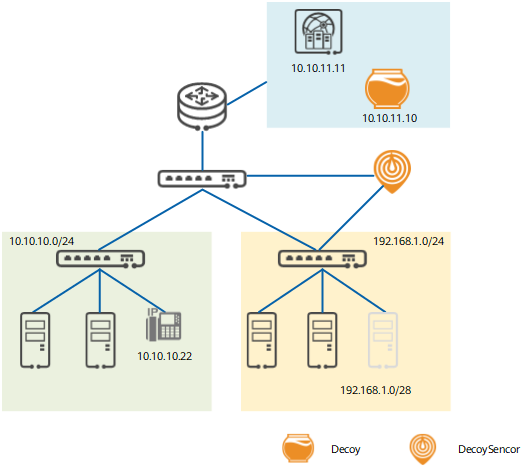
- The network segment of the office PC is 10.10.10.0/24, which is used to deceive the IP address, port number, and DNS scanning traffic initiated by or targeting a host in the address segment.
- The network segment of the service server is 192.168.1.0/24, which has the following security requirements:
- It is used to deceive the IP address, port number, and DNS scanning traffic initiated by or targeting a host in the address segment.
- Only the domain name of the real IP address+testaci can be used to access the service.
- 192.168.1.0/28 is planned as the decoy network segment. Once a hacker scans the address segment, the traffic is immediately diverted to the Decoy.
- 10.10.11.11 is the address of an NMS that periodically checks the status of devices on the entire network. So this address must be added to the source address whitelist.
- 10.10.10.22 is the address of an old-fashioned device that does not reply to IP address or port scanning requests. So this address must be added to the destination address whitelist.
Prerequisites
- The service configuration of the DecoySensor is complete, including the IP address and security policy of each interface.
- The DecoySensor and Decoy can communicate.
- To detect IP address scanning, the DecoySensor must have Layer 3 interfaces connected to the network segment and configured with IP addresses in the same network segment.
- To detect port and DNS scanning, the switch must divert the traffic destined for the network segment to the DecoySensor. After the DecoySensor detects the traffic, it injects the traffic back to the original path.
Procedure
- Access the deception view.
<FW> system-view
 [FW] deception
- Configure an IP address for the Decoy.
[FW-deception] deception decoy destination 10.10.11.10 - Configure a detected network segment.
[FW-deception] deception detect-network id 1 192.168.1.0 255.255.255.0
[FW-deception] deception detect-network id 2 10.10.10.0 255.255.255.0
- Configure a decoy network segment.
[FW-deception] deception decoy-network id 1 destination 192.168.1.0 255.255.255.240 - Configure a whitelist.
[FW-deception] deception whitelist id 1 source 10.10.11.11
[FW-deception] deception whitelist id 2 destination 10.10.10.22
- Enable the Route-Miss deception function.
[FW-deception] deception fib-miss enable - Enable the ARP-Miss deception function.
[FW-deception] deception arp-miss enable - Enable the security-policy-deny deception function.
[FW-deception] deception security-policy-deny enable - Enable deception against unknown domain name attacks.
[FW-deception] deception dns enable - Enable ACI deception on the service server network segment.
[FW-deception] deception aci suffix testaci
[FW-deception] deception aci detect-network id 2 enable
- Display the deception configuration.
If the configuration is incorrect, normal network traffic may be affected. Therefore, enable deception only after you confirm that the deception configuration is correct.
[FW-deception] display this # deception deception decoy destination 10.10.11.10 deception detect-network id 1 192.168.1.0 255.255.255.0 deception detect-network id 2 10.10.10.0 255.255.255.0 deception decoy-network id 1 destination 192.168.1.0 255.255.255.240 deception whitelist id 1 source 10.10.11.11 deception whitelist id 2 destination 10.10.10.22 deception fib-miss enable deception arp-miss enable deception security-policy-deny enable deception dns enable deception aci suffix testaci deception aci detect-network id 2 enable # - Enable the DecoySensor.
[FW-deception] deception enable - Check the connection status between the DecoySensor and Decoy.
[FW-deception] display deception decoy status
  Decoy register status information:
    Register status                                             : alive
    Decoy select                                                : master
    Online time                                                 : 37062(s)
    Send heartbeat timeout                                      : 0(s)
    Receive heartbeat timeout                                   : 5(s)
  Decoy register port information:
    445       80        8080      443       22
    3389      21        3306      6379
Configuration Scripts
#
 deception
  deception enable
  deception decoy destination 10.10.11.10
  deception detect-network id 1 192.168.1.0 255.255.255.0
  deception detect-network id 2 10.10.10.0 255.255.255.0
  deception decoy-network id 1 destination 192.168.1.0 255.255.255.240
  deception whitelist id 1 source 10.10.11.11
  deception whitelist id 2 destination 10.10.10.22
  deception fib-miss enable
  deception arp-miss enable
  deception security-policy-deny enable
  deception dns enable
  deception aci suffix testaci
  deception aci detect-network id 2 enable
 #