CLI: SSL Decryption-exempted
You can configure SSL-encrypted traffic detection policies so that the FW decrypts SSL-encrypted traffic generated by an extranet user to access an intranet server, and configure security policies to enable the FW to check content security of decrypted traffic.
Networking Requirements
In Figure 1, the FW is deployed at the network border as an enterprise gateway and checks content security of traffic generated when intranet users access extranet HTTPS server and SMTPS server (mail server). It does not perform SSL decryption on intranet users' access to the sensitive information website www.example.com, and only performs simple certificate consistency check on SSL connections.
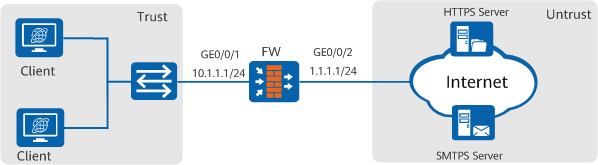
Configuration Roadmap
In this scenario, SSL decryption is performed only for some traffic. Therefore, two SSL-encrypted traffic detection policies and two detection profiles need to be configured. If multiple detection policies are configured, the FW matches traffic against the detection policies based on the policy priorities. In non-decryption scenarios, the destination address is specified, so the detection policy and detection profile for non-decryption have higher priorities and need to be configured first.
If SSL decryption is not performed on intranet users' access to the sensitive information website, the configuration roadmap is as follows:
- Optional: Import the CA certificate issued by the trusted certificate issue organization on the FW, so that the FW can verify validity of the certificate.
Note that over 100 common server CA certificates have been preset on the FW by default, which can be used to verify most server certificates. Generally, these default CA certificates are enough and you do not need to import other CA certificates. In some cases, however, if the preset CA certificates cannot verify the peer server certificates, you need to import other CA certificates. This section describes how to import a CA certificate as a configuration step.
- Configure a detection profile.
If SSL-encrypted traffic accessing www.example.com does not need to be decrypted, the FW determines whether the SSL connection between the client and the server can be established based on the server certificate verification result and result of matching between SNI and SAN/CN. This example assumes that it is allowed to establish an SSL connection between the server and client.
- Configure an SSL-encrypted traffic detection policy to ensure that the SSL-encrypted traffic accessing www.example.com is not decrypted.
If SSL decryption and content security check need to be performed for the traffic generated when intranet users access extranet HTTPS server and SMTPS server (mail server), the configuration roadmap is as follows:
- Configure an SSL decryption certificate.
The SSL decryption certificate can be imported to the FW or generated on the FW.
- If the enterprise has a CA server that can issue CA certificates, import the CA certificate issued by the CA server to the FW.If the enterprise does not have a CA server, manually generate an SSL decryption certificate on the FW.
This section uses a manually generated SSL decryption certificate on the FW as an example.
- If the enterprise has a CA server that can issue CA certificates, import the CA certificate issued by the CA server to the FW.If the enterprise does not have a CA server, manually generate an SSL decryption certificate on the FW.
- Optional: Import the CA certificate issued by the trusted certificate issue organization on the FW, so that the FW can verify certificates of the HTTPS server and SMTPS server.
- Configure a detection profile.
- Configure SSL-encrypted traffic detection policies.
Specify a detection profile in the detection policies, and set the file type of the detection profile to Outbound. According to actual requirements, you can configure refined policies, so that the FW decrypts only traffic that really requires content security check. You must avoid proxy policies with wide configuration conditions, because traffic encryption or decryption affects the forwarding performance of the device to a certain extent.
- Configure a security policy to enable the system checks the content security of decrypted SSL traffic.
After the SSL-encrypted traffic detection policy is configured, you still need to configure correct security policies and reference the content security profile to check the content security of traffic.
Procedure
- Set interface IP addresses and assign the interfaces to security zones.
- Set the IP address of interface GigabitEthernet 0/0/1 and add it to the Untrust zone.
<FW> system-view
[FW] interface GigabitEthernet 0/0/1
[FW-GigabitEthernet 0/0/1] ip address 10.1.1.1 24
[FW-GigabitEthernet 0/0/1] quit
[FW] firewall zone trust
[FW-zone-untrust] add interface GigabitEthernet 0/0/1
[FW-zone-untrust] quit
- Set the IP address of interface GigabitEthernet 0/0/2 and add it to the Trust zone.
[FW] interface GigabitEthernet 0/0/2
[FW-GigabitEthernet 0/0/2] ip address 1.1.1.1 24
[FW-GigabitEthernet 0/0/2] quit
[FW] firewall zone untrust
[FW-zone-trust] add interface GigabitEthernet 0/0/2
[FW-zone-trust] quit
- Set the IP address of interface GigabitEthernet 0/0/1 and add it to the Untrust zone.
- Configure the SSL decryption certificate and import the trusted certificate on the intranet PC.
- Create an RSA key pair of the SSL decryption certificate.
[FW] pki rsa built-in-ca ssl-decryption-certificate create exportable Info: The name of the new key-pair will be: ssl-decryption-certificate The size of the public key ranges from 2048 to 4096. Input the bits in the modules:2048 Generating key-pairs... ............................................+++ ...................................................+++ - Create a PKI entity.
[FW] pki entity ssl-decryption-certificate
[FW-pki-entity-ssl-decryption-certificate] common-name ssl-decryption-certificate
[FW-pki-entity-ssl-decryption-certificate] locality trust-Network
[FW-pki-entity-ssl-decryption-certificate] country CN
[FW-pki-entity-ssl-decryption-certificate] quit
- Generate the SSL decryption certificate and mark it as trusted.
[FW] pki generate built-in-ca certificate rsa-key-pair ssl-decryption-certificate entity ssl-decryption-certificate
 Please enter the file name for built in CA certificate <length 1-64>: ssl-decryption-certificate.cer
 Info: Generate built in CA certificate successfully.
[FW] pki import-certificate built-in-ca filename ssl-decryption-certificate.cer
 Info: Succeeded in importing the built in CA certificate.
[FW] app-proxy built-in-ca trust filename ssl-decryption-certificate.cer
- Export the trusted certificate and the corresponding key pair.
[FW] pki export built-in-ca rsa-key-pair ssl-decryption-certificate and-certificate ssl-decryption-certificate.cer pem ssl-decryption-certificate.pem password Mypassword@123
The password is used to protect the key file in the certificate. When you install the certificate, the system requires you to enter this password.
- Download the exported certificate file using FTP, send the certificate file to intranet users, and require the users to install and trust this certificate on the PC. If the certificate is not installed, normal access may be blocked.
- Create an RSA key pair of the SSL decryption certificate.
- Import the CA certificate issued by a trusted organization.
- This section describes how to download the CA certificate to the FW storage device using the FW that functions as an FTP client as an example
<FW> cd hda1:/pki/public/
<FW> ftp 10.1.1.100
Trying 10.1.1.100...
Press CTRL+K to abort
Connected to 10.1.1.100.
220 FTP service ready.
User(10.1.1.100:(none)):ftpuser
331 Password required for ftpuser
Enter password:
230 User logged in.
[ftp] get https_server_ca.crt
200 Port command okay.
150 Opening ASCII mode data connection for https_server_ca.crt.
226 Transfer complete.
FTP: 393 byte(s) received in 8.190 second(s) .48byte(s)/sec.
[ftp] get smtps_server_ca.crt
200 Port command okay.
150 Opening ASCII mode data connection for smtps_server_ca.crt.
226 Transfer complete.
FTP: 393 byte(s) received in 8.190 second(s) .48byte(s)/sec.[ftp] bye
[ftp] get example_server_ca.crt
200 Port command okay.
150 Opening ASCII mode data connection for example_server_ca.crt.
226 Transfer complete.
FTP: 393 byte(s) received in 8.190 second(s) .48byte(s)/sec.[ftp] bye
- Import the CA certificate to the device.
<FW> system-view
[FW] pki import-certificate ca filename https_server_ca.crt
[FW] pki import-certificate ca filename smtps_server_ca.crt
[FW] pki import-certificate ca filename example_server_ca.crt
- Specify the imported CA certificate as the server CA certificate. The FW determines whether the server certificate is trusted based on the server CA certificate.
[FW] app-proxy ca trust filename https_server_ca.crt
[FW] app-proxy ca trust filename smtps_server_ca.crt
[FW] app-proxy ca trust filename example_server_ca.crt
- This section describes how to download the CA certificate to the FW storage device using the FW that functions as an FTP client as an example
- Configure the detection profile and detection policy for SSL-encrypted traffic that accesses www.example.com and does not need to be decrypted.
- Configure a detection profile.
[FW] profile type decryption name profile1
[FW-profile-decryption-profile1] detect type no-decrypt
[FW-profile-decryption-profile1] undo untrust-certificate block
[FW-profile-decryption-profile1] undo sni-cn-mismatch block
[FW-profile-decryption-profile1] quit
- Configure an SSL-encrypted traffic detection policy.
[FW] decryption-policy
[FW-policy-decryption] rule name 2
[FW-policy-decryption-rule-2] source-zone trust
[FW-policy-decryption-rule-2] destination-zone untrust
[FW-policy-decryption-rule-2] source-address 10.1.1.0 24
[FW-policy-decryption-rule-2] service https smtps
[FW-policy-decryption-rule-2] action no-decrypt profile profile
[FW-policy-decryption-rule-2] quit
[FW-policy-decryption] quit
- Configure a detection profile.
- Configure the detection profile and detection policy for SSL-encrypted traffic that accesses the HTTPS server and SMTPS server and needs to be decrypted.
- Configure a detection profile.
[FW] profile type decryption name profile
[FW-profile-decryption-profile] detect type outbound
[FW-profile-decryption-profile] undo unsupport ssl-version block
[FW-profile-decryption-profile] undo unsupport ssl-cipher block
[FW-profile-decryption-profile] quit
- Configure an SSL-encrypted traffic detection policy.
[FW] decryption-policy
[FW-policy-decrytion] rule name 1
[FW-policy-decrytion-rule-1] source-zone trust
[FW-policy-decrytion-rule-1] destination-zone untrust
[FW-policy-decrytion-rule-1] source-address 10.1.1.0 24
[FW-policy-decrytion-rule-1] service https smtps
[FW-policy-decrytion-rule-1] action decrypt profile profile
[FW-policy-decrytion-rule-1] quit
[FW-policy-decrytion] quit
- Configure a detection profile.
- Configure a security policy to enable the system to check the content security of decrypted SSL traffic.
- Create a mail content filtering profile.
In this example, a mail content filtering profile needs to be configured to filter traffic of a user who accesses the mail server.
[FW] profile type mail-filter name mail_filter
[FW-profile-mail-filter-mail_filter] send-mail anonymity action allow
[FW-profile-mail-filter-mail_filter] recv-mail anonymity action allow
[FW-profile-mail-filter-mail_filter] send-mail attachment max-amount enable
[FW-profile-mail-filter-mail_filter] recv-mail attachment max-amount enable
[FW-profile-mail-filter-mail_filter] send-mail attachment max-size enable
[FW-profile-mail-filter-mail_filter] recv-mail attachment max-size enable
[FW-profile-mail-filter-mail_filter] send-mail sender filter-mode block
[FW-profile-mail-filter-mail_filter] send-mail receiver filter-mode block
[FW-profile-mail-filter-mail_filter] recv-mail sender filter-mode block
[FW-profile-mail-filter-mail_filter] recv-mail receiver filter-mode block
- Configure a security policy.
[FW] security-policy
[FW-policy-security] rule name policy1
[FW-policy-security-rule-policy1] source-zone trust
[FW-policy-security-rule-policy1] destination-zone untrust
[FW-policy-security-rule-policy1] source-address 10.1.1.0 24
[FW-policy-security-rule-policy1] service https smtps
[FW-policy-security-rule-policy1] profile av default
[FW-policy-security-rule-policy1] profile ips default
[FW-policy-security-rule-policy1] profile mail-filter mail_filter
[FW-policy-security-rule-policy1] action permit
[FW-policy-security-rule-policy1] quit
[FW-policy-security] quit
In this example, antivirus, IPS, and mail filtering items are selected for content security check. Default security profiles of antivirus and IPS are used. You can configure or select multiple security profiles based on actual situations.
- Create a mail content filtering profile.
Verification
The SSL-encrypted traffic detection policy is matched when intranet users access extranet HTTPS server and SMTPS server. If the decrypted traffic passes the content security check, the access is allowed. If the decrypted traffic does not pass the content security check, the access is blocked. Intranet users can properly access www.example.com.
Configuration Scripts
#
 pki rsa built-in-ca ssl-server-ca create exportable
 pki entity ssl-server-ca
  common-name ssl-server-ca
  locality trust-Network
  country CN
#
 pki generate built-in-ca certificate rsa-key-pair ssl-decryption-certificate entity ssl-decryption-certificate
 pki import-certificate built-in-ca filename ssl-decryption-certificate.cer
 app-proxy built-in-ca trust filename ssl-decryption-certificate.cer
#
 pki export built-in-ca rsa-key-pair ssl-server-ca and-certificate ssl-server-ca.cer pem ssl-server-ca.pem password Mypassword@123
#
 pki import-certificate ca der filename https_server_ca.crt
 pki import-certificate ca der filename smtps_server_ca.crt
 pki import-certificate ca der filename example_server_ca.crt
#
 app-proxy ca trust filename https_server_ca.crt
 app-proxy ca trust filename smtps_server_ca.crt
 app-proxy ca trust filename example_server_ca.crt
#
interface GigabitEthernet 0/0/1
 undo shutdown
 ip address 10.1.1.1 255.255.255.0
#
interface GigabitEthernet 0/0/2
 undo shutdown
 ip address 1.1.1.1 255.255.255.0
#
firewall zone trust
 add interface GigabitEthernet 0/0/1
#
firewall zone untrust
 add interface GigabitEthernet 0/0/2
#
 profile type mail-filter name mail-filter
  undo rbl-filter enable
  send-mail anonymity action allow
  recv-mail anonymity action allow
  send-mail attachment max-amount enable
  send-mail attachment max-amount 10 action alert
  recv-mail attachment max-amount enable
  recv-mail attachment max-amount 10 action alert
  send-mail attachment max-size enable
  send-mail attachment max-size 20480 action alert
  recv-mail attachment max-size enable
  recv-mail attachment max-size 20480 action alert
  send-mail sender filter-mode block
  send-mail receiver filter-mode block
  recv-mail sender filter-mode block
  recv-mail receiver filter-mode block
#
 decryption-policy
  rule name 1
   source-zone trust
   destination-zone untrust
   source-address 10.1.1.0 24
   service https smtps
   action decrypt profile profile
  rule name 2
   source-zone trust
   destination-zone untrust
   source-address 10.1.1.0 24
   service https
   action no-decrypt profile profile1
#
 profile type decryption name profile
  detect type outbound
  undo unsupport ssl-version block
  undo unsupport ssl-cipher block
#
 profile type decryption name profile1
  detect type no-decrypt
  undo untrust-certificate block
  undo sni-cn-mismatch block
#
 security-policy
  rule name policy1
   source-zone trust
   destination-zone untrust
   source-address 10.1.1.0 24
   service https
   service smtps
   profile av default
   profile ips default
   profile mail-filter mail_filter
   action permit