Configuring Domain Groups Using the Web UI
This section describes how to configure domain groups on the web UI.
Procedure
- Choose .
- Click Add and set domain group parameters.
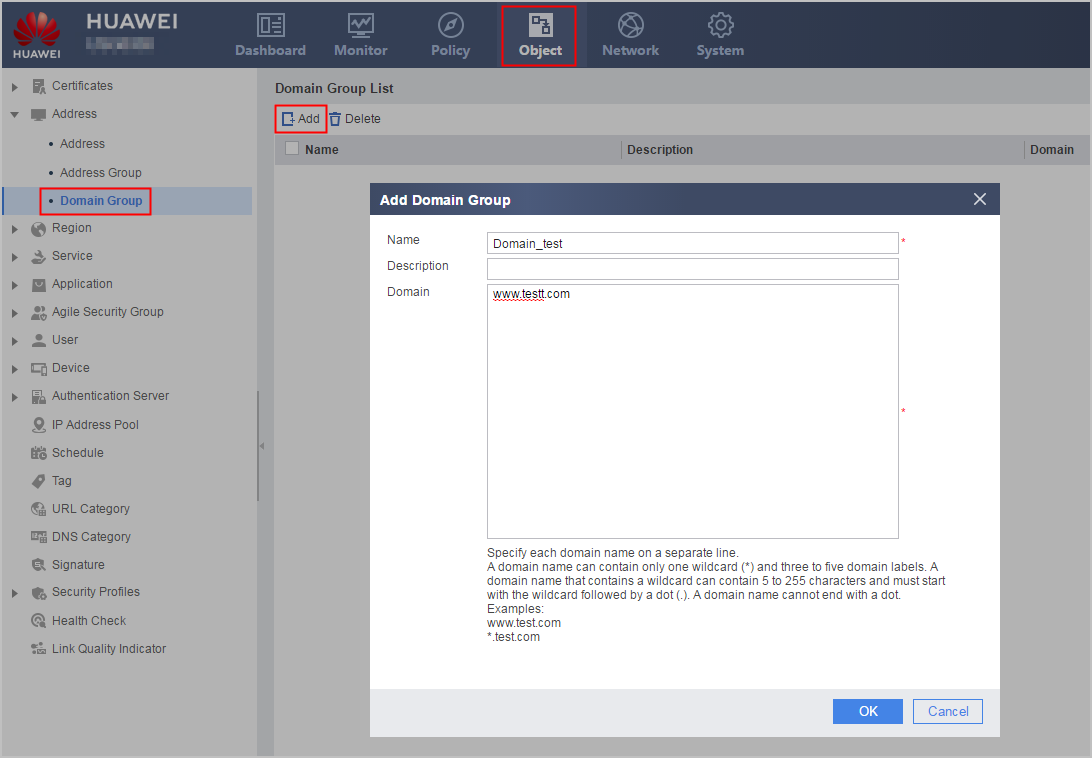
Parameter
Description
Name
Name of the domain group
Description
Description of the domain group
Domain name
You can configure a domain name in each line. Use a carriage return to separate domain names. The domain names must meet the following requirements:
- A domain name is a string of 1 to 255 case-sensitive characters and does not support the following characters: @\:*"<>|/#='&.
- If the domain name contains an asterisk wildcard character (*), the domain name length ranges from 5 to 255. Only asterisk wildcard characters (*) are supported. A domain name can contain only one asterisk wildcard character (*), and the asterisk (*) must be at the beginning. A domain name supports two to four periods (.) that cannot be consecutive and cannot end with a period. That is, the format must be *.X.X, *.X.X.X, or *.X.X.X.X. In addition, the number of characters between two periods cannot exceed 63.
Correct examples:- www.test.com
- *.test.com
- *.test.test1.com
Incorrect examples:- *www.test.com.
- test.*.com
- *..test
- *.test.com.
- Click to view the created domain group.