Web: Example for Configuring an IPsec over GRE Tunnel
Networking Requirements
The headquarters and branch originally communicate with each other over a GRE tunnel. In presence of increasing network threats, the enterprise manager hopes to enhance intranet communication security without changing the original network deployment. Therefore, IPSec encapsulation of traffic can be performed before GRE encapsulation to form an IPSec over GRE tunnel, as shown in Figure 1.
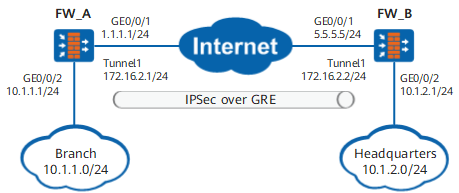
Configuration Procedure
- Create a tunnel interface on FW_A and FW_B respectively for establishing the GRE tunnel.
- Configure an IPsec policy on FW_A and FW_B respectively and apply this policy to the tunnel interface on FW_A and FW_B.
Procedure
- Configure FW_A.
- Configure the interface IP address and assign the interface to the security zone.
- Choose .
Click
 of GE0/0/1 and set the parameters as follows:
Security zone
untrust
IPv4
IP address
1.1.1.1/24
- Click OK.
Repeat the preceding steps to configure GE0/0/2.
Security zone
trust
IPv4
IP address
10.1.1.1/24
- Configure encapsulation parameters for the tunnel interface.
- Choose .
- Click Add in GRE Interface List.
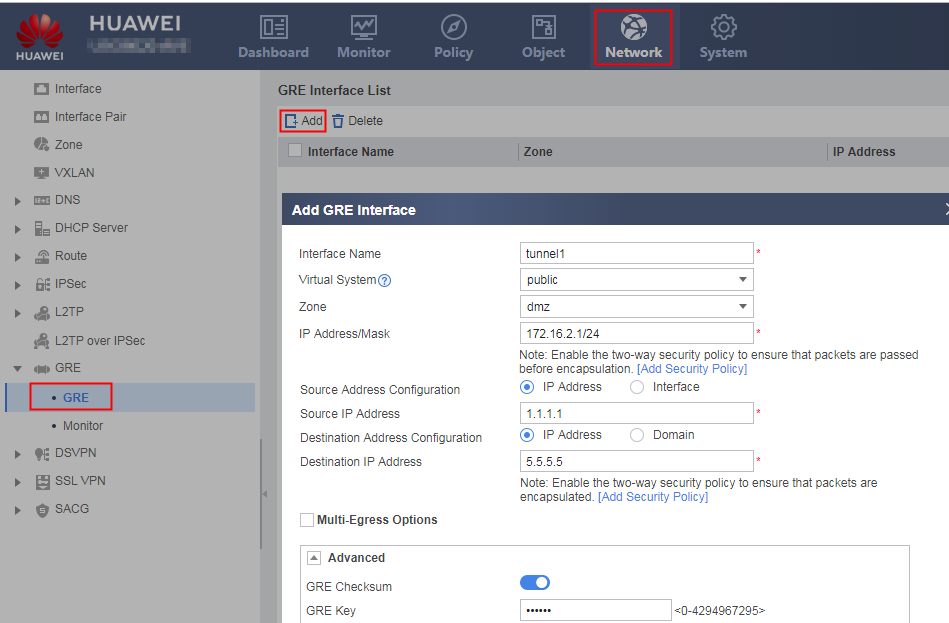
- Set GRE tunnel interface parameters, as shown in the following figure.
- Configure interzone security policies.Configure a Trust-DMZ interzone security policy to permit unencapsulated packets.
Choose .
Click Add, select Add Security, and set the following parameters for the Trust -> DMZ interzone policy.
Name
policy1
Source Zone
trust
Destination Zone
dmz
Action
Permit
- Click OK.
- Repeat the preceding steps to configure the DMZ -> Trust, Local -> Untrust, and Untrust -> Local interzone policies.
Name
policy2
Source Zone
dmz
Destination Zone
trust
Action
Permit
Name
policy3
Source Zone
local
Destination Zone
untrust
Action
Permit
Name
policy4
Source Zone
untrust
Destination Zone
local
Action
Permit
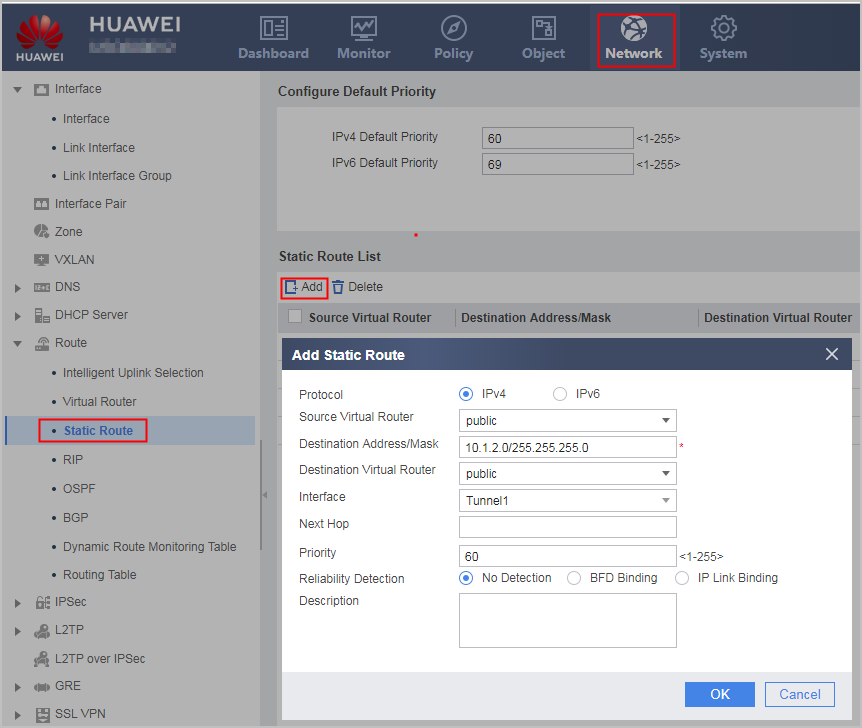
- Configure a static route to direct traffic to the GRE tunnel.
- Choose .
- Click Add and set the following parameters.
Protocol
IPv4
Destination Address/Mask
10.1.2.0/255.255.255.0
Interface
Tunnel1
- Configure the IPsec policy.
- Choose .
- Click Add and configure an IPsec policy.
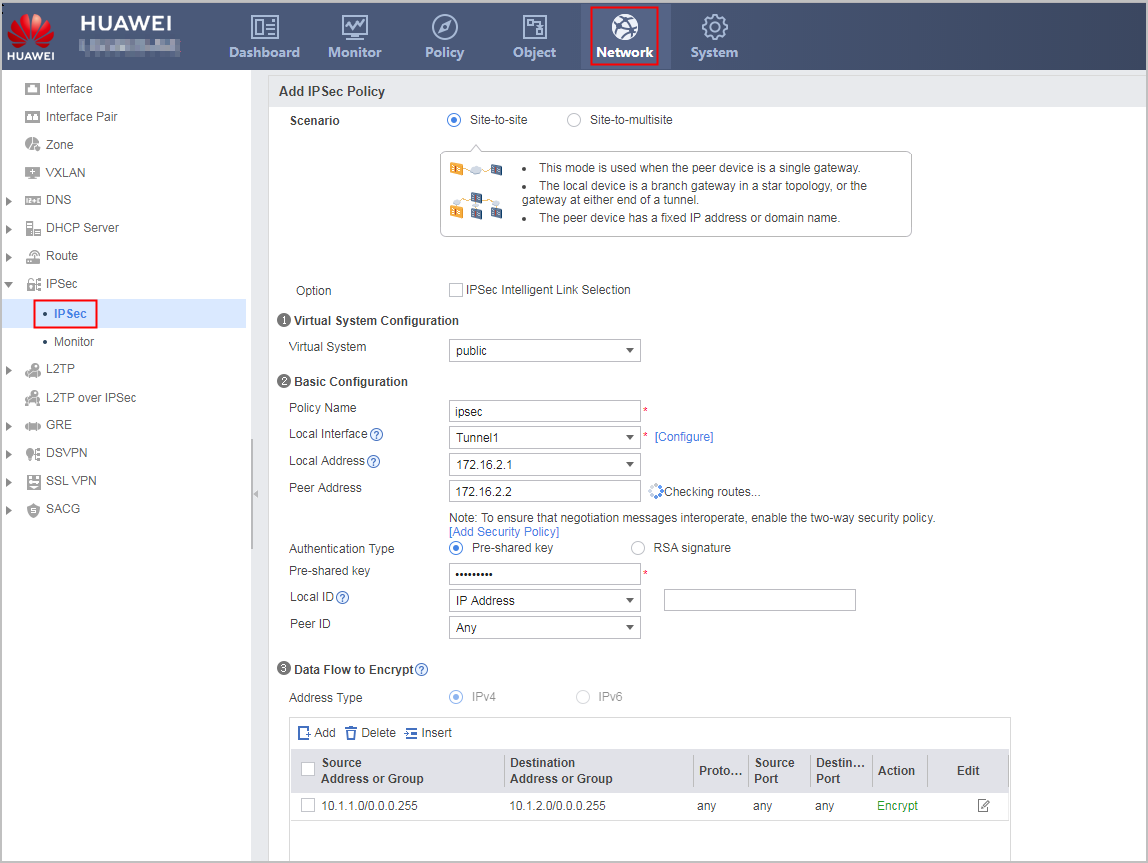
- Click Apply.
- Configure the interface IP address and assign the interface to the security zone.
- Configure FW_B.
- Configure the interface IP address and assign the interface to the security zone.
- Choose .
Click
of GE0/0/1 and set the parameters as follows:Zone
untrust
IPv4
IP Address
5.5.5.5/24
- Click OK.
Repeat the preceding steps to configure GE0/0/2.
Zone
trust
IPv4
IP Address
10.1.2.1/24
- Configure encapsulation parameters for the tunnel interface.
- Choose .
- Click Add in GRE Interface List.
- Set GRE tunnel interface parameters, as shown in the following figure.
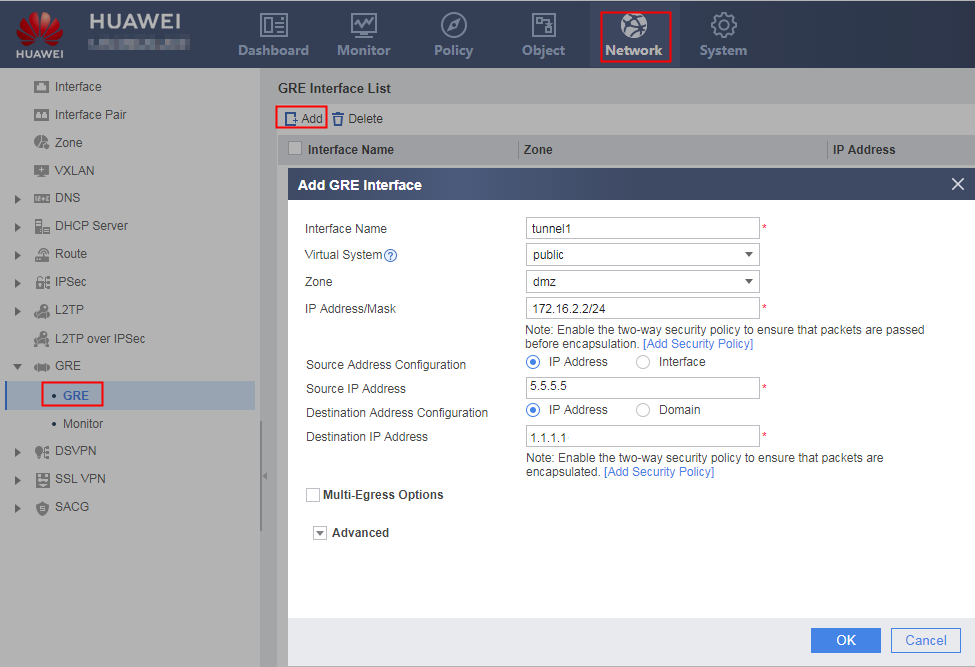
- Configure interzone security policies.Configure a Trust-DMZ interzone security policy to permit unencapsulated packets.
Choose .
Click Add, select Add Security, and set the following parameters for the Trust -> DMZ interzone policy.
Name
policy1
Source Zone
trust
Destination Zone
dmz
Action
Permit
- Click OK.
- Repeat the preceding steps to configure the DMZ -> Trust, Local -> Untrust, and Untrust -> Local interzone policies.
Name
policy2
Source Zone
dmz
Destination Zone
trust
Action
Permit
Name
policy3
Source Zone
local
Destination Zone
untrust
Action
Permit
Name
policy4
Source Zone
untrust
Destination Zone
local
Action
Permit
- Configure the IPsec policy.
- Choose .
- Click Add and configure an IPsec policy.
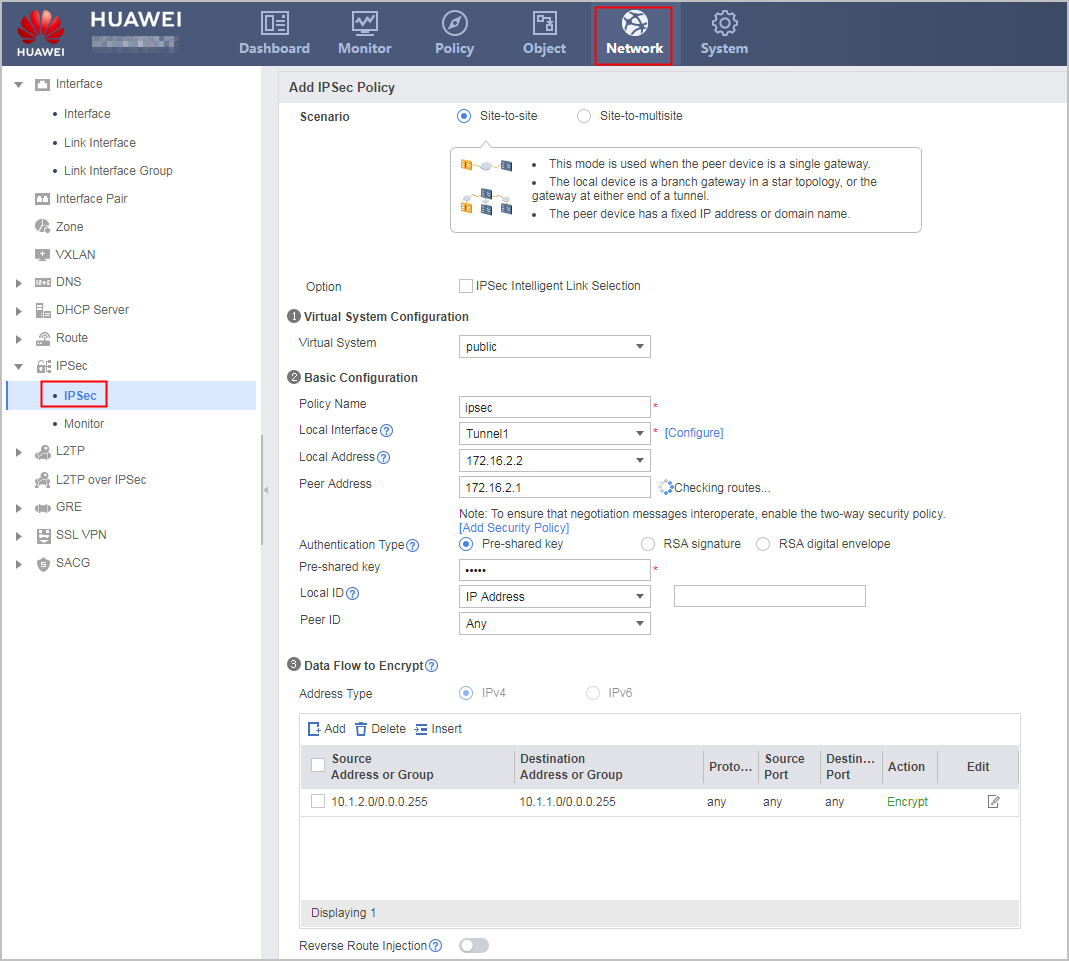
- Click Apply.
- Configure a static route to direct traffic to the GRE tunnel.
- Choose .
- Click Add and set the following parameters.
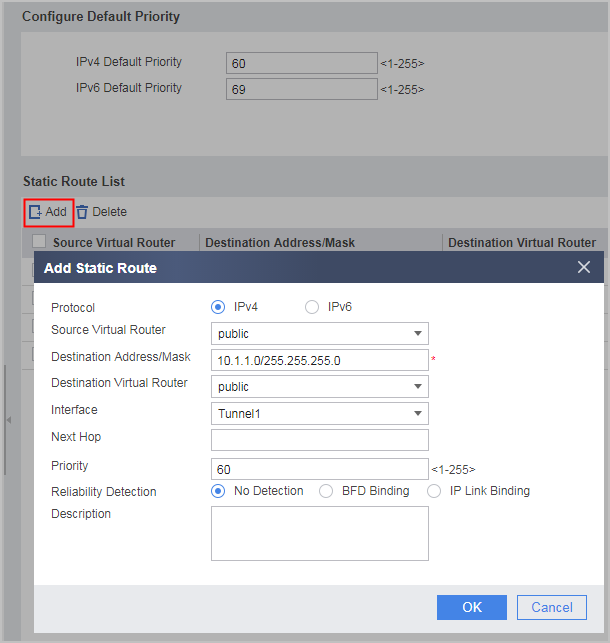
Protocol
IPv4
Destination Address/Mask
10.1.1.0/255.255.255.0
Interface
Tunnel1
- Configure the interface IP address and assign the interface to the security zone.
Verification
- Networks 1 and 2 can ping each other.
- Choose on FW_A. The routing table displays a route pointing to 10.1.2.0/24 with tunnel 1 as the outgoing interface.
Configuration Scripts
Configuration script of FW_A:
#
 sysname FW_A
#
acl 3000
 rule permit ip source 10.1.1.0 0.0.0.255 destination 10.1.2.0 0.0.0.255
#
ipsec proposal tran1
 esp authentication-algorithm sha2-256
 esp encryption-algorithm aes-256
#
ike proposal 10
 authentication-method pre-share
 authentication-algorithm sha2-256
 encryption-algorithm aes-256
 dh group14
#
ike peer b
 ike-proposal 10
 remote-address 172.16.2.2
 pre-shared-key %^%#eY>XCM5+)9nKwEIT`J+YA0lL31/MGS=gZBF.""`6%^%#
#
ipsec policy map1 10 isakmp
 security acl 3000
 proposal tran1
 ike-peer b
#
interface GigabitEthernet0/0/1
 ip address 1.1.1.1 255.255.255.0
#
interface GigabitEthernet0/0/2
 ip address 10.1.1.1 255.255.255.0
#
interface Tunnel1
 ip address 172.16.2.1 255.255.255.0
 tunnel-protocol gre
 source 1.1.1.1
 destination 5.5.5.5
 gre key cipher %^%#=F~T>w'>n:QlQ8BI3>67Ir3I*Onzv'\(%^%#
 alias tunnel 1
 keepalive
 ipsec policy map1
#
ip route-static 0.0.0.0 0.0.0.0 1.1.1.2
ip route-static 10.1.2.0 255.255.255.0 Tunnel1
#
firewall zone trust
 set priority 85
 add interface GigabitEthernet0/0/2
#
firewall zone untrust
 set priority 5
 add interface GigabitEthernet0/0/1
#
firewall zone dmz
 set priority 50
 add interface Tunnel 1
#
security-policy
 rule name policy1
  source-zone trust
  destination-zone dmz
  action permit
 rule name policy2
  source-zone dmz
  destination-zone trust
  service gre
  action permit
 rule name policy3
  source-zone local
  destination-zone untrust
  service gre
  action permit
 rule name policy4
  source-zone untrust
  destination-zone local
  service gre
  action permit
#
return
Configuration script of FW_B:
#
 sysname FW_B
#
acl 3000
 rule permit ip source 10.1.2.0 0.0.0.255 destination 10.1.1.0 0.0.0.255
#
ipsec proposal tran1
 esp authentication-algorithm sha2-256
 esp encryption-algorithm aes-256
#
ike proposal 10
 authentication-method pre-share
 authentication-algorithm sha2-256
 encryption-algorithm aes-256
 dh group14
#
ike peer b
 ike-proposal 10
 remote-address 172.16.2.1
 pre-shared-key %^%#eY>XCM5+)9nKwEIT`J+YA0lL31/MGS=gZBF.""`6%^%#
#
ipsec policy map1 10 isakmp
 security acl 3000
 proposal tran1
 ike-peer b
#
interface GigabitEthernet0/0/1
 ip address 5.5.5.5 255.255.255.0
#
interface GigabitEthernet0/0/2
 ip address 10.1.2.1 255.255.255.0
#
interface Tunnel1
 ip address 172.16.2.2 255.255.255.0
 tunnel-protocol gre
 source 5.5.5.5
 destination 1.1.1.1
 gre key cipher %^%#=F~T>w'>n:QlQ8BI3>67Ir3I*Onzv'\(%^%#
 alias tunnel 1
 keepalive
 ipsec policy map1
#
ip route-static 0.0.0.0 0.0.0.0 5.5.5.1
ip route-static 10.1.1.0 255.255.255.0 Tunnel1
#
firewall zone trust
 set priority 85
 add interface GigabitEthernet0/0/2
#
firewall zone untrust
 set priority 5
 add interface GigabitEthernet0/0/1
#
firewall zone dmz
 set priority 50
 add interface Tunnel 1
#
security-policy
 rule name policy1
  source-zone trust
  destination-zone dmz
  action permit
 rule name policy2
  source-zone dmz
  destination-zone trust
  service gre
  action permit
 rule name policy3
  source-zone local
  destination-zone untrust
  service gre
  action permit
 rule name policy4
  source-zone untrust
  destination-zone local
  service gre
  action permit
#
return