Controlling VRRP Group Status Through VGMP Groups
Basic VRRP Concepts
Virtual Router Redundancy Protocol (VRRP) enables a standby router to automatically replace a faulty active router (default gateway) to forward packets, ensuring service continuity and availability.
When configuring VRRP on the FWs, you need to add the interfaces with the same ID on the two FWs to the same VRRP group. A VRRP group functions as a virtual routing device and has a virtual IP address and a virtual MAC address. The default gateway address on the hosts in the network must be set to the virtual IP address of the VRRP group so that the hosts can communicate with external networks through virtual router.
A VRRP group can be in any of the following states: Initialize, Master, and Backup.
- Initialize: indicates the initial state. A VRRP group in the Initialize state cannot be used.
- Master: indicates the master state. A device whose VRRP group state is Master is called a master device. The master device is the owner of the virtual IP address and virtual MAC address of the VRRP group. When the master device receives an ARP request with the destination IP address being the virtual IP address, it responds to the ARP request.
- Backup: indicates the backup state. A device whose VRRP group state is Backup is called a backup device. The backup device does not respond to ARP requests with the destination IP address being the virtual IP address.
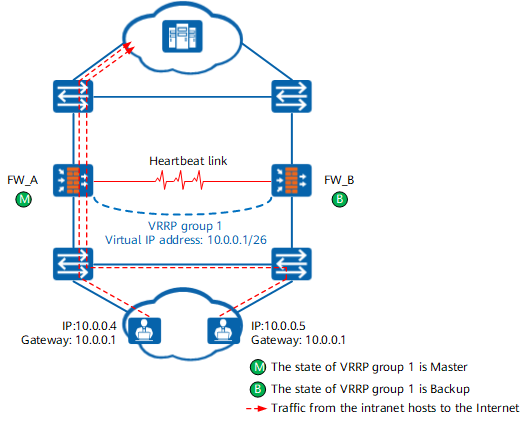
When the master device is normal, hosts on the network communicate with external networks through the master device. When the master device fails, the backup device becomes the new master device and forwards the packets to ensure network continuity. As shown in Figure 1, VRRP group 1 is configured on the downstream service interfaces of FW_A and FW_B. The gateway address on the intranet hosts is set to the virtual IP address (10.0.0.1) of VRRP group 1. When an intranet host accesses an external network, it broadcasts an ARP request to request the MAC address mapped to 10.0.0.1. VRRP group 1 on FW_A is in Master state, and FW_A responds to the ARP requests from intranet host. VRRP group 1 on FW_B is in Backup state, and FW_B does not respond to ARP requests from intranet hosts. The traffic from the intranet host to the Internet is diverted to FW_A for forwarding.
Controlling VRRP Group Status Through VGMP Groups
The status of a VRRP group on a Huawei switch or router depends on the VRRP priority. In a VRRP group, the VRRP group state of the device with the highest VRRP priority is Master and that of other devices is Backup. The VRRP group status on FWs is not determined by the VRRP priority. The VRRP priority on FWs is not user-configurable. After hot standby is enabled on a FW, the VRRP priority is fixed to 120.
When an interface on a FW is faulty, the state of the VRRP group on the interface is Initialize. When the interface is normal, the status of the VRRP group on the interface is determined by the status of the VGMP group. The details are as follows:
- When the VGMP group state is active, the VRRP group state is Master.
- When the VGMP group state is standby, the VRRP group state is Backup.
When the VGMP group is in the load-balance state, the state of the VRRP group is determined by the configuration of the VRRP group.
The command for configuring a VRRP group is as follows:
vrrp vrid virtual-router-id virtual-ip virtual-address { active | standby }
In the preceding command, active indicates that the state of the specified VRRP group is Master, and standby indicates that the state of the specified VRRP group is Backup.
The networking diagram in Figure 2 is an example to describe how the device adjusts the VRRP group status based on the VGMP group status. Table 1 describes the key configurations of FW_A and FW_B.
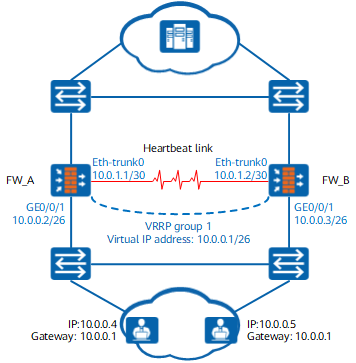
| FW_A | FW_B |
|---|---|
#
hrp enable                               /*Enable hot standby.*/
hrp interface eth-trunk0 remote 10.0.1.2 /*Configure the heartbeat interface.*/
#
interface GigabitEthernet 0/0/1
 ip addresss 10.0.0.2 255.255.255.192
 vrrp vrid 1 virtual-ip 10.0.0.1 active  /*Configure a VRRP group.*/
|
#
hrp enable                               /*Enable hot standby.*/
hrp interface eth-trunk0 remote 10.0.1.1 /*Configure the heartbeat interface.*/
#
interface GigabitEthernet 0/0/1
 ip addresss 10.0.0.3 255.255.255.192
 vrrp vrid 1 virtual-ip 10.0.0.1 standby /*Configure a VRRP group.*/
|
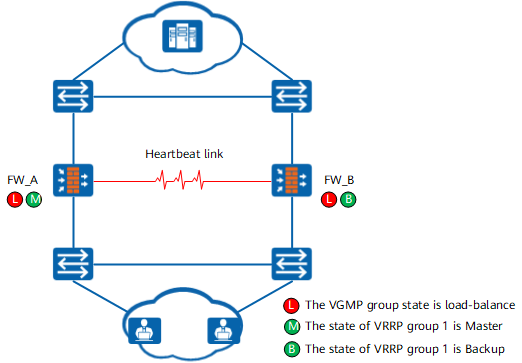
As shown in Figure 3, both devices are normal and have the same VGMP group priority and state, which is load-balance. The running status of the VRRP group is determined by the configuration. VRRP group 1 on FW_A is in the Master state, and VRRP group 1 on FW_B is in the Backup state.
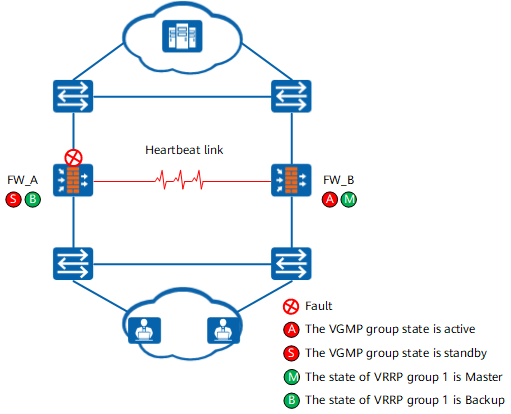
As shown in Figure 4, the upstream service interface of FW_A is faulty, and FW_B is normal. The VGMP group priority on FW_A is lower than that on FW_B. The VGMP group state on FW_A changes to standby, and that on FW_B to active. In this case, the running status of the VRRP group is determined by the status of the VGMP group. The running status of the VRRP backup group on FW_A changes to Backup, and that on FW_B to Master.