Service Active/Standby and Configuration Active/Standby Status
This section describes the service active/standby and configuration active/standby status on FWs and their differences.
Differences between service active/standby and configuration active/standby status
- The service active/standby status determines whether the FW carries services. In active/standby networking, only one FW carries services and the other FW functions as the backup. The FW that carries services is the service active device and the other is the service backup device. In load balancing networking, both FWs carry services, and the two FWs are both service active devices.
The configuration active/standby status determines which FW can execute configuration commands. Only configuration commands that support backup except the save command can be executed only on the configuration active device. These commands are automatically backed up to the configuration standby device, for example, security and NAT policy configuration commands. If you run a command on a configuration standby device, the following message is displayed: Error: The device is in HRP standby state, so this command cannot be executed. The commands that do not support backup can be executed on both the configuration active and standby devices, for example, display and debug commands.

If you need to execute commands that support backup on a configuration standby device, you can run the hrp standby config enable command on the configuration active or standby device.
Run the display hrp state command to check the service active/standby status of a FW. Role indicates the service active/standby status of the local device, and peer indicates the service active/standby status of the peer end. For example, Role: standby, peer: active indicates that the local end is the service standby device and the peer end is the service active device. The two FWs work in active/standby mode. Role: active, peer: active indicates that both the local end and the peer end are service active devices, and the two FWs work in load balancing mode.
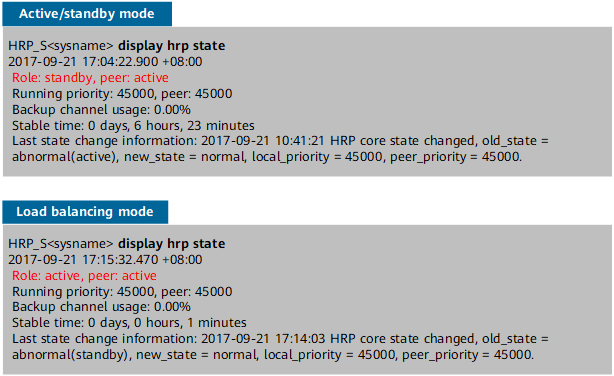
You can determine the configuration active/standby status of a FW based on the command prompt. If the command prompt is HRP_M, the FW is a configuration active device. If the command prompt is HRP_S, the FW is a configuration standby device.
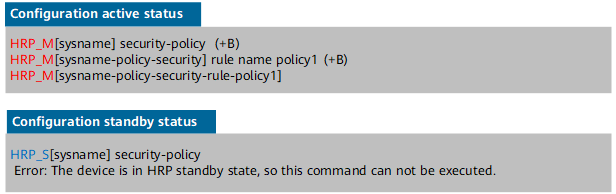
In the active/standby networking, the service active device is the configuration active device, and the service standby device is the configuration standby device. In load balancing networking, the configuration active/standby status of FWs is negotiated based on the following principles:
- The configuration active/standby status is determined by the value of the host name (sysname) ASCII. The device with a smaller host name ASCII is the configuration active device, and the device with a larger host name ASCII is the configuration standby device. For example, the host names of the two FWs are FW_A and FW_B respectively. FW_A becomes the configuration active device and FW_B the configuration standby device.
If the host names (sysnames) of the two FWs are the same, the configuration active/standby status is determined by the clock of the hot standby function. The device with a smaller clock becomes the configuration active device, and the device with a large clock becomes the configuration standby device.
If the FWs are restarted after the hot standby feature is enabled, the clock when the hrp enable command is recovered is used.