Configuration Backup
The FW supports real-time backup of configuration commands and batch backup of running configurations.
Real-time Configuration Backup
If two FWs are running properly and the hot standby relationship has been established, the configuration command executed on one device is immediately backed up to the other. By default, configuration commands that can be backed up except the save command can be executed only on the configuration active device, not on the configuration standby device. If you need to execute commands that support backup on a configuration standby device, you can run the hrp standby config enable command on the configuration active or standby device. After running this command, the configurations executed on the configuration standby device can be synchronized to the configuration active device.
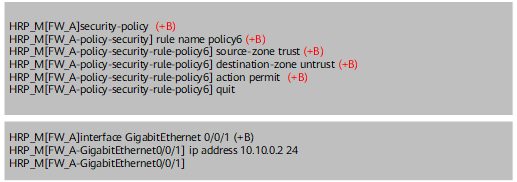
If a configuration command can be backed up, the command is marked with (+B). As shown in Figure 1, the configuration commands related to security policies can be backed up, but the interface IP address configuration commands cannot be backed up.
Batch Backup of Running Configurations
Batch backup of running configurations is triggered in the following cases:
- One or two FWs in hot standby networking are restarted.
- When two running FWs establish hot standby relationship, a batch backup of running configurations is automatically triggered.
- Batch backup is manually triggered when the hrp sync config command is executed on a FW.
For details about batch backup, see Table 1.
Item |
Description |
|---|---|
Batch backup of running configurations triggered by restart |
Batch backup is triggered when one or two FWs in hot standby networking restart. The configurations are backed up from the configuration active device to the configuration standby device. After the configuration standby device is started, the running configurations include only hot standby configurations and configurations that cannot be backed up. All other configurations are backed up from the configuration active device. The configuration backup mechanism is disabled by default. You can enable the function using the hrp base config enable command. The backup mechanism takes effect only in mirroring mode, not in non-mirroring mode. And it can be configured only in DCN scenarios. During batch backup, you cannot log in to the configuration standby device through the console port. |
Batch backup of running configurations triggered when two running FWs establish hot standby relationship |
The two FWs have been started and the configurations have been restored, but the hot standby relationship has not been established. For example, the two FWs are started, but the heartbeat cables are not connected or the hot standby function is not enabled. A batch backup is triggered during the establishment of the hot standby relationship. This backup mechanism is enabled by default and cannot be disabled. Only the new configurations executed after hot standby is enabled and before the hot standby relationship is established are backed up between the two FWs. The backup mechanism takes effect only in the mirroring mode. |
Manually triggered batch backup of running configurations |
Batch backup is triggered when the hrp sync config command is executed on either FW in hot standby networking. Configurations are backed up from the FW on which the hrp sync config command is executed to the peer device. When the backup starts, the following information is displayed on the CLI: HRP_M<FW_A> hrp sync config
Info: Starting to synchronize configuration to peer device, and can not do oper
ations during this period, please wait for a moment....
When the backup is complete, the following information is displayed on the CLI: HRP_M<FW_A> hrp sync config
Info: Starting to synchronize configuration to peer device, and can not do oper
ations during this period, please wait for a moment.......send complete.
|
After the batch backup is complete, the configurations are saved in the running configuration file but not saved in the startup configuration file. You need to run the save command to save the configurations. When you run the save command on the active device, the device displays the following prompt: Do you want to synchronically save the configuration to the startup saved-configuration file on peer device? Select y so that the standby device automatically saves the configurations.
HRP_M<FW_A> save
The current configuration (excluding the configurations of unregistered boards o
r cards) will be written to hda1:/vrpcfg.zip.
Are you sure to continue?[Y/N] y
Now saving the current configuration to the slot 0.....
Save the configuration successfully.
Do you want to synchronically save the configuration to the startup saved-config
uration file on peer device?[Y/N]: y
Now synchronically saving the configuration to the startup saved-configuration f
ile on peer device.............success.
Precautions
During batch backup, the configurations that can be backed up are sent from one FW to the peer and then executed on the peer. When the batch backup is triggered by the restart of a FW, the configuration standby device retains only hot standby configurations and configurations that cannot be backed up. Configurations that can be backed up are not retained. The configurations backed up from the configuration active device are executed on the configuration standby device so that the two FWs have the same configurations. However, other two types of batch configuration backup methods cannot ensure that the two FWs have the same configurations.
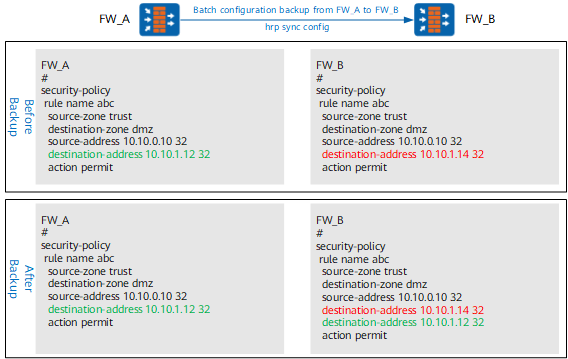
As shown in Figure 2, the destination-address in security policy abc on FW_A is different from that on FW_B. When the hrp sync config command is executed on FW_A, security policy abc on FW_A is sent to and executed on FW_B. One matching condition (destination-address 10.10.1.12 32) is added to security policy abc on FW_B. However, the original matching condition (destination-address 10.10.1.14 32) is not deleted. FW_A and FW_B still have different configurations.
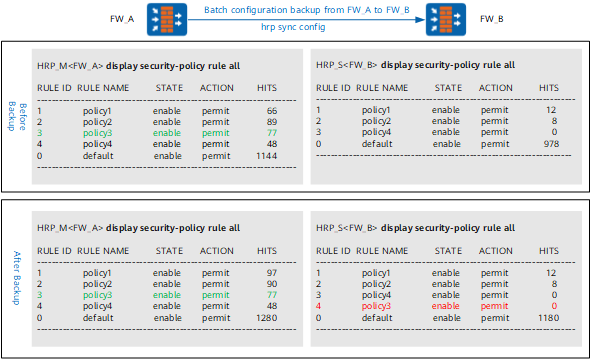
As shown in Figure 3, FW_A has one more security policy (policy3) than FW_B. When the hrp sync config command is executed on FW_A, security policy policy3 on FW_A is sent to and executed on FW_B. When a policy is added to a FW, the policy is placed above the default but below the last non-default policy. Therefore, policy3 is below policy4 on FW_B. The security policy sequence on FW_A is different from that on FW_B.