Status Information Backup
When processing packets, FWs generate table entries for packet inspection and forwarding. To ensure that services are not interrupted after a failover, service entries need to be backed up between the two FWs of a hot standby group. In active/standby networking, only the active FW processes services, generates service entries, and backs up the service entries to the standby FW. In load balancing networking, both FWs process services, generate service entries, and back up the service entries to the peer device.
Figure 1 shows whether service entries can be backed up. For service entries that cannot be backed up, faults may occur after failover.
Service Table |
Support Backup or Not |
Description |
|---|---|---|
IPv4 session table |
Y |
- |
IPv6 session table |
Y |
- |
MAC address table |
Y |
Only static MAC address entries can be backed up. |
Routing table |
N |
- |
NAT No-PAT entries |
Y |
- |
NAPT entries |
Y |
- |
3-Tuple NAT entries |
Y |
- |
NAT64 entries |
Y |
- |
DS-Lite NAT entries |
Y |
- |
CAR-NAT entries |
Y |
- |
PCP entries |
Y |
- |
Entries related to port pre-allocation and incremental allocation |
Y |
- |
Static mapping entries |
Y |
- |
NAT server entries |
Y |
- |
Destination NAT entries |
Y |
- |
DS-Lite NAT server entries |
Y |
- |
Entries related to bandwidth management |
N |
- |
Blacklist |
Y |
The dynamic blacklist cannot be backed up. |
Whitelist |
Y |
- |
AAA user table |
Y |
- |
PKI certificates |
Y |
- |
CRL |
Y |
- |
IPSec tunnels |
Y |
- |
L2TP tunnels |
N |
- |
GRE tunnels |
N |
- |
DSVPN |
N |
- |
Entries related to SSL VPN |
Y |
During the failover in hot standby networking, online users do not need to log in again. However, connections need to be re-established for services, such as port forwarding, web proxy, file sharing, and network extension. |
Layer 4 SLB-related entries |
Y |
- |
Layer 7 SLB-related entries |
Y |
- |
Entries related to content security inspection |
N |
Content security inspection refers to the inspection of application-layer data packets, such as antivirus, IPS, and URL filtering. During the inspection, the IAE generates entries to record packet inspection information, such as IAE session entries and fragmented packet-related session entries. |
Quick Session Backup
The default support for backup and backup timing of different types of session tables on the FWs are described as follows:
- Sessions generated for packets originated from or destined for the FWs are not backed up. For example, the session generated when an administrator logs in to a FW is not backed up.
- ICMP sessions are not backed up.
- TCP sessions are back up only when the TCP three-way handshake is complete.
- UDP sessions are backed up only when the FWs receive the second packet in the forward direction.
- SCTP sessions are backed up only when the SCTP four-way handshake is complete.
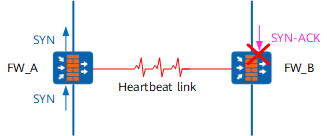
However, the preceding session backup mechanisms may cause anomalies when the forward and return paths are different. As shown in Figure 1, the SYN packet of a TCP connection is forwarded by FW_A, and the SYN-ACK packet is diverted to FW_B. The FW creates a TCP session only when the FW receives an SYN packet, not SYN-ACK or ACK packet. Therefore, after receiving an SYN packet, FW_A creates a half-open TCP connection. FW_B receives only an SYN-ACK packet and does not create a session. half-open TCP connection to FW_B. When the SYN-ACK packet arrives on FW_B, it is discarded because it does not match any session. As a result, the TCP connection cannot be established.
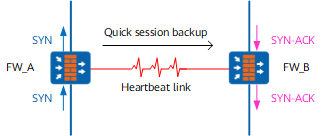
To solve this problem, you need to enable the quick session backup function on the FWs. After the quick session backup function is enabled, the support for backup and backup timing of different types of session tables on the FWs are described as follows:
- Sessions generated for packets originated from or destined for the FWs are not backed up.
- ICMP sessions are generated and backed up when a FW receives the ICMP ECHO-REQUEST packet.
- TCP sessions are generated and backed up when a FW receives the SYN packet.
- UDP sessions are generated and backed up when a FW receives the first packet in the forward direction.
- SCTP sessions are generated and backed up when a FW receives the INIT packet.
As shown in Figure 2, when quick session backup is enabled, FW_A creates a half-open TCP connection and backs it up to FW_B upon receiving the SYN packet. When the SYN-ACK packet arrives on FW_B, it matches the session backed up by FW_A.

After quick session backup is enabled, the CPU usage and bandwidth usage of the heartbeat interfaces increase because the frequency of session backup increases.