Understanding Interworking Between Hot Standby and BFD/IP-Link
Before configuring interworking between hot standby and BFD/IP-link, familiarize yourself with the implementation principles.
Link reliability means that if a network link indirectly connected to a device is faulty (remote interface fault), the device can detect the fault in a timely manner, adjust the forwarding path or route, and send service traffic to a healthy link or network. In this way, service traffic can be switched to the backup link in a timely manner if the network fails. Hot standby allows the standby device to take over if the active device fails, ensuring service continuity. However, if the network link indirectly connected to the device is faulty, a link reliability technology needs to be introduced to trigger an active/standby switchover in a timely manner.
- BFD is a light-loaded rapid fault detection mechanism that can detect a link fault in milliseconds. BFD uses small detection packets to implement bidirectional detection, occupying a few network resources for rapid forwarding. When BFD works with hot standby, VGMP groups are used to monitor static BFD sessions, and the priorities of VGMP groups change based on the status of BFD sessions. The change of the priorities of VGMP groups triggers an active/standby switchover.
- IP-Link detects the reachability of every IP address on the network in real time. If an IP address becomes unreachable, IP-Link considers the link to the address faulty and instructs the device to adjust routes or the active/standby state, so that service traffic can be switched to healthy standby links. Interworking between IP-link and hot standby enables VGMP groups to monitor the status of interfaces or links that are not directly connected to the FW. In this way, the priorities of the VGMP groups change with the status of IP-link to monitor the faults of remote interfaces and trigger the active/standby switchover in a timely manner.
Note that interworking between hot standby and BFD/IP-link can only be used when service interfaces on the FW work at Layer 3 because the FW needs to use interface IP addresses to send BFD/IP-link detection packets to remote devices.
Monitoring the Status of Remote Interfaces Through BFD
To monitor the status of remote interfaces through BFD, you can use BFD to detect remote interfaces and configure VGMP groups to monitor the BFD status on the FW. If a remote interface tracked by BFD is faulty, the BFD state changes to Down. The VGMP group detects the BFD status change and reduces its priority by 2.
As shown in Figure 1, FW_A and FW_B are hot-standby. FW_A is active, and FW_B is standby. To enable the FW to monitor the status of non-direct links, you need to use BFD session 10 on FW_A (FW_B) to detect GE0/0/1 of R1 (R2) and add BFD session 10 to the VGMP group, so that the VGMP group monitors the status of BFD session 10.
If GE0/0/1 of R1 is faulty, the BFD session detects the fault (from Up to Down) and reports the fault to the VGMP group of FW_A. The priority of the VGMP group on FW_A decreases by 2, lower than that of FW_B. As a result, the active/standby switchover occurs, and FW_B becomes active.
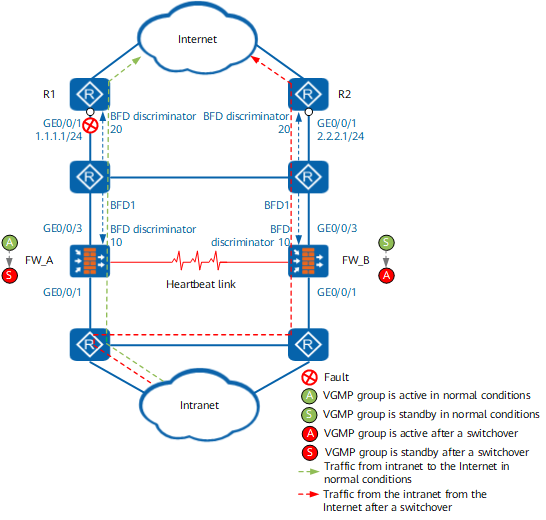
Table 1 shows the key configuration for interworking between hot standby and BFD. (The prerequisite is that hot standby has been configured.)
FW_A |
FW_B |
|---|---|
bfd 1 bind peer-ip 1.1.1.1 /*Create a BFD session to monitor 1.1.1.1.*/ discriminator local 10 /*The local discriminator is 10.*/ discriminator remote 20 /*The remote discriminator is 20.*/ hrp track bfd-session 10 /*Add the BFD session to the VGMP group.*/ |
bfd 1 bind peer-ip 2.2.2.1 /*Create a BFD session to monitor 2.2.2.1.*/ discriminator local 10 /*The local discriminator is 10.*/ discriminator remote 20 /*The remote discriminator is 20.*/ hrp track bfd-session 10 /*Add the BFD session to the VGMP group.*/ |
Monitoring the Status of Remote Interfaces Through IP-Link
To monitor the status of remote interfaces through IP-link, you can use configure IP-link to detect remote interfaces and configure VGMP groups to monitor the IP-link status on the FW. If IP-link detects an interface fault, the IP link state becomes Down. The VGMP group detects the IP-link status change and decreases its priority by 2.
As shown in Figure 2, FW_A and FW_B are hot-standby. FW_A is active, and FW_B is standby. To enable the FW to monitor the status of non-direct links, you need to use IP-link 1 on FW_A (FW_B) to detect GE0/0/1 of R1 (R2) and add IP-link 1 to the VGMP group, so that the VGMP group monitors the status of IP-link 1.
If GE0/0/1 of R1 is faulty, IP-link detects the fault (from Up to Down) and reports the fault to the VGMP group of FW_A. The priority of the VGMP group on FW_A decreases by 2, lower than that of FW_B. As a result, the active/standby switchover occurs, and FW_B becomes active.
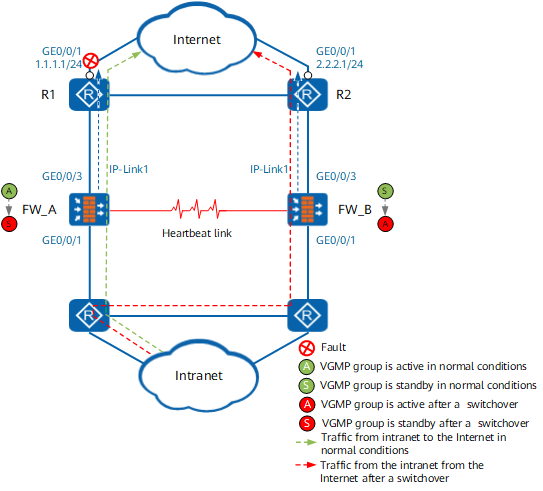
Table 1 shows the key configuration for interworking between hot standby and IP-link. (The prerequisite is that hot standby has been configured.)
FW_A |
FW_B |
|---|---|
ip-link check enable /*Enable IP-link.*/
 ip-link name 1      /*Create IP-link 1 to monitor 1.1.1.1.*/
  destination 1.1.1.1 interface GigabitEthernet0/0/3 mode icmp
 hrp track ip-link 1 /*Add IP-link 1 to the VGMP group.*/
|
ip-link check enable /*Enable IP-link.*/
 ip-link name 1      /*Create IP-link 1 to monitor 2.2.2.1.*/
  destination 2.2.2.1 interface GigabitEthernet0/0/3 mode icmp
 hrp track ip-link 1 /*Add IP-link 1 to the VGMP group.*/
|