CLI: Example for Configuring IPv6 Hot Standby in Load Balancing Mode on Firewalls That Connect Switches in Upstream and Downstream Directions
This section describes how to configure VRRPv6 groups with their own virtual IPv6 addresses using the CLI to implement IPv6 hot standby in load balancing mode on an IPv6 network where the service interfaces work at Layer 3 and connect to switches in the upstream and downstream directions.
Networking Requirements
As shown in Figure 1, the service interfaces of the FWs work at Layer 3 and are directly connected to switches. The FWs are expected to work in load balancing mode. Normally, both FW_A and FW_B forward traffic. If either FW fails, the other FW forwards all traffic to ensure service continuity.
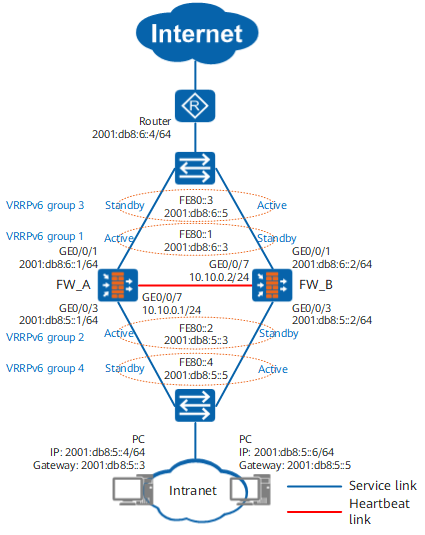
Procedure
- Complete basic network configurations.
FW_A
FW_B
# Enable the IPv6 packet forwarding function on FWs.
<FW_A> system-view
[FW_A] ipv6
<FW_B> system-view
[FW_B] ipv6
# Set IP addresses for the interfaces on FWs.
[FW_A] interface GigabitEthernet 0/0/1
[FW_A-GigabitEthernet0/0/1] ipv6 enable
[FW_A-GigabitEthernet0/0/1] ipv6 address 2001:db8:6::1 64
[FW_A-GigabitEthernet0/0/1] quit
[FW_A] interface GigabitEthernet 0/0/3
[FW_A-GigabitEthernet0/0/3] ipv6 enable
[FW_A-GigabitEthernet0/0/3] ipv6 address 2001:db8:5::1 64
[FW_A-GigabitEthernet0/0/3] quit
[FW_A] interface GigabitEthernet 0/0/7
[FW_A-GigabitEthernet0/0/7] ip address 10.10.0.1 24
[FW_A-GigabitEthernet0/0/7] quit
[FW_B] interface GigabitEthernet 0/0/1
[FW_B-GigabitEthernet0/0/1] ipv6 enable
[FW_B-GigabitEthernet0/0/1] ipv6 address 2001:db8:6::2 64
[FW_B-GigabitEthernet0/0/1] quit
[FW_B] interface GigabitEthernet 0/0/3
[FW_B-GigabitEthernet0/0/3] ipv6 enable
[FW_B-GigabitEthernet0/0/3] ipv6 address 2001:db8:5::2 64
[FW_B-GigabitEthernet0/0/3] quit
[FW_B] interface GigabitEthernet 0/0/7
[FW_B-GigabitEthernet0/0/7] ip address 10.10.0.2 24
[FW_B-GigabitEthernet0/0/7] quit
# Assign the interfaces to security zones on FWs.
[FW_A] firewall zone trust
[FW_A-zone-trust] add interface GigabitEthernet 0/0/3
[FW_A-zone-trust] quit
[FW_A] firewall zone dmz
[FW_A-zone-dmz] add interface GigabitEthernet 0/0/7
[FW_A-zone-dmz] quit
[FW_A] firewall zone untrust
[FW_A-zone-untrust] add interface GigabitEthernet 0/0/1
[FW_A-zone-untrust] quit
[FW_B] firewall zone trust
[FW_B-zone-trust] add interface GigabitEthernet 0/0/3
[FW_B-zone-trust] quit
[FW_B] firewall zone dmz
[FW_B-zone-dmz] add interface GigabitEthernet 0/0/7
[FW_B-zone-dmz] quit
[FW_B] firewall zone untrust
[FW_B-zone-untrust] add interface GigabitEthernet 0/0/1
[FW_B-zone-untrust] quit
# Create a default route with next hop 2001:db8:6::4 on FWs to forward traffic of intranet users to the router.
[FW_A] ipv6 route-static 0:0::0:0 0 2001:db8:6::4[FW_B] ipv6 route-static 0:0::0:0 0 2001:db8:6::4 - Configure VRRPv6 groups.
FW_A
FW_B
# Configure VRRPv6 groups 1 and 3 on upstream service interface GE0/0/1 of FW_A and set the status of VRRPv6 group 1 to Active and status of VRRPv6 group 3 to Standby. Configure VRRPv6 groups 1 and 3 on upstream service interface GE0/0/1 of FW_B and set the status of VRRPv6 group 1 to Standby and status of VRRPv6 group 3 to Active.
[FW_A] interface GigabitEthernet 0/0/1
[FW_A-GigabitEthernet0/0/1] vrrp6 vrid 1 virtual-ip FE80::1 link-local active
[FW_A-GigabitEthernet0/0/1] vrrp6 vrid 1 virtual-ip 2001:db8:6::3
[FW_A-GigabitEthernet0/0/1] vrrp6 vrid 3 virtual-ip FE80::3 link-local standby
[FW_A-GigabitEthernet0/0/1] vrrp6 vrid 3 virtual-ip 2001:db8:6::5
[FW_A-GigabitEthernet0/0/1] quit
[FW_B] interface GigabitEthernet 0/0/1
[FW_B-GigabitEthernet0/0/1] vrrp6 vrid 1 virtual-ip FE80::1 link-local standby
[FW_B-GigabitEthernet0/0/1] vrrp6 vrid 1 virtual-ip 2001:db8:6::3
[FW_B-GigabitEthernet0/0/1] vrrp6 vrid 3 virtual-ip FE80::3 link-local active
[FW_B-GigabitEthernet0/0/1] vrrp6 vrid 3 virtual-ip 2001:db8:6::5
[FW_B-GigabitEthernet0/0/1] quit
# Configure VRRPv6 groups 2 and 4 on downstream service interface GE0/0/3 of FW_A and set the status of VRRPv6 group 2 to Active and status of VRRPv6 group 4 to Standby. Configure VRRPv6 groups 2 and 4 on downstream service interface GE0/0/3 of FW_B and set the status of VRRPv6 group 2 to Standby and status of VRRPv6 group 4 to Active.
[FW_A] interface GigabitEthernet 0/0/3
[FW_A-GigabitEthernet0/0/3] vrrp6 vrid 2 virtual-ip FE80::2 link-local active
[FW_A-GigabitEthernet0/0/3] vrrp6 vrid 2 virtual-ip 2001:db8:5::3
[FW_A-GigabitEthernet0/0/3] vrrp6 vrid 4 virtual-ip FE80::4 link-local standby
[FW_A-GigabitEthernet0/0/3] vrrp6 vrid 4 virtual-ip 2001:db8:5::5
[FW_A-GigabitEthernet0/0/3] quit
[FW_B] interface GigabitEthernet 0/0/3
[FW_B-GigabitEthernet0/0/3] vrrp6 vrid 2 virtual-ip FE80::2 link-local standby
[FW_B-GigabitEthernet0/0/3] vrrp6 vrid 2 virtual-ip 2001:db8:5::3
[FW_B-GigabitEthernet0/0/3] vrrp6 vrid 4 virtual-ip FE80::4 link-local active
[FW_B-GigabitEthernet0/0/3] vrrp6 vrid 4 virtual-ip 2001:db8:5::5
[FW_B-GigabitEthernet0/0/3] quit
- Configure quick session backup, specify the heartbeat interface, and enable hot standby.
FW_A
FW_B
# Configure quick session backup on both FWs in case of inconsistent forward and return packet paths.
[FW_A] hrp mirror session enable[FW_B] hrp mirror session enable# Specify the heartbeat interface and enable hot standby on FWs.
[FW_A] hrp interface GigabitEthernet 0/0/7 remote 10.10.0.2
[FW_A] hrp enable
[FW_B] hrp interface GigabitEthernet 0/0/7 remote 10.10.0.1
[FW_B] hrp enable
- Configure a security policy to allow intranet users to access the Internet.
# Create a security policy on FW_A. After hot standby relationship is established, the security policy on FW_A will be automatically backed up to FW_B.
HRP_M[FW_A] security-policy
HRP_M[FW_A-policy-security] rule name trust_to_untrust
HRP_M[FW_A-policy-security-rule-trust_to_untrust] source-zone trust
HRP_M[FW_A-policy-security-rule-trust_to_untrust] destination-zone untrust
HRP_M[FW_A-policy-security-rule-trust_to_untrust] source-address 2001:db8:5:: 64
HRP_M[FW_A-policy-security-rule-trust_to_untrust] action permit
HRP_M[FW_A-policy-security-rule-trust_to_untrust] quit
HRP_M[FW_A-policy-security] quit
- Configure the switches and PCs.
- Add the three interfaces of the switches to the same VLANs accordingly. For configuration commands, refer to related documents of the switches.
- On some intranet PCs, specify the virtual IPv6 address of VRRPv6 group 2 as the default gateway address and on some other intranet PCs, specify the virtual IPv6 address of VRRPv6 group 4 as the default gateway address to implement load balancing of intranet traffic.
- Configure the router.
Configure equal-cost routes to FW_A and FW_B on the Router, with the next hops being the virtual IPv6 addresses of VRRPv6 group 1 and VRRPv6 group 3.
Verification
Run the display vrrp6 command on FW_A and FW_B to check the status information about the interfaces in the VRRPv6 group. If the following information is displayed, the VRRPv6 group is successfully created.
FW_A
FW_B
HRP_M<FW_A> display vrrp6
   GigabitEthernet0/0/1 | Virtual Router 1
     State : Master
     Virtual IP : FE80::1
                  2001:DB8:6::3
     Master IP : FE80::8269:33FF:FE8C:5C7D
     PriorityRun : 100
     PriorityConfig : 100
     MasterPriority : 0
     Preempt : YES   Delay Time : 0 s
     TimerRun : 4000 cs
     TimerConfig : 4000 cs
     Virtual MAC : 0000-5e00-0201
     Check hop limit : YES
     Config type : vgmp-vrrp
     Backup-forward : disabled
     Create time : 2019-04-13 14:54:28 UTC+08:00
     Last change time : 2019-04-13 14:56:53 UTC+08:00

   GigabitEthernet0/0/3 | Virtual Router 2
     State : Master
     Virtual IP : FE80::2
                  2001:DB8:5::3
     Master IP : FE80::8269:33FF:FE8C:5C6B
     PriorityRun : 100
     PriorityConfig : 100
     MasterPriority : 100
     Preempt : YES   Delay Time : 0 s
     TimerRun : 4000 cs
     TimerConfig : 4000 cs
     Virtual MAC : 0000-5e00-0202
     Check hop limit : YES
     Config type : vgmp-vrrp
     Backup-forward : disabled
     Create time : 2019-04-13 14:11:51 UTC+08:00
     Last change time : 2019-04-13 14:54:42 UTC+08:00

   GigabitEthernet0/0/1 | Virtual Router 3
     State : Backup
     Virtual IP : FE80::3
                  2001:DB8:6::5
     Master IP : FE80::8269:33FF:FE8C:5C7D
     PriorityRun : 100
     PriorityConfig : 100
     MasterPriority : 0
     Preempt : YES   Delay Time : 0 s
     TimerRun : 4000 cs
     TimerConfig : 4000 cs
     Virtual MAC : 0000-5e00-0203
     Check hop limit : YES
     Config type : vgmp-vrrp
     Backup-forward : disabled
     Create time : 2019-04-13 14:54:28 UTC+08:00
     Last change time : 2019-04-13 14:56:53 UTC+08:00
   GigabitEthernet0/0/3 | Virtual Router 4
     State : Backup
     Virtual IP : FE80::4
                  2001:DB8:5::5
     Master IP : FE80::8269:33FF:FE8C:5C6B
     PriorityRun : 100
     PriorityConfig : 100
     MasterPriority : 100
     Preempt : YES   Delay Time : 0 s
     TimerRun : 4000 cs
     TimerConfig : 4000 cs
     Virtual MAC : 0000-5e00-0204
     Check hop limit : YES
     Config type : vgmp-vrrp
     Backup-forward : disabled
     Create time : 2019-04-13 14:11:51 UTC+08:00
     Last change time : 2019-04-13 14:54:42 UTC+08:00
HRP_S<FW_B> display vrrp6
   GigabitEthernet0/0/1 | Virtual Router 1
     State : Backup
     Virtual IP : FE80::1
                  2001:DB8:6::3
     Master IP : FE80::4AF8:DBFF:FE50:82DB
     PriorityRun : 100
     PriorityConfig : 100
     MasterPriority : 0
     Preempt : YES   Delay Time : 0 s
     TimerRun : 4000 cs
     TimerConfig : 4000 cs
     Virtual MAC : 0000-5e00-0201
     Check hop limit : YES
     Config type : vgmp-vrrp
     Backup-forward : disabled
     Create time : 2019-04-13 14:28:28 UTC+08:00
     Last change time : 2019-04-13 15:08:53 UTC+08:00

   GigabitEthernet0/0/3 | Virtual Router 2
     State : Backup
     Virtual IP : FE80::2
                  2001:DB8:5::3
     Master IP : FE80::4AF8:DBFF:FE50:826B
     PriorityRun : 100
     PriorityConfig : 100
     MasterPriority : 100
     Preempt : YES   Delay Time : 0 s
     TimerRun : 4000 cs
     TimerConfig : 4000 cs
     Virtual MAC : 0000-5e00-0202
     Check hop limit : YES
     Config type : vgmp-vrrp
     Backup-forward : disabled
     Create time : 2019-04-13 14:30:51 UTC+08:00
     Last change time : 2019-04-13 15:10:42 UTC+08:00

   GigabitEthernet0/0/1 | Virtual Router 3
     State : Master
     Virtual IP : FE80::3
                  2001:DB8:6::5
     Master IP : FE80::4AF8:DBFF:FE50:82DB
     PriorityRun : 100
     PriorityConfig : 100
     MasterPriority : 0
     Preempt : YES   Delay Time : 0 s
     TimerRun : 4000 cs
     TimerConfig : 4000 cs
     Virtual MAC : 0000-5e00-0203
     Check hop limit : YES
     Config type : vgmp-vrrp
     Backup-forward : disabled
     Create time : 2019-04-13 14:28:28 UTC+08:00
     Last change time : 2019-04-13 15:08:53 UTC+08:00

   GigabitEthernet0/0/3 | Virtual Router 4
     State : Master
     Virtual IP : FE80::4
                  2001:DB8:5::5
     Master IP : FE80::4AF8:DBFF:FE50:826B
     PriorityRun : 100
     PriorityConfig : 100
     MasterPriority : 100
     Preempt : YES   Delay Time : 0 s
     TimerRun : 4000 cs
     TimerConfig : 4000 cs
     Virtual MAC : 0000-5e00-0204
     Check hop limit : YES
     Config type : vgmp-vrrp
     Backup-forward : disabled
     Create time : 2019-04-13 14:30:51 UTC+08:00
     Last change time : 2019-04-13 15:10:42 UTC+08:00
Run the display hrp state verbose command on FW_A and FW_B to check the VGMP group status. If the following information is displayed, hot standby relationship is successfully established.
FW_A
FW_B
HRP_M<FW_A> display hrp state verbose
  Role: active, peer: active
  Running priority: 45000, peer: 45000
  Backup channel usage: 0.00%
  Stable time: 0 days, 0 hours, 0 minutes
  Last state change information: 2019-04-13 15:01:44 HRP core state changed,
  old_state = initial, new_state = normal(active), local_priority = 45000,
  peer_priority = 45000.

  Configuration:
  hello interval:              1000ms
  preempt:                     60s
  mirror configuration:        off
  mirror session:              on
  track trunk member:          on
  auto-sync configuration:     on
  auto-sync connection-status: on
  adjust ospf-cost:            on
  adjust ospfv3-cost:          on
  adjust bgp-cost:             on
  nat resource:                off

  Detail information:
           GigabitEthernet0/0/1 vrrp6 vrid 1: active
           GigabitEthernet0/0/3 vrrp6 vrid 2: active
           GigabitEthernet0/0/1 vrrp6 vrid 3: standby
           GigabitEthernet0/0/3 vrrp6 vrid 4: standby
HRP_S<FW_B> display hrp state verbose
  Role: active, peer: active
  Running priority: 45000, peer: 45000
  Backup channel usage: 0.00%
  Stable time: 0 days, 0 hours, 0 minutes
  Last state change information: 2019-04-13 15:01:44 HRP core state changed,
  old_state = initial, new_state = normal(active), local_priority = 45000,
  peer_priority = 45000.

  Configuration:
  hello interval:              1000ms
  preempt:                     60s
  mirror configuration:        off
  mirror session:              on
  track trunk member:          on
  auto-sync configuration:     on
  auto-sync connection-status: on
  adjust ospf-cost:            on
  adjust ospfv3-cost:          on
  adjust bgp-cost:             on
  nat resource:                off

  Detail information:
           GigabitEthernet0/0/1 vrrp6 vrid 1: standby
           GigabitEthernet0/0/3 vrrp6 vrid 2: standby
           GigabitEthernet0/0/1 vrrp6 vrid 3: active
           GigabitEthernet0/0/3 vrrp6 vrid 4: active
In the trust zone, select two PCs with the default gateways set to the virtual IPv6 addresses of VRRPv6 group 2 and VRRPv6 group 4 respectively and run the ping 2001:db8:6::4 command on the two PCs to ping the router in the untrust zone. The ping operation is successful. Run the display firewall ipv6 session table command on FW_A and FW_B. Sessions between the two FWs are successfully created and backed up.
FW_A
FW_B
HRP_M<FW_A> display firewall ipv6 session table Current Total Sessions : 2 icmpv6 VPN: public --> public 2001:DB8:5::4.0 --> 2001:DB8:6::4.2048 icmpv6 VPN: public --> public Remote 2001:DB8:5::6.0 --> 2001:DB8:6::4.2048HRP_S<FW_B> display firewall ipv6 session table Current Total Sessions : 2 icmpv6 VPN: public --> public Remote 2001:DB8:5::4.0 --> 2001:DB8:6::4.2048 icmpv6 VPN: public --> public 2001:DB8:5::6.0 --> 2001:DB8:6::4.2048The preceding command output shows that sessions with the Remote tag are created on the two FWs. This indicates that the sessions between the two FWs are successfully backed up after the hot standby function is configured.
Run the ping 2001:db8:6::4 -t command on the PC, pull out the cable from GE0/0/1 on FW_A, and then check whether active/standby switchover is performed and whether ping packets are discarded. Insert the cable back to GE0/0/1 on FW_A and check again whether active/standby switchover is performed and whether ping packets are discarded. During the entire process, the ping operation is not interrupted.
Configuration Scripts
FW_A |
FW_B |
|---|---|
# ipv6 # hrp enable hrp interface GigabitEthernet 0/0/7 remote 10.10.0.2 hrp mirror session enable # interface GigabitEthernet 0/0/1 ipv6 enable ipv6 address 2001:DB8:6::1/64 vrrp6 vrid 1 virtual-ip FE80::1 link-local active vrrp6 vrid 1 virtual-ip 2001:DB8:6::3 vrrp6 vrid 3 virtual-ip FE80::3 link-local standby vrrp6 vrid 3 virtual-ip 2001:DB8:6::5 # interface GigabitEthernet 0/0/3 ipv6 enable ipv6 address 2001:DB8:5::1/64 vrrp6 vrid 2 virtual-ip FE80::2 link-local active vrrp6 vrid 2 virtual-ip 2001:DB8:5::3 vrrp6 vrid 4 virtual-ip FE80::4 link-local standby vrrp6 vrid 4 virtual-ip 2001:DB8:5::5 # interface GigabitEthernet 0/0/7 ip address 10.10.0.1 255.255.255.0 # firewall zone trust set priority 85 add interface GigabitEthernet 0/0/3 # firewall zone untrust set priority 5 add interface GigabitEthernet 0/0/1 # firewall zone dmz set priority 50 add interface GigabitEthernet 0/0/7 # ipv6 route-static 0:0::0:0 0 2001:db8:6::4 # security-policy rule name trust_to_untrust source-zone trust destination-zone untrust source-address 2001:db8:5:: 64 action permit |
# ipv6 # hrp enable hrp interface GigabitEthernet 0/0/7 remote 10.10.0.1 hrp mirror session enable # interface GigabitEthernet 0/0/1 ipv6 enable ipv6 address 2001:DB8:6::2/64 vrrp6 vrid 1 virtual-ip FE80::1 link-local standby vrrp6 vrid 1 virtual-ip 2001:DB8:6::3 vrrp6 vrid 3 virtual-ip FE80::3 link-local active vrrp6 vrid 3 virtual-ip 2001:DB8:6::5 # interface GigabitEthernet 0/0/3 ipv6 enable ipv6 address 2001:DB8:5::2/64 vrrp6 vrid 2 virtual-ip FE80::2 link-local standby vrrp6 vrid 2 virtual-ip 2001:DB8:5::3 vrrp6 vrid 4 virtual-ip FE80::4 link-local active vrrp6 vrid 4 virtual-ip 2001:DB8:5::5 # interface GigabitEthernet 0/0/7 ip address 10.10.0.2 255.255.255.0 # firewall zone trust set priority 85 add interface GigabitEthernet 0/0/3 # firewall zone untrust set priority 5 add interface GigabitEthernet 0/0/1 # firewall zone dmz set priority 50 add interface GigabitEthernet0/0/7 # ipv6 route-static 0:0::0:0 0 2001:db8:6::4 # security-policy rule name trust_to_untrust source-zone trust destination-zone untrust source-address 2001:db8:5:: 64 action permit |