Overview of IDS Interworking
The Intrusion Detective System (IDS) interworking function refers to the interworking between the FW and IDS to identify and block malicious traffic.
IDS Interworking with the NIP
In a scenario of interworking with the IDS of the Huawei Technologies Co., Ltd., the FW has the following functions:
Restrict user access or information flow to the strictly controlled sites and monitor the access channels between trusted and untrusted networks to prevent external threats from spreading into internal networks.
Restrict user access or information flow from strictly controlled sites to protect the security of internal information.
Due to the designed purpose of the FW, the FW has a coarse inspection granularity and cannot analyze or inspect protocol specifics.
To resolve this issue, the FW provides an interface to interwork with the IDS to form a unified security network.
The typical networking for the FW to interwork with the IDS is shown in Figure 1.
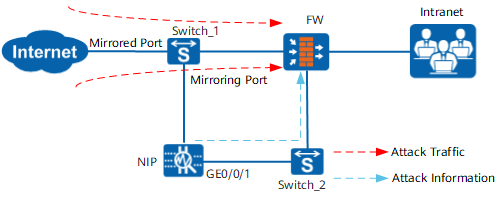
By interworking with the IDS, the FW can use the dedicated IDS software to thoroughly inspect and analyze packets to detect unusual and attack behavior and respond accordingly. If the IDS detects unusual or attack behavior, the IDS delivers the information about the abnormal packets and required actions to the FW through the interworking interface and the FW implements the action on attack packets.
Interworking with a Third-Party IDS
Currently, the FW can interwork with only one type of third-party IDS devices, namely, the Suricata. For details about the Suricata and its configuration, see the Suricata product documentation.
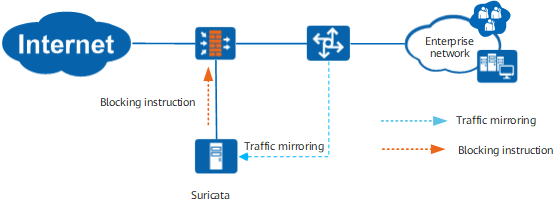
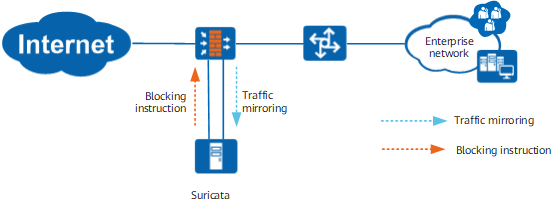
You may determine through which the traffic is to be mirrored to the Suricata, Mirroring of the FW or the downstream switch, based on the actual networking.
After the traffic arrives at the Suricata, detect whether the traffic is malicious and send the interworking packet to the FW through a trusted interface.FWAnalyze the interworking packet and add the source or destination address to the dynamic blacklist or directly block the corresponding session based on the instruction in the packet.
Scenario 1: Mirroring traffic to the Suricata through the switch
As shown in Figure 2, the FW is transparently deployed on the network, with service interfaces working at Layer 2, and traffic is mirrored to the Suricata through the downstream switch.
For the secure transmission of interworking packets, you must directly connect the FW to the Suricata and must configure a trusted interface on the FW. The FW analyzes only interworking packets from the trusted interface and execute corresponding instructions.
Scenario 2: Mirroring traffic to the Suricata through Mirroring of the FW
As shown in Figure 3, the FW is transparently deployed on the network, with service interfaces working at Layer 2, and traffic is mirrored to the Suricata through FW. For the secure transmission of interworking packets, you must directly connect the FW to the Suricata and must configure a trusted interface on the FW. The FW analyzes only interworking packets from the trusted interface and execute corresponding instructions.
As for traffic mirroring through the local port mirroring function of the FW, do not operate other services on the mirroring port. Otherwise, mirroring may fail.
Using the local port mirroring function may affect the FW performance to a certain degree. You are advised to mirror traffic to the Suricata through the downstream switch.