Configuring IDS Interworking with the NIP Using the Web UI
This section describes how to use the web user interface (UI) to configure interworking with the IDS.
Procedure
- Choose .
- In the Interworking Port, enter the
port for the FW to communicate with the IDS.
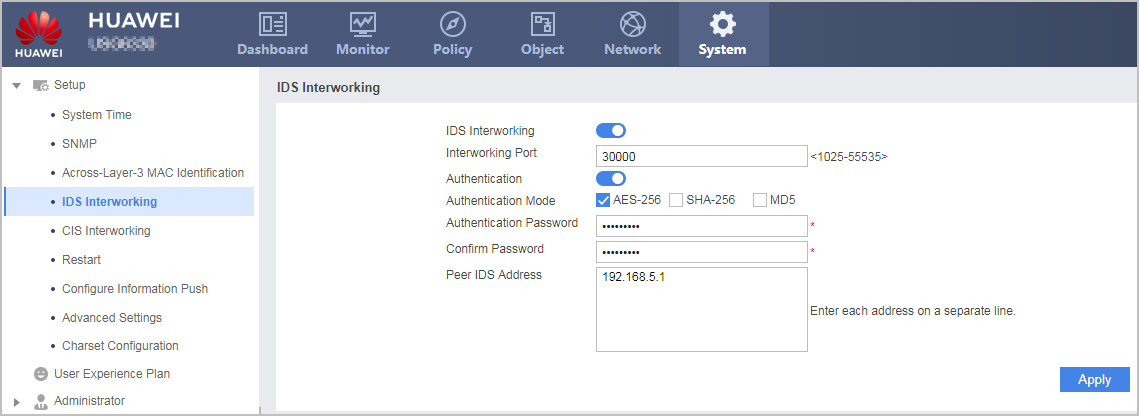
- Select the Enable of IDS
Interworking to enable the interworking with the IDS.
By default, the interworking between the FW and IDS is disabled.
- Specify the authentication method for the FW and IDS to authenticate
each other and the IP address of the IDS.
Parameter
Description
Authentication
You can click Enable to enable the authentication between the FW and IDS client.
If you do not click Enable, the FW interworks with the IDS client without authentication.
Authentication Mode
By default, the FW and IDS use the AES-256 authentication method to authenticate each other.
If you configure multiple authentication modes for the FW, the IDS client can use any one of them for the interworking with the FW.
NOTE:SHA-256 and MD5 are insecure. AES-256 is recommended.Authentication Password
Password used by the FW and IDS client to authenticate each other.
Confirm Password
Peer IDS Address
The IP address of the IDS.
- Click Apply.