Intelligent Uplink Selection Process
This section describes the intelligent uplink selection process.
Figure 1 shows the intelligent uplink selection process for the FW when multiple links are deployed at the network egress.
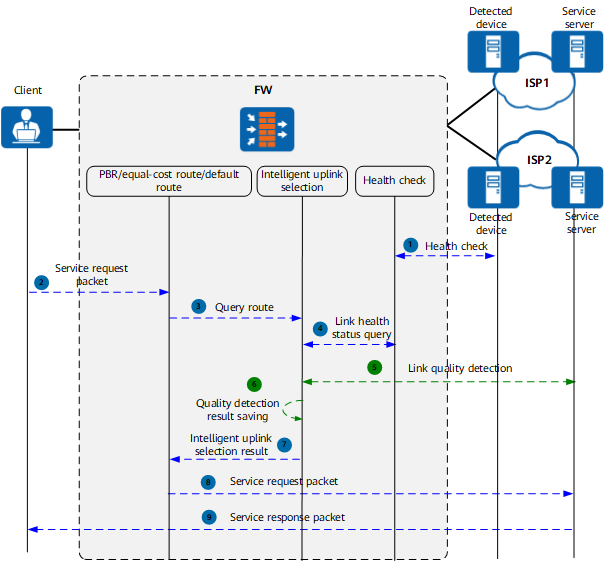
For the first packet (not matching any session):
- If you have configured health check, FW will send probe packets to the probed device to check whether the link between the local end and the destination network is reachable. When the FW requires intelligent uplink selection, health check will report the real-time link status to facilitate forwarding availability improvement. If you have not configured health check, the FW considers all links as available.
- When a service request from a client reaches the FW, the FW queries route based on the routing table.
The FW searches for policy-based routes, specific routes, and default routes in sequence. Specific routes are most commonly used, including dynamic and static routes.
- If the traffic matches a policy-based route, equal-cost route or default route and multiple outbound interfaces are available for traffic forwarding, the FW needs to determine the optimal outbound interface for forwarding the traffic (intelligent uplink selection).
- Before intelligent uplink selection, the FW checks whether the link of each outbound interface is available. Faulty links do not participate in intelligent uplink selection.
- If the physical layer status of an outbound interface is Down, the link connected to this interface is excluded.
- If the protocol layer status of an outbound interface is Down, the link connected to this interface is excluded.
- If the health check (if applicable) status of an outbound interface is Down, the link connected to this interface is excluded.

If the preceding three conditions exclude all member interfaces, packets do not enter the intelligent uplink selection process. Instead, an outbound interface is selected based on common route selection rules.
- If the link of an outbound interface does not meet the link quality requirement (if the health check and link quality indicators are referenced in the routing policy), the link is excluded.
- If the link bandwidth of an outbound interface reaches the overload threshold (if overload protection is configured on the interface), the link is excluded.
- Select the optimal outbound interface from the remaining links based on the configured route selection mode. If all member interfaces are excluded from the preceding process, intelligent uplink selection is performed on the interfaces excluded from d and e.
- When intelligent uplink selection mode is set to load balancing by link quality, the FW sends link quality probe packets to the service server on health links to obtain the transmission quality information of each link. In other intelligent uplink selection modes, link quality probe is not required.
- The FW saves link quality probe results in a link quality detection table. When receiving follow-up traffic destined to the same service server, the FW selects a link based on the information in the link quality detection table. When the link quality detection table ages and service traffic reaches the FW, the FW triggers link quality probing again.
- The FW calculates based on the specified intelligent uplink selection mode to obtain link selection result.
- The FW uses the specified outbound interface to forward service request packets based on the link selection result.
- The service server sends reply packets to the client.
For subsequent packets (matching sessions):
- Check the physical status of the outbound interface, protocol layer status, and health check status recorded in the matched session (if health check is applied to the interface):
- If any of the three items is Down, the device reselects a link. The link reselection process is the same as the process for the first packet.
- If the three items are Up, go to the next step.
- Check whether the packet matches the NAT policy.
- If so, the device forwards the packet based on the outbound interface recorded in the session and does not reselect a link.
- If not, go to the next step.
- Check whether the quality of a link for the outbound interface meets the link quality requirements (if health check and link quality indicators are applied to the link selection policy):
- If not, the device reselects a link. The link reselection process is the same as the process for the first packet.
- If so, the device forwards the packet based on the outbound interface recorded in the session and does not reselect a link.