Understanding PBR
This section describes the definition and principle of PBR.
Overview
To forward packets, the FW looks up the routing table and forwards the packets based on the destination address. This mechanism provides only the destination address-based forwarding service, but not differentiated service.
Using PBR, the FW selects routes based on the customized policies but not the routing table and forwards packets based on attributes, such as the incoming interface, source security zone, source and destination IP addresses, user, service type, and application type. This adds flexibility to packet forwarding control. PBR takes priority over, but does not take place of the routing table mechanism. PBR provides guidance for forwarding the traffic of certain services.
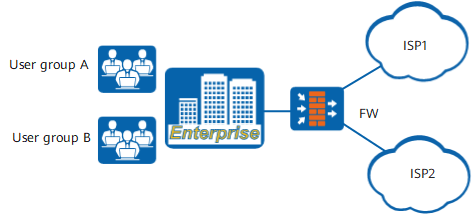
PBR applies to multi-egress networks. As shown in Figure 1, the FW serves as the egress gateway and connects to two networks:
ISP1: high Internet service speed but high charge
ISP2: low charge but low Internet service speed
PBR provides the following routing functions. You can select the functions as required.
User-specific routing: The specified users or user groups can access the Internet only through the specified links. For example, user group A has a higher permission and can access the Internet through ISP1 to use high-speed Internet services. User group B has a lower permission and accesses the Internet through ISP2.
Application- and protocol-specific routing For example, the traffic of voice and video applications is forwarded to the high-bandwidth link, whereas the traffic of data applications is forwarded to the low-bandwidth link.
PBR is control rules that consist of matching conditions and actions. After receiving traffic, the FW identifies traffic attributes, and matches the traffic attributes with the matching conditions of PBR. If all the conditions of a policy are met, the traffic matches the policy. The FW takes the action in the matched PBR.
Matching Conditions of PBR
The matching conditions are used to identify the traffic to be routed based on PBR. A source security zone and an incoming interface are mutually exclusive and cannot be both configured. Source and destination IP addresses, user, service, application, schedule, and DSCP priority are optional. If these conditions are not selected, the default value is any, indicating that PBR matches any packet. Table 1 shows matching conditions of PBR.
Matching Condition |
Function |
Example |
|---|---|---|
Incoming interface/Source security zone |
Specifies the interface through which traffic is received or the security zone where traffic is sent. |
Example 1: Assume that the security zone of an enterprise intranet is trust, and the enterprise deploys two links ISP1 and ISP2. ISP1 provides fast Internet access but at a higher price while ISP2 provides Internet access at a lower price but slower network access. The enterprise requires that service traffic be forwarded through ISP1 and entertainment traffic be forwarded through ISP2. In this case, you can configure two PBR rules with different outbound interfaces and use the source security zone for distinguishing traffic. Example 2: Assume that the education intranet is divided into office areas and dormitory areas, which are connected to the FW through different incoming interfaces. The office areas and the dormitory areas are required to access the Internet through different outbound interfaces. In this case, you can configure two PBR rules with different outbound interfaces and use the incoming interfaces to distinguish the traffic from the office areas and the dormitory areas. |
Source Address/Destination Address |
Specifies the address from or to which the traffic is sent. The value can be an address, address group or domain group. |
Assume that an enterprise deploys two links ISP1 and ISP2. ISP1 provides fast Internet access but at a higher price while ISP2 provides Internet access at a lower price but slower network access. The enterprise requires that users whose source address belongs to A access the Internet on 10.10.1.1/32 through ISP1 and users whose source address belongs to B access the Internet on 10.10.2.2/32 through ISP2. In this case, you need to configure two PBR rules with different outbound interfaces, and set the destination addresses for users whose source addresses belong to A and B to 10.10.1.1/32 and 10.10.2.2/32, respectively. |
User |
A user indicates from whom traffic is originated. The parameter value can be User, User Group, or Security Group. Both the source address and user indicate the traffic sender, so you can configure either of them. Generally, the source address mode applies to fixed IP addresses or small enterprises. The user mode applies to unfixed IP addresses and large enterprises. |
To enable different users to access the Internet through different links, enterprises need to create users, user groups, or security groups. For example, an enterprise has a marketing department and an R&D department, and deploys two links ISP1 and ISP2 to access the Internet. ISP1 provides fast Internet access but at a higher price while ISP2 provides Internet access at a lower price but slower network access. The marketing department require high network access speed and accesses the Internet through ISP1. The R&D department does not have high network access speed and accesses the Internet through ISP2. In this case, you can configure two PBR rules with different outbound interfaces and specify users as a matching condition. To configure users as the matching condition, you need to configure user authentication first. |
Service |
Specifies the protocol type or port number of traffic. To identify the traffic of a specified protocol type or port number, you can specify a service as a matching condition when creating a PBR rule. |
Assume that an enterprise wants HTTP traffic and SMTP traffic to access an Internet server through different links. In this case, you can configure two PBR rules with different outbound interfaces and set the predefined service as the matching condition. |
Application |
Specifies the application type of traffic. The FW can differentiate applications that use the same protocol and port number, making network management more refined. To forward protocol-specific data through different links, you can specify applications as a matching condition when creating a PBR rule. |
Assume that an enterprise deploys two links ISP1 and ISP2 to access the Internet. ISP1 has a higher bandwidth and ISP2 provides a lower bandwidth. If the enterprise wants to use ISP1 for forwarding voice and video application traffic and ISP2 for forwarding data application traffic, you can configure two PBR rules with different outbound interfaces and specify applications as the matching condition. |
Schedule |
Specifies the period for the PBR to take effect. If you want a PBR rule to take effect only in a specified period, set a schedule as a matching condition when creating the PBR rule. |
If an enterprise wants the created PBR policy to take effect within the working time (8:30 to 12:00 and 13:00 to 17:30), you can configure the PBR rule and specify the schedule as the matching condition. |
DSCP Value |
Specifies the DSCP priority of traffic. To match traffic with different priorities, you can specify the DSCP priority as a matching condition when creating a PBR rule. |
If an enterprise wants to match service traffic and entertainment traffic with different priorities, you can configure a PBR rule and specify the DSCP priority as the matching condition. |
PBR Actions
If traffic matches all matching conditions configured in a PBR, the traffic matches the PBR. The FW takes the action in the matched PBR. PBR actions are as follows:
- Forwards traffic based on PBR. Based on the type of the outbound interface, the options are as follows:
- Single egress: Forwards traffic to the specified next-hop device or Forwards traffic to the specified outgoing interface.
- Multi egress: Enables intelligent uplink selection to select one from the multiple outbound interfaces to forward traffic.
- Forwards traffic to other virtual systems based on PBR.
- Implements no PBR and forwards traffic based on the existing routing table.
PBR Matching Rules
Figure 2 shows the matching rules of PBR. Each PBR contains multiple matching conditions. The relationship between the matching conditions is AND. The FW considers that a packet matches a PBR only when the attributes of the packet match all conditions of the PBR. If multiple values are configured for a matching condition, the relationship between the values is OR. When a packet matches any value, the packet is considered to match the condition.
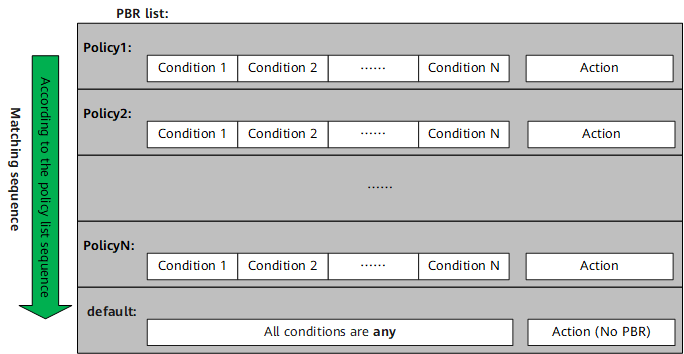
When multiple PBR rules are configured, the PBR list is arranged according to the configuration sequence. An earlier configured policy has a higher priority. The PBR is matched according to their configuration sequence. That is, the policies are matched one by one from the top of the policy list. If a packet matches a PBR, it will no longer match the following policies. Therefore, the configuration sequence of PBR is important. You need to configure policies with precise conditions and then policies with loose conditions. If a specific PBR is placed after a general PBR, it may never be matched.
In addition, the system has a default PBR. The default PBR is located at the bottom of the policy list and has the lowest priority. All matching conditions of the default PBR are any and the action is set to no PBR. That is, traffic is forwarded based on the existing routing table. If all the configured policies are not matched, the default PBR is used.
Application-based PBR
If an application is configured as a matching condition in PBR, traffic needs to be sent to the content security engine for application identification. The content security engine needs to obtain multiple packets to identify a specific application. However, the content security engine cannot identify the application through the first packet and matches the first packet based on PBR without identifying the application. To prevent service interruption, PBR is not re-checked for subsequent packets.
After receiving several subsequent packets, the content security engine identifies the application and generates a corresponding application association entry. For a new session, if an application is configured as a matching condition, 3-tuple information about a packet (including protocol, source or destination IP address, source or destination port) is matched with the application association entry. If the match is found, the application is identified. If not, you need to perform application identification again and save the application identification result to the application association entry to improve application identification efficiency. Therefore, if traffic with the same 3-tuple matches an application-based PBR entry, the PBR module identifies that the traffic is of the same application.