Configuring IP-Link Using the Web UI
This section describes how to configure IP-link on the web UI.
Prerequisites
Before you configure IP-Link, ensure that:
- IP addresses are specified for interfaces.
- Interfaces are assigned to security zones.
Procedure
- Choose .
- On the Configure IP-Link page, enable IP-Link Function, then click Apply.
- Click Add to create IP-Link and set IP-Link parameters on the Add IP-Link page.
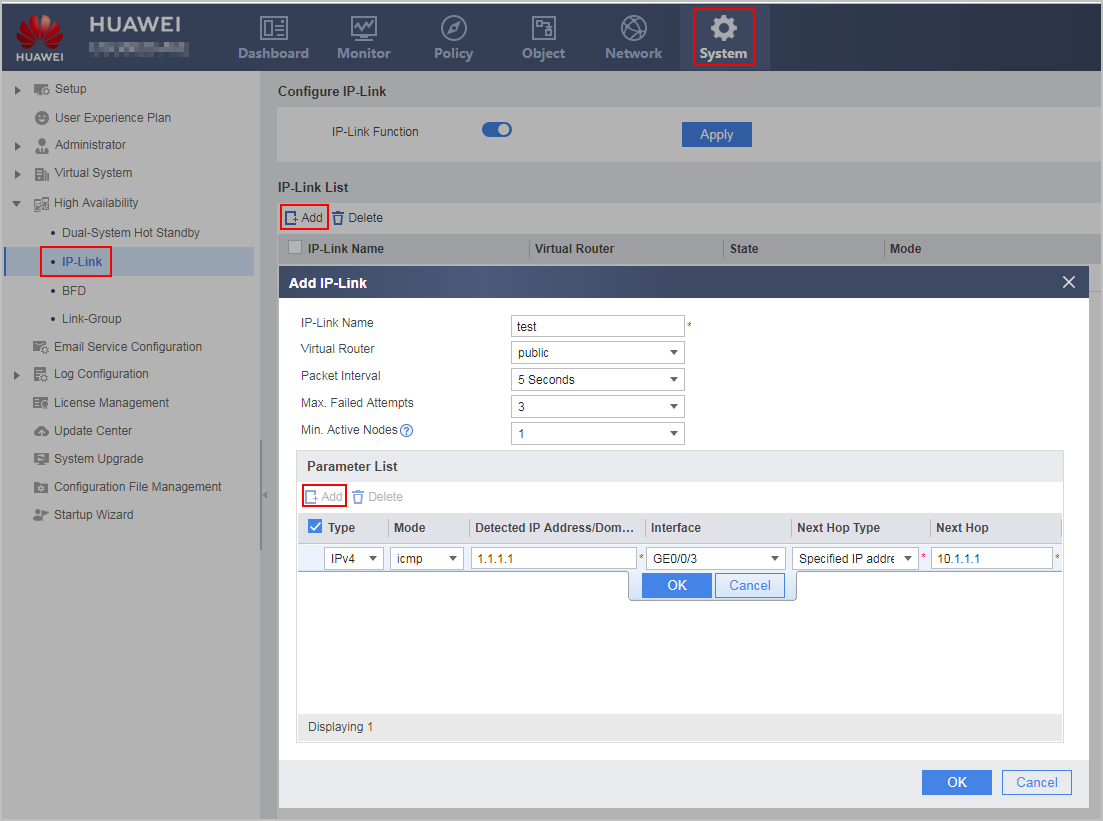
Parameter
Description
IP-Link Name
Indicates an IP-Link name, which uniquely identifies an IP-Link.
Virtual Router
Indicates the bound virtual router.
NOTE:The virtual routers bound to IP Link must be manually created in . IP Link cannot be bound to the virtual routers that are automatically created by the virtual system.
Packet Interval
Indicates the interval for sending IP-link probe packets.
Max. Failed Attempts
Indicates the maximum number of IP-link detection timeout failures.
Min. Active Nodes
Indicates the minimum number of active nodes for health check.
If the minimum number of active nodes is smaller than the number of member links, the IP-Link state becomes Down.
Type
Indicates IPv4 and IPv6.
Mode
Indicates ICMP and ARP modes.
Detected IP Address/Domain
Indicates the destination IP address or domain name to be detected.
Interface
Indicates the interface type and interface number of the local end of the IP-Link.- If this parameter is not specified, probe packets are forwarded based on the routing table.
- After this parameter is specified, the system skips policy-based routing and searches the routing table for the specified interface. If a matching route is found, the system forwards the probe packet through the outbound interface. The system considers that the detection is successful only when the response packet is returned through this interface.
Next Hop Type
- Automatically obtain: The next-hop address is not specified and is searched in the routing table.
- Specified IP address: A fixed IP address is specified as the next-hop address.
- DHCP gateway address: The next-hop address is automatically assigned by DHCP.
- PPPoE: The next-hop address is the IP address of the dialer interface.
Next Hop
When Next Hop Type is set to Specified IP address, an IP address needs to be specified.