Web: Example for Establishing an IPSec 6over4 Tunnel Based on Physical Interfaces Between Two Gateways
This section provides an example for establishing an IPSec 6over4 tunnel based on physical interfaces between two gateways with fixed IP addresses.
Networking Requirements
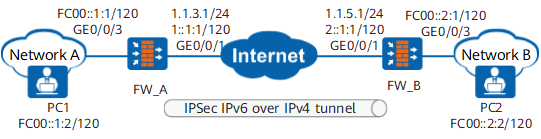
As shown in Figure 1, two IPv6 networks connect to an IPv4 public network respectively through FW_A and FW_B. Security protection is desired for mutual access traffic between the IPv6 networks. The IPv6 networks communicate with each other over the IPv4 public network. An IPSec 6over4 tunnel needs to be established between FW_A and FW_B so that users on the IPv6 networks can communicate with each other over the IPSec tunnel.
Data Planning
Item |
FW_A |
FW_B |
|---|---|---|
Interface configuration |
Interface: GigabitEthernet 0/0/1 IPv4 address: 1.1.3.1/24 IPv6 address: 1::1:1/120 Security zone: Untrust |
Interface: GigabitEthernet 0/0/1 IPv4 address: 1.1.5.1/24 IPv6 address: 2::1:1/120 Security zone: Untrust |
Interface: GigabitEthernet 0/0/3 IP address: FC00::1:1/120 Security zone: Trust |
Interface: GigabitEthernet 0/0/3 IP address: FC00::2:1/120 Security zone: Trust |
|
IPSec configuration |
Scenario: point-to-point Peer IP address: 1.1.5.1 Authentication mode: pre-shared key Local ID: IP address Peer ID: IP address |
Scenario: point-to-point Peer IP address: 1.1.3.1 Authentication mode: pre-shared key Local ID: IP address Peer ID: IP address |
Configuration Roadmap
- Enable the IPv6 function.
- Set IP addresses for interfaces and add the interfaces to security zones.
- Configure an IPSec policy.
Including the basic IPSec policy information, data flow to be protected by IPSec, and proposal parameters for security association negotiation.
- Configure routes.
Including the public network route between FW_A and FW_B and the private network route from FW_A or FW_B to its respective peer network.
- Configure security policies to permit IPSec negotiation packets and service packets.
The configuration roadmap is the same on FW_A and FW_B.
Procedure
- Configure FW_A.
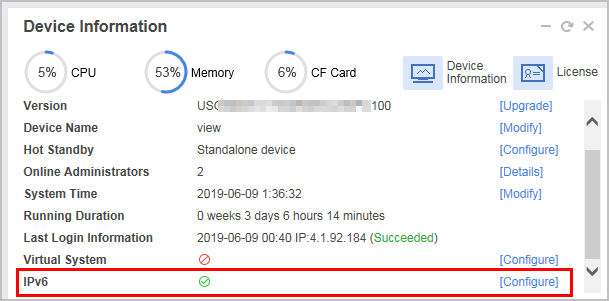
- Choose and click Configure of IPv6 to enable the IPv6 function.
- Set interface IP addresses and assign interfaces to security zones.
- Choose .
Click
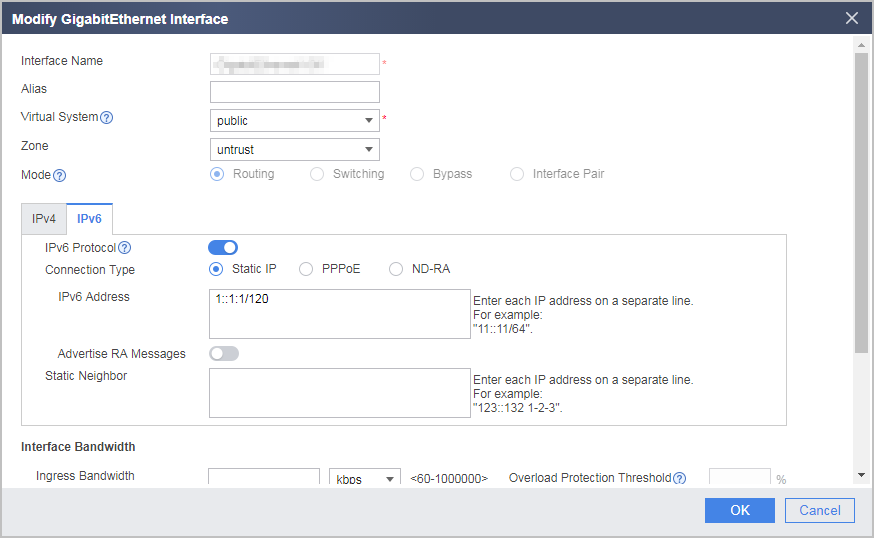
 of GE0/0/1 and set the parameters as follows:
Set the IPv4 address to 1.1.3.1/24 and IPv6 address to 1::1:1/120.
- Click OK.
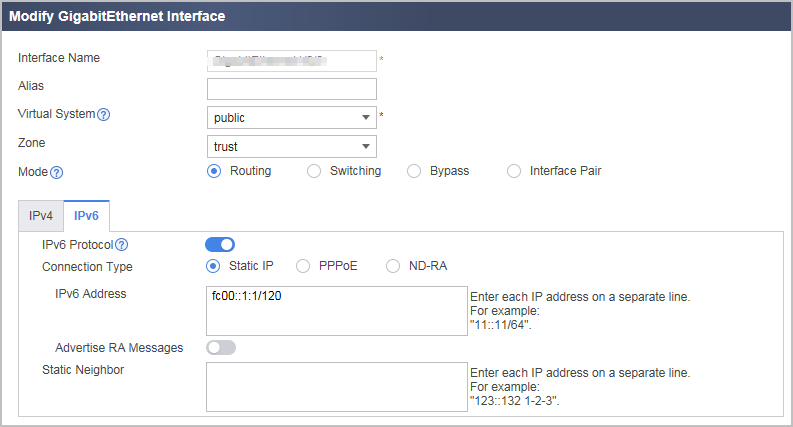
Repeat the preceding steps to set the parameters for GE0/0/3.
- Configure the IPSec tunnel on FW_A.
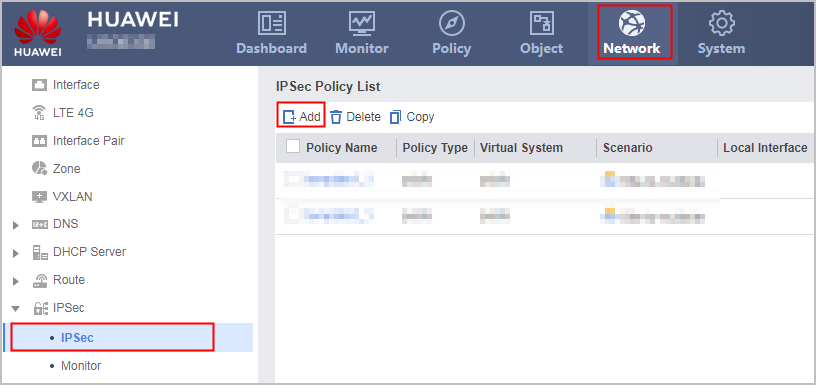
Choose , click Add, and set the parameters shown in the following figure.
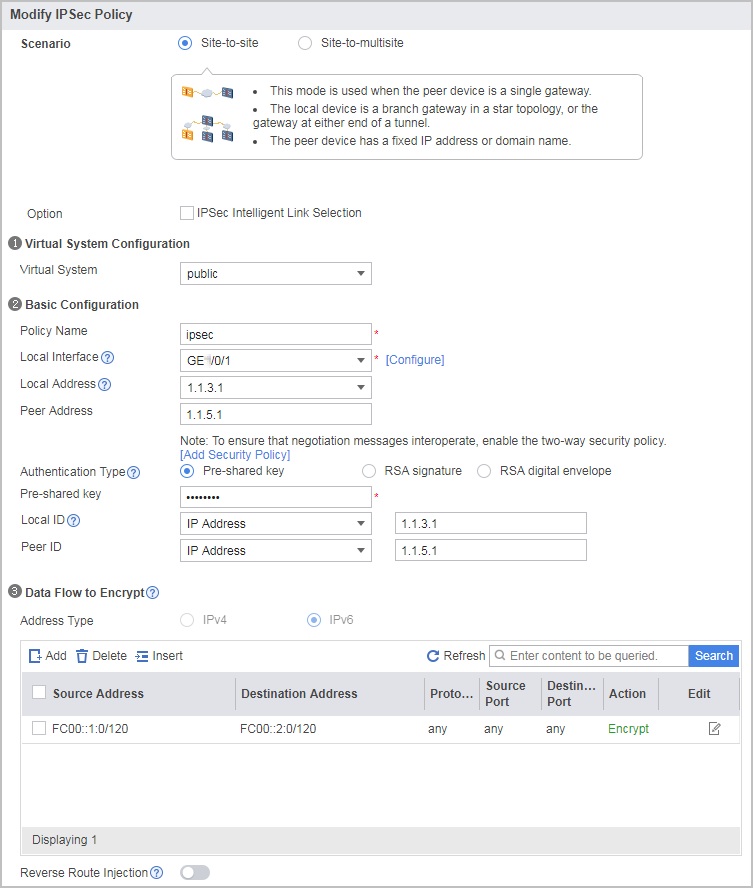
In the example, the default parameter settings are recommended for the IPSec proposal. To change parameter values, expand the Advanced settings of IKE/IPSec Proposal. The security proposals used by the tunnel ends must be the same. The pre-shared key is Hello123.
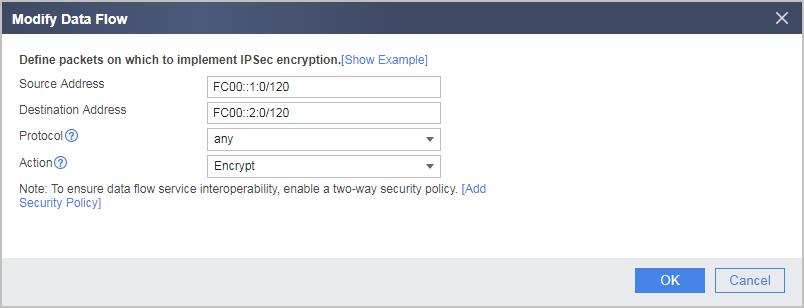
Configure one data flow to be encrypted. The parameter settings are provided in the following figure.

The local-untrust interzone policy controls whether IKE negotiation packets can pass through the FW. This policy can use the source and destination addresses, protocol, or port as the matching condition. In this example, the source and destination addresses are used as the matching condition. To use the protocol or port as the matching condition, you need to enable ESP and port 500 for UDP.
- Click Apply in the IPSec policy configuration to complete the configuration of FW_A.
- Configure a default route. In the example, the next-hop IP address to the Internet is 1.1.3.2.
Choose .
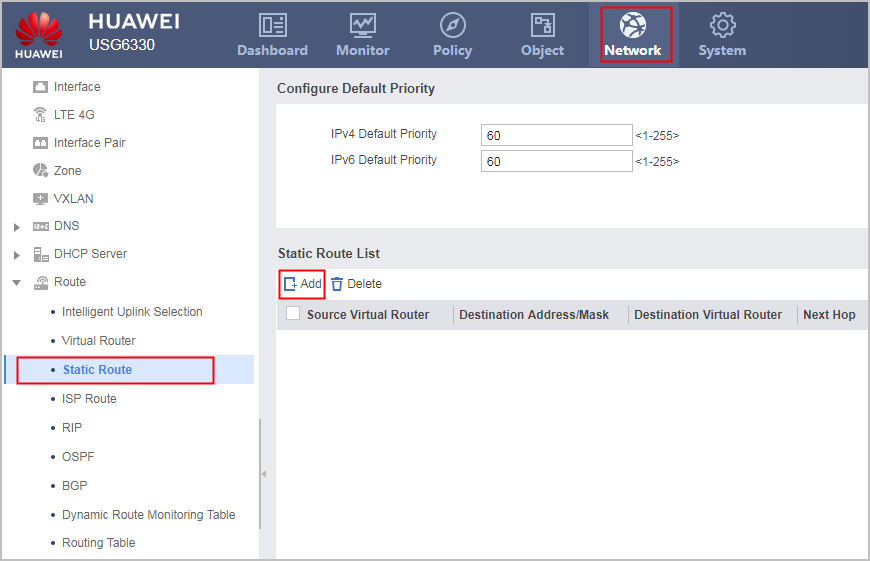
Click Add and set parameters as follows to configure two routes.

- Choose and click Configure of IPv6 to enable the IPv6 function.
- Configure FW_B.
- Choose and click Configure of IPv6 to enable the IPv6 function.
- Set interface IP addresses and assign interfaces to security zones.
- Choose .
Click
of GE0/0/1 and set the parameters as follows:Set the IPv4 address to 1.1.5.1/24 and IPv6 address to 2::1:1/120.
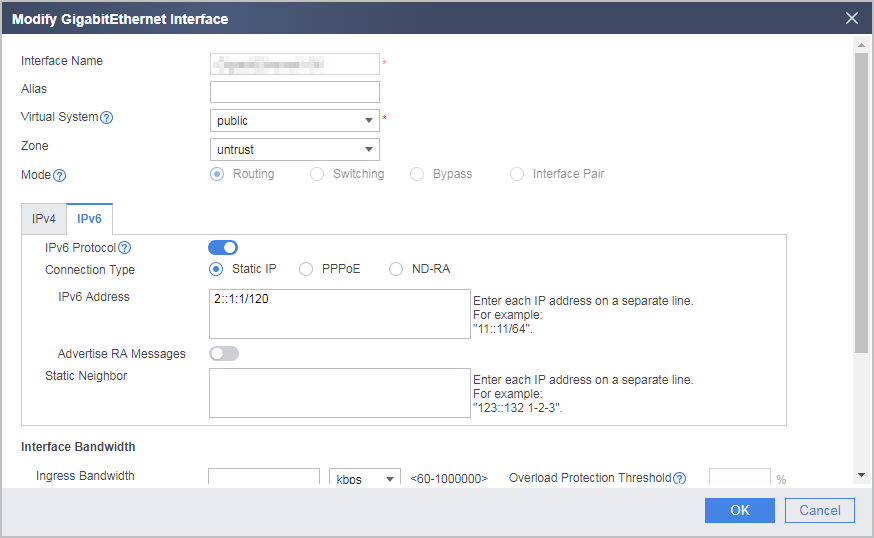
- Click OK.
Repeat the preceding steps to set the parameters for GE0/0/3.
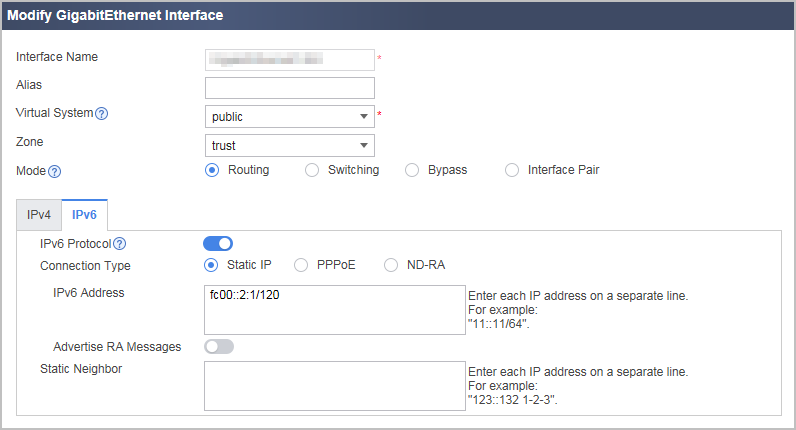
- Configure the IPSec tunnel on FW_B.
Choose , click Add, and set the parameters shown in the following figure.
In the example, the default parameter settings are recommended for the IPSec proposal. To change parameter values, expand the Advanced settings of IKE/IPSec Proposal. The security proposals used by the tunnel ends must be the same. The pre-shared key is Hello123.
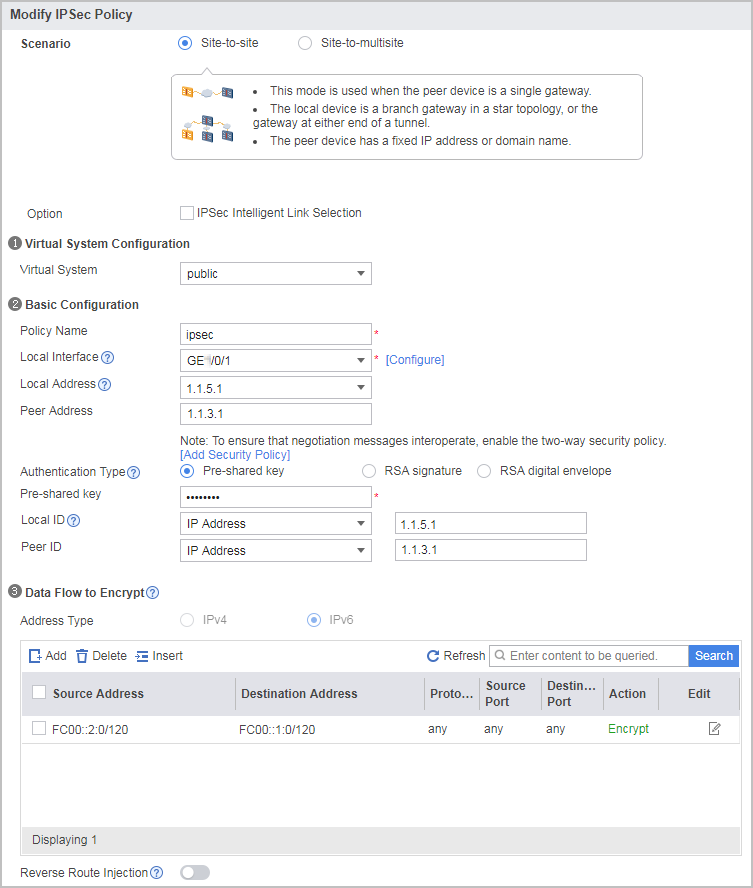
Configure one data flow to be encrypted. The parameter settings are provided in the following figure.
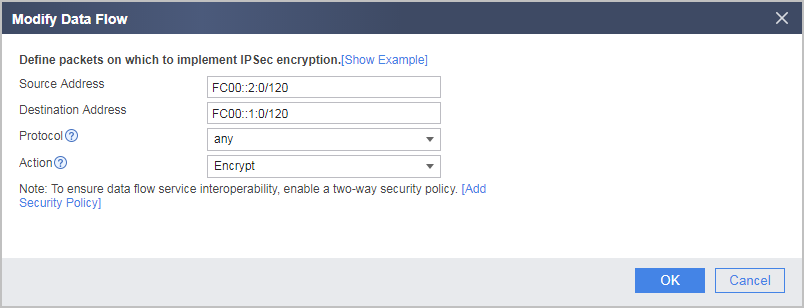
The local-untrust interzone policy controls whether IKE negotiation packets can pass through the FW. This policy can use the source and destination addresses, protocol, or port as the matching condition. In this example, the source and destination addresses are used as the matching condition. To use the protocol or port as the matching condition, you need to enable ESP and port 500 for UDP.
- Click Apply in the IPSec policy configuration to complete the configuration of FW_B.
- Configure a default route. In the example, the next-hop IP address to the Internet is 1.1.5.2.
Choose .
Click Add, set the parameters as shown in the following figure, and click OK.

- Choose and click Configure of IPv6 to enable the IPv6 function.
Verification
For example, on FW_A, choose to display the established tunnels. The following tunnel information is displayed. If the IKE negotiation success and IPSec negotiation success is displayed in the Status, the tunnel is successfully established.
Access a host on network B from a host on network A. The access succeeds.
Configuration Scripts
Configuration script of FW_A:
#
 sysname FW_A
#
ipv6
#
acl ipv6 number 3000
 rule 5 permit ipv6 source FC00::1:0/120 destination FC00::2:0/120
#
ipsec proposal prop28111627842
 encapsulation-mode auto
 esp authentication-algorithm sha2-256
 esp encryption-algorithm aes-256
#
ike proposal 1
 encryption-algorithm aes-256
 dh group14
 authentication-algorithm sha2-256
 authentication-method pre-share
 integrity-algorithm hmac-sha2-256
 prf hmac-sha2-256
#
ike peer ike281116278421
 exchange-mode auto
 pre-shared-key %^%#ljD3B%+u|Ci%<,Tk7FE*xzPWG:Y`$O1(oZVea8/S%^%#
 ike-proposal 1
 remote-id-type ip
 remote-id 1.1.5.1
 local-id 1.1.3.1
 dpd type periodic
 remote-address 1.1.5.1
#
ipsec policy ipsec2811162787 1 isakmp
 security acl ipv6 3000
 ike-peer ike281116278421
 proposal prop28111627842
 tunnel local applied-interface
 alias ipsec
 sa trigger-mode auto
 sa duration traffic-based 10485760
 sa duration time-based 3600
#
interface GigabitEthernet0/0/1
 undo shutdown
 ipv6 enable
 ip address 1.1.3.1 255.255.255.0
 ipv6 address 1::1:1/120
 ipsec policy ipsec2811162787
#
interface GigabitEthernet0/0/3
 undo shutdown
 ipv6 enable
 ipv6 address fc00::1:1/120
#
firewall zone trust
 set priority 85
 add interface GigabitEthernet0/0/3
#
firewall zone untrust
 set priority 5
 add interface GigabitEthernet0/0/1
#
ip route-static 1.1.5.0 255.255.255.0 1.1.3.2
#
ipv6 route-static FC00::2:0 120 GigabitEthernet0/0/1
#
security-policy
 rule name policy1
  source-zone trust
  destination-zone untrust
  source-address FC00::1:0 120
  destination-address FC00::2:0 120
  action permit
 rule name policy2
  source-zone untrust
  destination-zone trust
  source-address FC00::2:0 120
  destination-address FC00::1:1 120
  action permit
 rule name policy3
  source-zone local
  destination-zone untrust
  source-address 1.1.3.0 mask 255.255.255.0
  source-address 1::1:1 120
  destination-address 1.1.5.0 mask 255.255.255.0
  destination-address 2::1:1 120
  action permit
 rule name policy4
  source-zone untrust
  destination-zone local
  source-address 1.1.5.0 mask 255.255.255.0
  source-address 2::1:1 120
  destination-address 1.1.3.0 mask 255.255.255.0
  destination-address 1::1:1 120
  action permit
#
return
Configuration script of FW_B:
#
 sysname FW_B
#
ipv6
#
acl ipv6 number 3000
 rule 5 permit ipv6 source FC00::2:0/120 destination FC00::1:0/120
#
ipsec proposal prop28111627844
 encapsulation-mode auto
 esp authentication-algorithm sha2-256
 esp encryption-algorithm aes-256
#
ike proposal 1
 encryption-algorithm aes-256
 dh group14
 authentication-algorithm sha2-256
 authentication-method pre-share
 integrity-algorithm hmac-sha2-256
 prf hmac-sha2-256
#
ike peer ike281116278423
 exchange-mode auto
 pre-shared-key %^%#ljD3B%+u|Ci%<,Tk7FE*xzPWG:Y`$O1(oZVea8/S%^%#
 ike-proposal 1
 remote-id-type ip
 remote-id 1.1.3.1
 local-id 1.1.5.1
 dpd type periodic
 remote-address 1.1.3.1
#
ipsec policy ipsec2811162788 1 isakmp
 security acl ipv6 3000
 ike-peer ike281116278423
 proposal prop28111627844
 tunnel local applied-interface
 alias ipsec
 sa trigger-mode auto
 sa duration traffic-based 10485760
 sa duration time-based 3600
#
interface GigabitEthernet0/0/1
 undo shutdown
 ipv6 enable
 ip address 1.1.5.1 255.255.255.0
 ipv6 address 2::1:1/120
 ipsec policy ipsec2811162788
#
interface GigabitEthernet0/0/3
 undo shutdown
 ipv6 enable
 ipv6 address fc00::2:1/120
#
firewall zone trust
 set priority 85
 add interface GigabitEthernet0/0/3
#
firewall zone untrust
 set priority 5
 add interface GigabitEthernet0/0/1
#
ip route-static 1.1.3.0 255.255.255.0 1.1.5.2
#
ipv6 route-static FC00::1:0 120 GigabitEthernet0/0/1
#
security-policy
 rule name policy1
  source-zone trust
  destination-zone untrust
  source-address FC00::2:0 120
  destination-address FC00::1:0 120
  action permit
 rule name policy2
  source-zone untrust
  destination-zone trust
  source-address FC00::1:1 120
  destination-address FC00::2:0 120
  action permit
 rule name policy3
  source-zone local
  destination-zone untrust
  source-address 1.1.5.0 mask 255.255.255.0
  source-address 2::1:1 120
  destination-address 1.1.3.0 mask 255.255.255.0
  destination-address 1::1:1 120
  action permit
 rule name policy4
  source-zone untrust
  destination-zone local
  source-address 1.1.3.0 mask 255.255.255.0
  source-address 1::1:1 120
  destination-address 1.1.5.0 mask 255.255.255.0
  destination-address 2::1:1 120
  action permit
#
return