< Home

Example for Configuring an IPv6 over IPv4 Manual Tunnel

To configure an IPv6 over IPv4 manual tunnel, configure the source and destination IPv4 addresses of the tunnel on the devices at both ends of the tunnel. Hosts on different IPv6 networks can communicate with each other through the IPv6 over IPv4 tunnel.

Networking Requirements

As shown in Figure 1, FW_A and FW_B support the IPv6/IPv4 dual stack and connect to the IPv6 networks and IPv4 network. An IPv6 over IPv4 manual tunnel needs to be established between FW_A and FW_B, so that hosts on the two IPv6 networks can communicate.
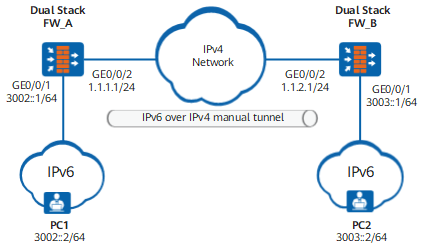
Figure 1 Networking diagram of an IPv6 over IPv4 manual tunnel

Configuration Roadmap

The configuration roadmap is as follows:

  1. Configure addresses for the interfaces that connect FW_A and FW_B to the IPv4 and the IPv6 networks and enable IPv6 packet forwarding. This is because FW_A and FW_B support the IPv4/IPv6 dual stack and both connect to the IPv4 and the IPv6 networks.
  2. To establish an IPv6 over IPv4 manual tunnel, set an encapsulation type, a source address or interface, a destination address, and an IPv6 address for the tunnel on FW_A and FW_B.
  3. Configure routes. (This example uses static routes.)

Procedure

  • Configure FW_A.
    1. Enable the IPv6 packet forwarding function.

      <FW_A> system-view
      [FW_A] ipv6

    2. Set addresses for interfaces and add the interfaces to security zones.

      # Configure an IP address for GE0/0/2.

      [FW_A] interface GigabitEthernet 0/0/2
      [FW_A-GigabitEthernet0/0/2] ip address 1.1.1.1 255.255.255.0
      [FW_A-GigabitEthernet0/0/2] quit
      [FW_A] firewall zone untrust
      [FW_A-zone-untrust] add interface GigabitEthernet 0/0/2
      [FW_A-zone-untrust] quit

      # Configure an IPv6 address for GE0/0/1.

      [FW_A] interface GigabitEthernet 0/0/1
      [FW_A-GigabitEthernet0/0/1] ipv6 enable
      [FW_A-GigabitEthernet0/0/1] ipv6 address 3002::1 64
      [FW_A-GigabitEthernet0/0/1] quit
      [FW_A] firewall zone trust
      [FW_A-zone-trust] add interface GigabitEthernet 0/0/1
      [FW_A-zone-trust] quit

    3. Configure an IPv6 over IPv4 manual tunnel.

      # Configure Tunnel1 of the IPv6 over IPv4 manual tunnel.

      [FW_A] interface Tunnel 1
      [FW_A-Tunnel1] tunnel-protocol ipv6-ipv4
      [FW_A-Tunnel1] source GigabitEthernet 0/0/2
      [FW_A-Tunnel1] destination 1.1.2.1
      [FW_A-Tunnel1] ipv6 enable
      [FW_A-Tunnel1] ipv6 address 3001::1 64
      [FW_A-Tunnel1] quit

      # Assign Tunnel1 to the Untrust zone.

      [FW_A] firewall zone untrust
      [FW_A-zone-untrust] add interface tunnel 1
      [FW_A-zone-untrust] quit

    4. Configure a security policy

      [FW_A] security-policy
      [FW_A-policy-security] rule name policy1
      [FW_A-policy-security-policy1] source-zone trust untrust
      [FW_A-policy-security-policy1] destination-zone trust untrust
      [FW_A-policy-security-policy1] action permit
      [FW_A-policy-security-policy1] quit
      [FW_A-policy-security] rule name policy2
      [FW_A-policy-security-policy2] source-zone local untrust
      [FW_A-policy-security-policy2] destination-zone local untrust
      [FW_A-policy-security-policy2] action permit

    5. Configure routes.

      # Configure an IPv6 route from FW_A to the IPv6 network connected to FW_B.

      [FW_A] ipv6 route-static 3003:: 64 tunnel 1

  • Configure FW_B.
    1. Enable the IPv6 packet forwarding function.

      <FW_B> system-view
      [FW_B] ipv6

    2. Configure addresses for interfaces and add the interfaces to security zones.

      # Configure an IP address for GE0/0/2.

      [FW_B] interface GigabitEthernet 0/0/2
      [FW_B-GigabitEthernet0/0/2] ip address 1.1.2.1 255.255.255.0
      [FW_B-GigabitEthernet0/0/2] quit
      [FW_B] firewall zone untrust
      [FW_B-zone-untrust] add interface GigabitEthernet 0/0/2
      [FW_B-zone-untrust] quit

      # Configure an IPv6 address for GE0/0/1.

      [FW_B] interface GigabitEthernet 0/0/1
      [FW_B-GigabitEthernet0/0/1] ipv6 enable
      [FW_B-GigabitEthernet0/0/1] ipv6 address 3003::1/64
      [FW_B-GigabitEthernet0/0/1] quit
      [FW_B] firewall zone trust
      [FW_B-zone-trust] add interface GigabitEthernet 0/0/1
      [FW_B-zone-trust] quit

    3. Configure an IPv6 over IPv4 manual tunnel.

      # Configure Tunnel1 of the IPv6 over IPv4 manual tunnel.

      [FW_B] interface Tunnel 1
      [FW_B-Tunnel1] tunnel-protocol ipv6-ipv4
      [FW_B-Tunnel1] source GigabitEthernet 0/0/2
      [FW_B-Tunnel1] destination 1.1.1.1
      [FW_B-Tunnel1] ipv6 enable
      [FW_B-Tunnel1] ipv6 address 3001::2 64
      [FW_B-Tunnel1] quit

      # Assign Tunnel1 to the Untrust zone.

      [FW_B] firewall zone untrust
      [FW_B-zone-untrust] add interface tunnel 1
      [FW_B-zone-untrust] quit

    4. Configure a security policy.

      [FW_B] security-policy
      [FW_B-policy-security] rule name policy1
      [FW_B-policy-security-policy1] source-zone trust untrust
      [FW_B-policy-security-policy1] destination-zone trust untrust
      [FW_B-policy-security-policy1] action permit
      [FW_B-policy-security-policy1] quit
      [FW_B-policy-security] rule name policy2
      [FW_B-policy-security-policy2] source-zone local untrust
      [FW_B-policy-security-policy2] destination-zone local untrust
      [FW_B-policy-security-policy2] action permit

    5. Configure routes.

      # Configure an IPv6 route from FW_B to the IPv6 network connected to FW_A.

      [FW_B] ipv6 route-static 3002:: 64 tunnel 1

  • Configure PC1 and PC2.

    You must configure an address and a gateway for each PC. The methods for configuring addresses and routes for PCs vary according to the operating systems of the PCs.

Verification

# Configure FW_B to ping the IPv6 address of Tunnel 1 on FW_A. FW_B can receive reply packets from FW_A.

[FW_B] ping ipv6 3001::1
  PING 3001::1 : 56  data bytes, press CTRL_C to break
    Reply from 3001::1
    bytes=56 Sequence=1 hop limit=255  time = 28 ms
    Reply from 3001::1
    bytes=56 Sequence=2 hop limit=255  time = 27 ms
    Reply from 3001::1
    bytes=56 Sequence=3 hop limit=255  time = 26 ms
    Reply from 3001::1
    bytes=56 Sequence=4 hop limit=255  time = 27 ms
    Reply from 3001::1
    bytes=56 Sequence=5 hop limit=255  time = 27 ms
    Reply from 3001::1
  --- 3001::1 ping statistics ---
    5 packet(s) transmitted
    5 packet(s) received
    0.00% packet loss
round-trip min/avg/max = 26/26/28 ms

# PC1 can ping through PC2.

C:\> ping6 3003::2
from 3002::2 with 32 bytes of data:
Reply from 3003::2: time<1ms
Ping statistics for 3003::2:
    Packets: Sent = 4, Received = 4, Lost = 0 (0% loss),
Approximate round trip times in milli-seconds:
    Minimum = 0ms, Maximum = 0ms, Average = 0ms

Configuration Scripts

  • Configuration script of FW_A:

    #
     sysname FW_A
    #
    ipv6
    #
    interface GigabitEthernet0/0/2
     ip address 1.1.1.1 255.255.255.0
    #
    interface GigabitEthernet0/0/1
     ipv6 enable
     ipv6 address 3002::1 64 
    #
    interface Tunnel 1    
     tunnel-protocol ipv6-ipv4
     ipv6 enable    
     source GigabitEthernet0/0/2        
     destination 1.1.2.1
     ipv6 address 3001::1 64 
    #                                                                               
    firewall zone trust                                                             
     add interface GigabitEthernet0/0/1
    #                                                                               
    firewall zone untrust                                                             
     add interface GigabitEthernet0/0/2
     add interface tunnel1
    #
     ipv6 route-static 3003:: 64 Tunnel 1
    #                                                                               
    security-policy                                                                 
     rule name policy1                                               
      source-zone trust                                                             
      source-zone untrust                                                             
      destination-zone trust                                                             
      destination-zone untrust                                                             
      action permit
     rule name policy2                                               
      source-zone local                                                             
      source-zone untrust                                                             
      destination-zone local                                                             
      destination-zone untrust                                                             
      action permit
    #
    return
  • Configuration script of FW_B:

    #
     sysname FW_B
    #
    ipv6
    #
    interface GigabitEthernet0/0/2
     ip address 1.1.2.1 255.255.255.0
    #
    interface GigabitEthernet0/0/1
     ipv6 enable
     ipv6 address 3003::1 64
    #                                                                               
    interface Tunnel 1    
     tunnel-protocol ipv6-ipv4
     ipv6 enable    
     source GigabitEthernet0/0/2        
     destination 1.1.1.1
     ipv6 address 3001::2 64 
    #                                                                               
    firewall zone trust                                                             
     add interface GigabitEthernet0/0/1
    #                                                                               
    firewall zone untrust                                                             
     add interface GigabitEthernet0/0/2
     add interface tunnel1
    #  
    ipv6 route-static 3002:: 64 Tunnel 1
    #                                                                               
    security-policy                                                                 
     rule name policy1                                               
      source-zone trust                                                             
      source-zone untrust                                                             
      destination-zone trust                                                             
      destination-zone untrust                                                             
      action permit
     rule name policy2                                               
      source-zone local                                                             
      source-zone untrust                                                             
      destination-zone local                                                             
      destination-zone untrust                                                             
      action permit
    #
    return
Copyright © Huawei Technologies Co., Ltd.
Next topic >