< Home

Example for Configuring an ISATAP Tunnel

To establish an ISATAP tunnel between a border device and host, configure a source IPv4 address for the tunnel on the border device and host. Therefore, the host can obtain an IPv6 address through the border device, and hosts on different IPv6 networks can communicate.

Networking Requirements

As shown in Figure 1, the FW and PC2 support the IPv4/IPv6 dual stack. The FW connects to IPv6 network and IPv4 networks. An ISATAP tunnel is required between the FW and PC2 to enable PC1 and PC2 on two IPv6 networks to communicate.
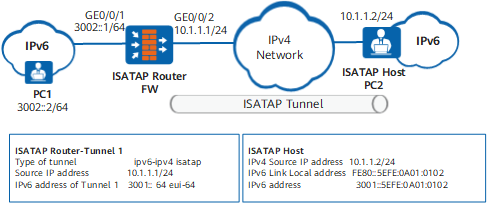
Figure 1 Networking diagram of an ISATAP tunnel

Configuration Roadmap

The configuration roadmap is as follows:

  1. Configure addresses for the interfaces that connect the FW to the IPv4 and IPv6 networks and enable IPv6 packet forwarding. This is because the FW supports the IPv4/IPv6 dual stack and connects to the IPv4 and the IPv6 networks.
  2. To establish an ISATAP tunnel, set a source address for the ISATAP tunnel and an ISATAP address prefix for the tunnel interface on the FW. The ISATAP address prefix is an EUI-64 global unicast address. In addition, enable the RA message advertisement function to send the prefix to ISATAP hosts.
  3. On PC2, configure a route to the FW.

Procedure

  • Configure the FW
    1. Enable the IPv6 packet forwarding function.

      <FW> system-view
      [FW] ipv6

    2. Configure addresses for interfaces and add the interfaces to security zones.

      # Configure an IP address for GE0/0/2.

      [FW] interface GigabitEthernet 0/0/2
      [FW-GigabitEthernet0/0/2] ip address 10.1.1.1 24
      [FW-GigabitEthernet0/0/2] quit
      [FW] firewall zone untrust
      [FW-zone-untrust] add interface GigabitEthernet 0/0/2
      [FW-zone-untrust] quit

      # Configure an IPv6 address for GE0/0/1.

      [FW] interface GigabitEthernet 0/0/1
      [FW-GigabitEthernet0/0/1] ipv6 enable
      [FW-GigabitEthernet0/0/1] ipv6 address 3002::1 64
      [FW-GigabitEthernet0/0/1] quit
      [FW] firewall zone trust
      [FW-zone-trust] add interface GigabitEthernet 0/0/1
      [FW-zone-trust] quit

    3. Configure an ISATAP Tunnel.

      # Configure Tunnel1 of the ISATAP Tunnel.

      [FW] interface Tunnel 1
      [FW-Tunnel1] tunnel-protocol ipv6-ipv4 isatap
      [FW-Tunnel1] source 10.1.1.1
      [FW-Tunnel1] ipv6 enable
      [FW-Tunnel1] ipv6 address 3001::1 64 eui-64
      [FW-Tunnel1] undo ipv6 nd ra halt
      [FW-Tunnel1] quit

      # Assign Tunnel1 to the Untrust zone.

      [FW] firewall zone untrust
      [FW-zone-untrust] add interface tunnel 1
      [FW-zone-untrust] quit

    4. # Configure a security policy.

      [FW] security-policy
      [FW-policy-security] rule name policy1
      [FW-policy-security-policy1] source-zone trust untrust
      [FW-policy-security-policy1] destination-zone trust untrust
      [FW-policy-security-policy1] action permit
      [FW-policy-security-policy1] quit
      [FW-policy-security] rule name policy2
      [FW-policy-security-policy2] source-zone local untrust
      [FW-policy-security-policy2] destination-zone local untrust
      [FW-policy-security-policy2] action permit

  • Configure PC1
    1. Access the CLI and configure IPv6.

      In this example, the operating systems of PC1 and PC2 are Microsoft Windows XP Professional. The configurations vary according to operating systems. Refer to the Help information of the operating systems.

      C:\>ipv6 install
      Installing...
      Succeeded.

    2. Set the IPv6 address to 3002::2/64 for PC1.

      C:\>ipv6 adu 4/3002::2
      C:\>ipconfig/all
      Ethernet adapter local area connection 4:
      
              Connection-specific DNS Suffix  . :
              Description . . . . . . . . . . . : Microsoft Loopback Adapter
              Physical Address. . . . . . . . . : 02-00-4C-4F-4F-50
              Dhcp Enabled. . . . . . . . . . . : No
              IP Address. . . . . . . . . . . . : 192.168.0.35
              Subnet Mask . . . . . . . . . . . : 255.255.255.0
              IP Address. . . . . . . . . . . . : 3002::2
              IP Address. . . . . . . . . . . . : fe80::4cff:fe4f:4f50%4
              Default Gateway . . . . . . . . . :
              DNS Servers . . . . . . . . . . . : fec0:0:0:ffff::1%1
                                                  fec0:0:0:ffff::2%1
                                                  fec0:0:0:ffff::3%1
      

    3. On PC1, configure a static route that passes through the tunnel to the FWso that the PCs on two different IPv6 networks can communicate through the ISATAP tunnel.

      C:\> ipv6 rtu 3001::/64 6/3002::1

  • Configure PC2
    1. Configure a default route from PC2 to the FW. By default, interface 2 is an ISATAP interface. (The IPv4 address is set to 10.1.1.2/24.)

      C:\>ipv6 rlu 2 10.1.1.1

    2. Run the following command to view the address of PC2.

      C:\>ipv6 if 2
      Interface 2: Automatic Tunneling Pseudo-Interface
        Guid {48FCE3FC-EC30-E50E-F1A7-71172AEEE3AE}
        does not use Neighbor Discovery
        uses Router Discovery
        routing preference 1
        EUI-64 embedded IPv4 address: 10.1.1.2
        router link-layer address: 10.1.1.1
          preferred global 3001::5efe:10.1.1.2, life 29d23h59m54s/6d23h59m54s (public)
          preferred link-local fe80::5efe:10.27.146.172, life infinite
          preferred link-local fe80::5efe:192.168.0.35, life infinite
        link MTU 1500 (true link MTU 65515)
        current hop limit 64
        reachable time 28000ms (base 30000ms)
        retransmission interval 1000ms
        DAD transmits 0
        default site prefix length 48

      The IPv6 address of interface 2 is 3001::5efe:10.1.1.2, of which the prefix (3001::) is assigned by the FW.

Verification

Check the status of Tunnel1 on the FW, The command output shows that Tunnel1 is in the Up state.

[FW] display ipv6 interface Tunnel 1
Tunnel0 current state : UP
IPv6 protocol current state : UP
IPv6 is enabled, link-local address is FE80::5EFE:A01:101
  Global unicast address(es):
    3001::5EFE:A01:101, subnet is 3001::/64
  Joined group address(es):
    FF02::1:FF01:101
    FF02::2
    FF02::1
  MTU is 1500 bytes  ND reachable time is 30000 milliseconds
  ND retransmit interval is 1000 milliseconds
  ND advertised reachable time is 0 milliseconds
  ND advertised retransmit interval is 0 milliseconds
  ND router advertisement max interval 600 seconds, min interval 200 seconds
  ND router advertisements live for 1800 seconds
  Hosts use stateless autoconfig for addresses

Configure the FW to ping the global unicast address of the tunnel interface on PC2.

[FW] ping ipv6 3001::5efe:10.1.1.2
  PING 3001::5efe:10.1.1.2 : 56  data bytes, press CTRL_C to break
    Reply from 3001::5EFE:A01:102
    bytes=56 Sequence=1 hop limit=64  time = 4 ms
    Reply from 3001::5EFE:A01:102
    bytes=56 Sequence=2 hop limit=64  time = 3 ms
    Reply from 3001::5EFE:A01:102
    bytes=56 Sequence=3 hop limit=64  time = 2 ms
    Reply from 3001::5EFE:A01:102
    bytes=56 Sequence=4 hop limit=64  time = 2 ms
    Reply from 3001::5EFE:A01:102
    bytes=56 Sequence=5 hop limit=64  time = 2 ms
  --- 3001::5efe:10.1.1.2 ping statistics ---
    5 packet(s) transmitted
    5 packet(s) received
    0.00% packet loss
    round-trip min/avg/max = 2/2/4 ms

Configure PC2 to ping the global unicast address of the FW.

C:\> ping6 3001::5efe:10.1.1.1
Pinging 3001::5efe:10.1.1.1
from 3001::5efe:10.1.1.2 with 32 bytes of data:
Reply from 3001::5efe:10.1.1.1: bytes=32 time=1ms
Ping statistics for 3001::5efe:10.1.1.1:
    Packets: Sent = 4, Received = 4, Lost = 0 (0% loss),
Approximate round trip times in milli-seconds:
    Minimum = 1ms, Maximum = 1ms, Average = 1ms

Configure PC2 to ping PC1. The ping operation succeeds.

C:\> ping6 3002::2
Pinging 3002::2 with 32 bytes of data:
Reply from 3002::2: time<1ms
Ping statistics for 3002::2:
    Packets: Sent = 4, Received = 4, Lost = 0 (0% loss),
Approximate round trip times in milli-seconds:
    Minimum = 0ms, Maximum = 0ms, Average = 0ms

Configuration Scripts

  • Configuration script of FW

    #
     sysname FW
    #
    ipv6
    #
    interface GigabitEthernet0/0/2
     ip address 10.1.1.1 255.255.255.0
    #
    interface GigabitEthernet0/0/1
     ipv6 enable
     ipv6 address 3002::1 64 
    #
    interface Tunnel 1    
     tunnel-protocol ipv6-ipv4 isatap
     ipv6 enable    
     source 10.1.1.1        
     undo ipv6 nd ra halt
     ipv6 address 3001::1 64 eui-64
    #                                                                               
    firewall zone trust                                                             
     add interface GigabitEthernet0/0/1
    #                                                                               
    firewall zone untrust                                                             
     add interface GigabitEthernet0/0/2
     add interface tunnel1
    #                                                                               
    security-policy                                                                 
     rule name policy1                                               
      source-zone trust                                                             
      source-zone untrust                                                             
      destination-zone trust                                                             
      destination-zone untrust                                                             
      action permit
     rule name policy2                                               
      source-zone local                                                             
      source-zone untrust                                                             
      destination-zone local                                                             
      destination-zone untrust                                                             
      action permit
    #
    return
Copyright © Huawei Technologies Co., Ltd.
< Previous topic
