What Is the Relationship Between the License Validity Period and Control Item Validity Periods?
As shown in the following figure, the validity period of the license is 2023-06-26, and the validity periods of control items in the license are 2023-06-26 or 2024-06-26.
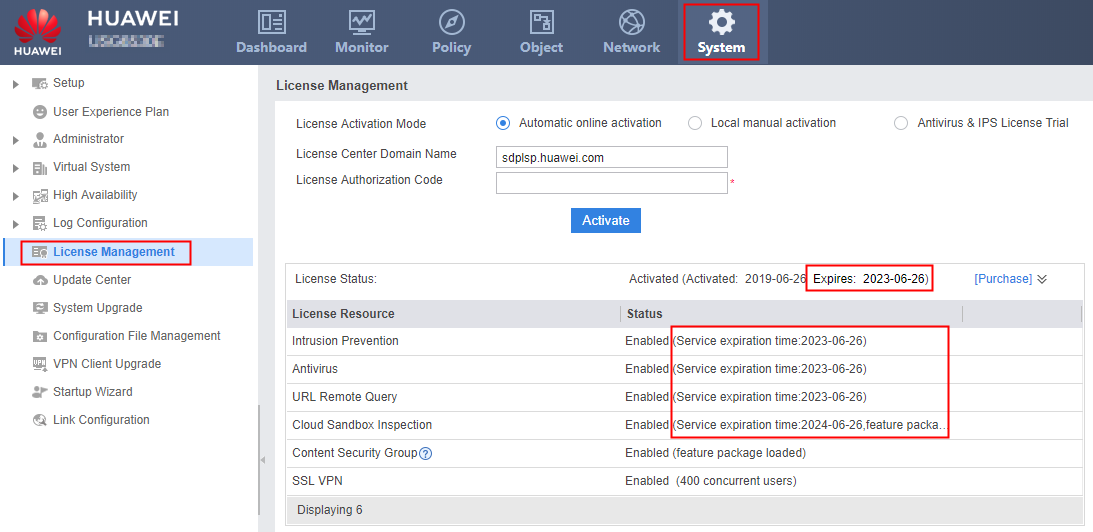
The license file does not have a validity period. Only the control items have a validity period. If all control items expire, the license file becomes invalid. The expiration time displayed in License Status indicates the earliest expiration time among all control items.

The function and resource control items of a temporary license have validity periods, which are not displayed on the web page. The administrator can run the following command in the user view to view the validity periods of the functions and resources:
<sysname> more hda1:/lic_filename.dat # The actual path of the license file prevails, which can be obtained using the display license command.
Therefore, in addition to the validity periods of the upgrade services, the validity periods of functions and resources must also be considered for the license expiration time displayed on the web page.