System Logs
The FW can output the logs generated on its functional modules in syslog format from the information center.
The FW can output the information generated during the running of each functional module to the log server or other storage paths through the information center. You can refer to the Log Reference to learn system log information generated by the functional modules on the firewall. The information center is the information hub for system software modules on the FW. You can sort output system information in a refined manner to effectively filter information.
Log Type |
Log Format |
Log Output Mode |
||
|---|---|---|---|---|
System logs For example, the administrator login or logout log, blacklist log, and operation log of command lines, which are not described one by one here. |
Syslog |
The logs are sent to the eLog through the information center. |
||
Information Categorization
Information has eight levels based on its severity and emergency. More critical information has a lower level, as shown in Table 1.
Log Level |
Severity Level |
Description |
|---|---|---|
0 |
Emergency |
Critical device fault which causes the system unable to recover, and device restart is required. For example, program exception causes device restart or memory usage error. |
1 |
Alert |
Major device fault which requires an immediate solution. For example, the device memory usage reaches the upper limit. |
2 |
Critical |
Major device fault which requires a solution or cause analysis. For example, the memory usage exceeds the lower limit, the temperate exceeds the lower limit, BFD detects that a device is unreachable, or an error message is detected (the message is from the inside device). |
3 |
Error |
Incorrect operations or abnormal device processing that do not affect subsequent services but require attention and cause analysis, such as incorrect commands, incorrect passwords, and detection of error packets (the packets are detected by another device). |
4 |
Warning |
Device operating exceptions that may cause service failures. such as routing process disabled, packet loss detected by BFD, and detection of error protocol packets. |
5 |
Notice |
Key device operating information, such as the execution of the shutdown command and neighbor discovery. |
6 |
Informational |
General device operating information. |
7 |
Debug |
General device operating information that requires no attention. |
When you filter information based on the severity level, the system displays the severity level of the current configuration and the information that is more serious than the severity level of the configured level.
For example, if the output severity level is set to Informational, only the log level of 0 to 6 is output.
Information Output
The information center defines 10 information channels independent from each other to facilitate information output control in each direction. You can configure system log output rules for the FW to output specific information from specific information channels to specific directions, as shown in Figure 1.
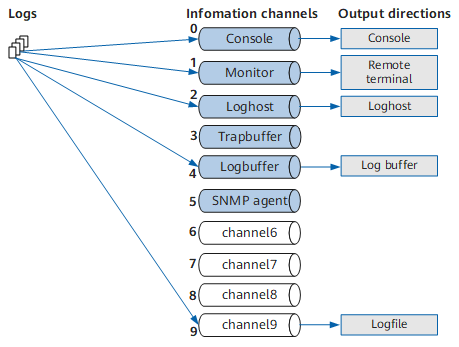
Table 2 shows the mapping between information channels and output directions.
Channel ID |
Default Channel Name |
Output Direction |
Description |
Default Output Log Level |
Default Status |
|---|---|---|---|---|---|
0 |
console |
console |
Local console that can receive logs, alarms, and debugging messages. |
warning* |
on |
1 |
monitor |
monitor |
VTY terminal that can receive logs, alarms, and debugging messages to facilitate remote maintenance. |
warning* |
on |
2 |
loghost |
loghost |
Log host that can receive logs, alarms, and debugging messages. Information is stored as files on log hosts. |
informational* |
on |
3 |
trapbuffer |
trapbuffer |
Trap buffer that can receive alarm information. The buffer allocated inside the FW is used to record information. |
informational* |
off |
4 |
logbuffer |
logbuffer |
Log buffer that can receive log information. The buffer allocated inside the FW is used to record information. |
warning* |
on |
5 |
snmpagent |
snmpagent |
SNMP agent that can receive alarm information. |
debugging* |
off |
6 |
channel6 |
Unspecified |
Reserved. The customer can specify the output direction. |
debugging* |
on |
7 |
channel7 |
Unspecified |
Reserved. The customer can specify the output direction. |
debugging* |
on |
8 |
channel8 |
Unspecified |
Reserved. The customer can specify the output direction. |
debugging* |
on |
9 |
channel9 |
logfile |
Log file that can receive logs, alarms, and debugging messages. The information is saved as files on the FW CF card. |
debugging* |
on |
*Indicates the severity of logs that can be output by each channel by default. If the severity of a log generated by a device is lower than that of the default log, the channel cannot output these logs.
Example: By default, the information center sends logs of the warning level and higher levels (such as error level) to channel 4. The information center does not send policy matching logs since the log level is informational, lower than the default warning level. Therefore, to view policy matching logs in the log buffer, run the info-center source POLICY channel logbuffer log level informational command.
When multiple log hosts are configured, you can enable the FW to output system logs from one or more channels to different logs hosts. For example, the FW can output some system logs from channel 2 (loghost) to one log host and some other logs from channel 6 to another log host. You can also change the name of channel 6 to facilitate information channel management.
Log Format
Figure 2 lists the formats of system logs.

Table 3 describes the details of each field.
Field |
Meaning |
Description |
|---|---|---|
<Int_16> |
Preamble |
The FW adds a preamble before sending logs to a log host. If logs are saved on the FW, the preamble is not saved. |
TIMESTAMP |
Timestamp, indicating the information output time. |
Five timestamp formats are available:
|
HOSTNAME |
Host name |
The default value is FW. |
%% |
Huawei identifier |
Indicates that a log is output by a Huawei device. |
dd |
Version |
Identifies the version of the log format. |
AAA |
Module name |
Indicates the name of the module that outputs information to the information center. |
B |
Log level |
Indicates the level of the log information. |
CCC |
Brief description |
Further describes the type of the information. |
(l) |
Information category |
1: Log identifier |
[N] |
Log position |
Display the position of the current log in the log queue. |
YYYY |
Description |
Details on the information that each module outputs to the information center. Each module adds a description before sending a log to describe log details. |