CLI: Example for Configuring a Device to Send User Internet Access Logs to a Log Server in the Wireless Internet Access for Non-operating Public Places
This section provides an example for configuring a device to send user Internet access logs to a log server in the wireless Internet access for non-operating public places to meet wireless Internet access compliance requirements.
Networking Requirements
As shown in Figure 1, uses in a non-operating public place (hotel, library, and entertainment place) access the Internet through a wireless network. The FW serves as an egress gateway to perform identity identification for users who attempt to access the Internet and send user Internet access logs to a third-party log server.
In the solution, the AC and Agile Controller work together to implement portal authentication for users. The FW reports logs, as shown in Figure 2.
The Agile Controller sends device login and logout logs to a third party log server. The AC sends device information logs, security organization information logs, and AP information logs to a third-party log server.
Currently, the third-party log server is provided by Renzixing company.
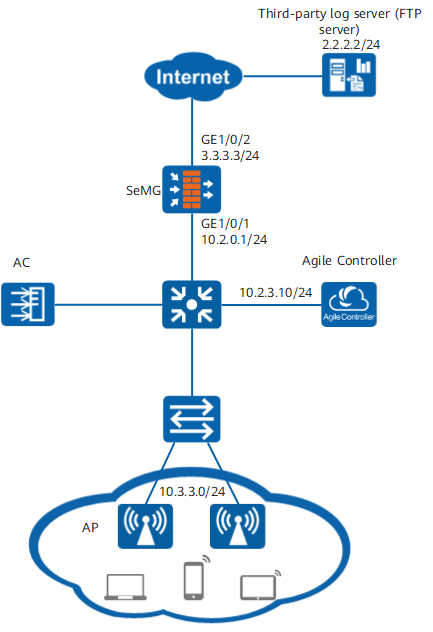
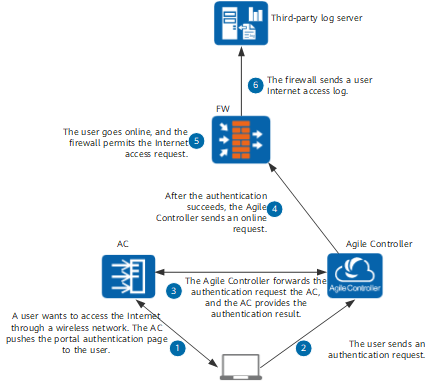
FW to send user Internet access logs as follows:
- When a user attempts to access the wireless network, the AC pushes the portal authentication page of the Agile Controller to authenticate the user.
- After receiving the portal authentication page, the user enters authentication information and sends an authentication request to the Agile Controller.
- After receiving the authentication request, the Agile Controller sends a user authentication request to the AC. The AC provides the authentication results.
- After the user passes the authentication, the Agile Controller sends a request for user login to the FW and sends the device MAC address, AP MAC address, and place code to the FW. The FW uses the information to report logs.
- The FW uses Agile Controller SSO for user login and permit the user Internet access request.
- Configure the FW to send user Internet access logs to the third-party server.

Figure 2 shows only the process in which the FW reports user Internet access logs and does not provide the contents of logs reported by the AC and Agile Controller. In this example, only user Internet access log-related configurations are provided.
Configuration Roadmap
- Configure the AC to enable the AC to work with the Agile Controller to perform portal authentication on users.
For configuration details, see the AC product documentation.
- Configure the FW.
- Configure interfaces and security policies.
- Configure the Agile Controller server, SSO login parameters, authentication domain, and new user options.
- Configure NAT static mapping.
- Configure identity identification for Internet access users.
- Configure the log sending function.
Data Planning
Item |
Data |
Description |
|---|---|---|
Agile Controller server |
|
Configure the Agile Controller server on the FW, namely, set parameters for the FW to communicate with the Agile Controller server. The parameter settings on the FW must be consistent with those on the Agile Controller server. |
Agile Controller SSO |
|
Configure SSO parameters on the FW to receive user login and logout information from the Agile Controller server. |
Group of new users |
Use the permission on the /default group as temporary users. |
All users serve as temporary users and have the permission on the /default group. |
NAT static mapping |
|
Translate the private addresses of Internet access users into public addresses. |
Third-party log server |
|
The FW encapsulates and encrypts the collected original log information and reports it to the third-party log server (FTP server) through FTP. If FTPS is enabled on the third-party log server, the log information can be sent to the third-party server through FTPS. FTP is used in this example. |
Procedure
- Set IP addresses for interfaces and add the interfaces to security zones.
# Configure an IP address for GE0/0/1.
<FW> system-view
[FW] interface GigabitEthernet 0/0/1
[FW-GigabitEthernet 0/0/1] ip address 10.2.0.1 24
[FW-GigabitEthernet 0/0/1] quit
# Configure an IP address for GE0/0/2.
[FW] interface GigabitEthernet 0/0/2
[FW-GigabitEthernet 0/0/2] ip address 3.3.3.3 24
[FW-GigabitEthernet 0/0/2] quit
# Add GE0/0/3 to the Trust zone.
[FW] firewall zone trust
[FW-zone-trust] add interface GigabitEthernet 0/0/1
[FW-zone-trust] quit
# Add GE0/0/4 to the Untrust zone.
[FW] firewall zone untrust
[FW-zone-untrust] add interface GigabitEthernet 0/0/2
[FW-zone-untrust] quit
- Configure security policies.
# Configure a security policy from the Trust zone where the Agile Controller resides to the Local zone so that the Agile Controller and firewall can interact.
[FW] security-policy
[FW-policy-security] rule name trust_local
[FW-policy-security-rule-trust_local] source-zone trust
[FW-policy-security-rule-trust_local] destination-zone local
[FW-policy-security-rule-trust_local] source-address 10.2.3.10 24
[FW-policy-security-rule-trust_local] action permit
[FW-policy-security-rule-trust_local] quit
# Configure a security policy for the FW to send logs to the third-party server.
[FW-policy-security] rule name local_untrust
[FW-policy-security-rule-local_untrust] source-zone local
[FW-policy-security-rule-local_untrust] destination-zone untrust
[FW-policy-security-rule-local_untrust] destination-address 2.2.2.2 32
[FW-policy-security-rule-local_untrust] action permit
[FW-policy-security-rule-local_untrust] quit
- Add the FW on the Agile Controller server.
The Agile Controller is used as an example. The user interface may vary with the version. For details, see the product documentation of the Policy Center or Agile Controller.
- Click Add and set parameters as follows:
The port must be the same as the Agile Controller SSO port on the FW. The default value is 8001.
The key and encryption algorithm must be consistent with the shared key and encryption algorithm on the 4 respectively.
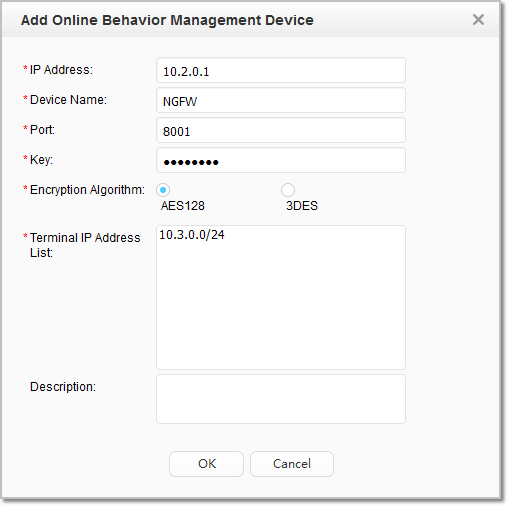
- Click Add and set parameters as follows:
- Configure the Agile Controller server on the FW.
# The parameter settings on the FW must be consistent with those on the Agile Controller server. In most cases, the server port of the Policy Center is 8080, and that of the Agile Controller is 8084.
[FW] tsm-server template auth_server_tsm
[FW-tsm-auth_server_tsm] tsm-server ip-address 10.2.3.10
[FW-tsm-auth_server_tsm] tsm-server port 8084
[FW-tsm-auth_server_tsm] tsm-server encryption-mode aes128 shared-key Admin@123
[FW-tsm-auth_server_tsm] test tsm-server template auth_server_tsm
[FW-tsm-auth_server_tsm] quit
- Configure SSO parameters on the FW.
[FW] user-manage single-sign-on tsm
[FW-sso-tsm] enable
[FW-sso-tsm] auth-level security-auth
[FW-sso-tsm] quit
- Configure an authentication domain and set new user options.
[FW] aaa
[FW-aaa] domain default
[FW-aaa-domain-default] service-type internetaccess
[FW-aaa-domain-default] new-user add-temporary group /default
[FW-aaa-domain-default] quit
[FW-aaa] quit
- Configure an authentication policy.
[FW] auth-policy
[FW-policy-auth] rule name authrule
[FW-policy-auth-rule-authrule] action exempt-auth
[FW-policy-auth-rule-authrule] quit
- Configure NAT static mapping.
# Configure a private address pool with the index of 1.
[FW] nat static-mapping
[FW-nat-static] inside-ipv4-pool 1
[FW-nat-static-inside-pool-1] section 1 10.3.3.0 10.3.3.255
[FW-nat-static-inside-pool-1] quit
# Configure a public address pool with the index of 1.
[FW-nat-static] global-pool 1
[FW-nat-static-global-pool-1] section 1 3.3.2.1 3.3.2.20
[FW-nat-static-global-pool-1] quit
# Configure static mapping.
[FW-nat-static] static-mapping 1 inside-ipv4-pool 1 global-pool 1 port-range 2048 65535 port-block-size 256 ip-first# Apply static mapping to the NAT policy.
[FW] nat-policy
[FW-policy-nat] rule name policy_nat_1
[FW-policy-nat-rule-policy_nat_1] source-zone trust
[FW-policy-nat-rule-policy_nat_1] destination-zone untrust
[FW-policy-nat-rule-policy_nat_1] action source-nat static-mapping 1
[FW-policy-nat-rule-policy_nat_1] quit
- Configure the log sending function.
[FW] file-upload name test ftp 2.2.2.2 user admin password Admin@123
[FW] gawa-log data-source-id 320000 data-destination-id 320100 file-upload test
[FW] gawa-log password abcdef iv fedcba
- Configure identity identification for Internet access users.
# Log in to the device as an audit administrator to perform the step.
Only the audit administrator has the permission to perform the following configurations. By default, no audit administrator is created for the FW. Create an audit administrator and then log in to the FW using the audit administrator account to perform the configurations.
# After identifying the virtual identity of the Internet access behavior, the user Internet access logs sent by the FW contain virtual identity information.
# Define the audit profile and enable the virtual identity identification function in the profile.
[FW] profile type audit name policy1
[FW-profile-audit-policy1] virtual-identity-audit record
[FW-profile-audit-policy1] quit
# Configure an audit policy.
[FW] audit-policy
[FW-policy-audit] rule name policy_audit
[FW-policy-audit-rule-policy_audit] source-address 10.3.3.0 24
[FW-policy-audit-rule-policy_audit] action audit profile policy1
[FW-policy-audit-rule-policy_audit] quit
Verification
- Run the display user-manage online-user verbose command on the FW to view online user information.
<sysname> display user-manage online-user verbose
 Current Total Number: 1
--------------------------------------------------------------------------------
 IP Address: 10.3.3.6
 Login Time: 2017-05-16 12:03:13  Online Time: 00:00:10
 State: Active  TTL: 00:30:00  Left Time: 00:30:00
 Access Type: local
 Authentication Mode: Single Sign-on
 Access Device Type: unknown
 <--packets: 8 bytes: 1590  -->packets: 8 bytes: 1389
 Downlink Rate: 23 kbps     Uplink Rate: 750 kbps
 Build ID: 0
 User Name: test  Parent User Group: /default
 User Mac: 5844-98a1-e116
 AP Mac: 643e-8c3c-a200
 Site Code: xxxxxxxxxxxxxx
--------------------------------------------------------------------------------
- Check user's Internet access logs on the log server.
- Access the FTP directory. You can find folder 005 (used to store users' Internet access logs).
- Folder YYYYMMDD exists in folder 005.
- xxx.zip.ok and xxx.zip files exist in folder YYYYMMDD.
- xxx.xml and xxx.bcp files exist in folder xxx.zip.
Configuration Scripts
#
 sysname FW

#
 tsm-server template auth_server_tsm
 #
 tsm-server template auth_server_tsm
  tsm-server encryption-mode aes128 shared-key %$%$MGYZ"j{Rn('Rq+47Ig]9TRM]%$%$
  tsm-server ip-address 10.2.3.10
 #
 user-manage single-sign-on tsm
  enable
  auth-level security-auth
 #
 aaa
  domain default
   service-type internetaccess
   new-user add-temporary group /default
#
manager-user audit-admin
 password cipher %@%@*y:3*ZN}.%%qcL1cC|@XBVMDyDwlB.Wq'6JF(iOz2D8>A\SN%@%@
#
bind manager-user audit-admin role audit-admin
#
nat static-mapping
 inside-ipv4-pool 1
  section 1 10.3.3.0 10.3.3.255
 global-pool 1
  section 1 3.3.2.1 3.3.2.20
 static-mapping 1 inside-ipv4-pool 1 global-pool 1 port-range 2048 65535 port-block-size 256 ip-first
#
profile type audit name policy1
 virtual-identity-audit record
#
security-policy
 rule name trust_local
  source-zone trust
  destination-zone local
  source-address 10.2.3.10 24
  action permit
 rule name local_untrust
  source-zone local
  destination-zone untrust
  destination-address 2.2.2.2 32
  action permit
#
audit-policy
 rule name policy_audit
  source-address 10.3.3.0 24
  action audit profile policy1
#
nat-policy
 rule name policy_nat_1
  source-zone trust
  destination-zone untrust
  action source-nat static-mapping 1
#
auth-policy
 rule name authrule
  action exempt-auth
#
interface GigabitEthernet 0/0/1
 ip address 10.2.0.1 255.255.255.0
#
interface GigabitEthernet 0/0/2
 ip address 3.3.3.3 255.255.255.0
#
firewall zone trust
 add interface GigabitEthernet 0/0/1
#
firewall zone untrust
 add interface GigabitEthernet 0/0/2
#
file-upload name test ftp 2.2.2.2 user admin password %$%$MGYZ"j{Rn('Rq+47Ig]hz8M]%$%$
gawa-log data-source-id 320000 data-destination-id 320100 file-upload test
gawa-log password %$%$5v\+14`03G@y_n)E"pi(9'c&%$%$ iv %$%$|vQ85+P/b60C!hPOM69/1t%$%$
#