Web: Example for Outputting Customized Syslogs to a Log Host
This section provides an example for outputting customized syslogs to a third-party log host through the web UI.
Networking Requirements
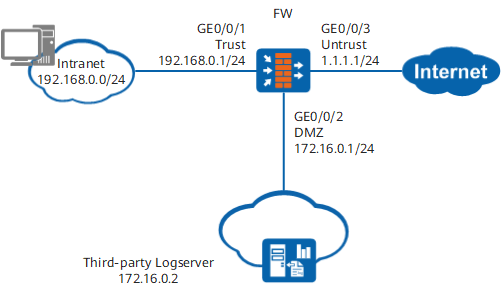
As shown in Figure 1, the FW is deployed on the network border. The network environment is as follows:
- The intranet is the Trust zone, while the Internet is the Untrust zone. Users on the intranet access the Internet using the NAT function provided by the FW.
- A third-party log server is deployed in the DMZ.
The FW is required to send session information generated when intranet users access the Internet to the third-party log server in the customized syslog format. The administrator can view and analyze session information on the third-party log server.
Configuration Roadmap

This example provides only the FW configuration. For the third-party log server configuration, see the third-party log server product document.
The system time must be set correctly during the initial configuration. Changing the system time during device running will result in incorrect timestamps in historical logs. The time zone of the log server must be the same as that of the FW.
- Set the IP addresses for interfaces and add the interfaces to security zones.
- Configure security policies.
- Configure a NAT policy.
- Configure routes.
- Configure log hosts.
- Enable the session log function in a security policy.
- Customize the syslog format.
Procedure
- Set the IP addresses for interfaces and add the interfaces to security zones.
Choose .
Click GE0/0/1 and set the following parameters.
Zone
trust
IPv4
IP Address
192.168.0.1/24
Click OK.
Repeat the preceding steps to configure GE0/0/2.
Zone
dmz
IPv4
IP Address
172.16.0.1/24
Repeat the preceding steps to configure GE0/0/3.
Zone
untrust
IPv4
IP Address
1.1.1.1/24
- Configure security policies.
- Choose .
- Click Add and configure a security policy from Trust to Untrust.
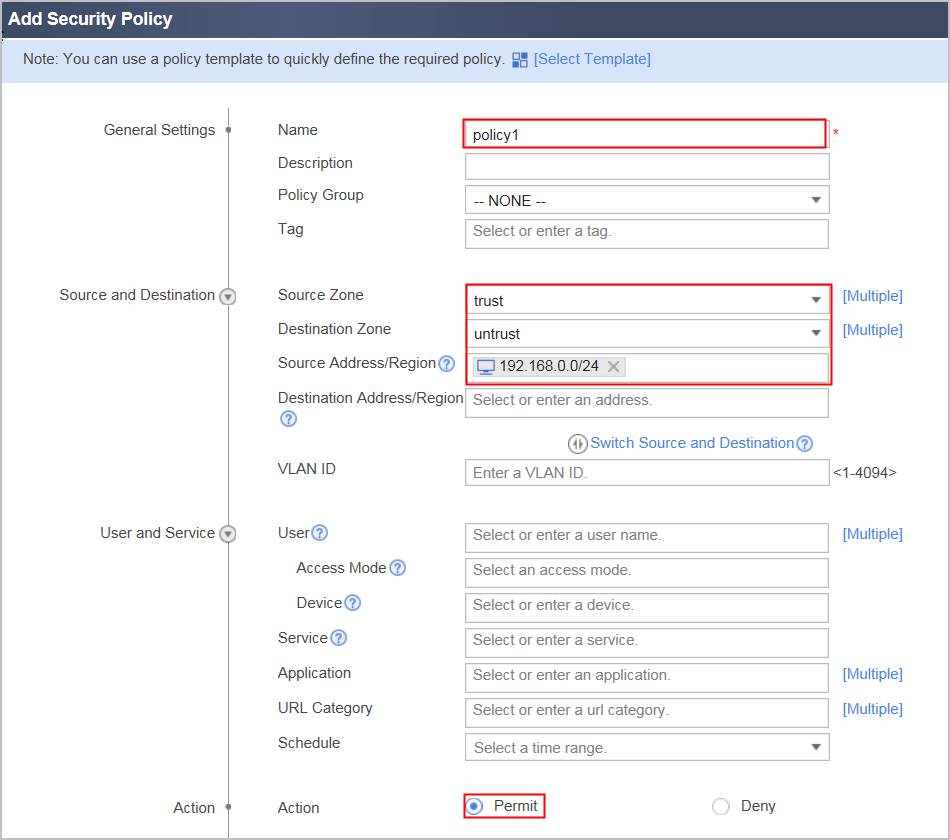
Session log packets are not controlled by packet filtering. Therefore, you do not need to configure session log security policies. You only need to configure the preceding security policies.
- Configure a NAT policy.Configure the NAT address pool and use the PAT mode (also the default mode). If the nat-mode no-pat command is used here to specify the No-PAT mode, the firewall will generate No-PAT-mode session logs. You can check the corresponding log information in on the eLog.
- Choose .
- Click the Source Translation Address Pool tab, click Add, configure the NAT address pool according to the following parameters, and click OK.
Name
addr1
IP Address Range
1.1.1.10-1.1.1.1.15
Configure the NAT policy and reference the NAT address pool.- Choose , click Add in NAT Policy List, and configure the NAT policy as follows. Click OK.
Name
policy1
NAT Type
NAT
Source Zone
trust
Destination Type
Destination Zone (untrust)
Source Address
192.168.0.0/24
Translated After
Translated Mode
IP Address in the IP Address Pool
Address Pool
addr1
- Configure routes.
# Configure a default route. In this example, the next hop of the FW to the Internet is 1.1.1.2.
Choose .
In Static Route List, click Add and configure a default route based on the following parameter values.
Protocol
IPv4
Destination Address/Mask
0.0.0.0/0.0.0.0
Next Hop
1.1.1.2
Click OK.
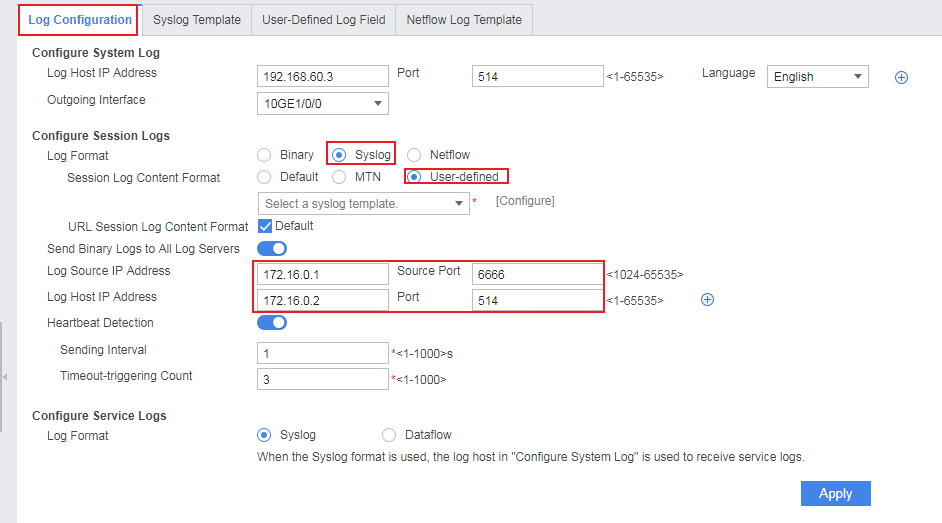
- Configure the log host and the source IP address and source port for sending logs.
Choose .
- Enable the session log function.
# Enable the record function for session logs in the security policy for service traffic.
Choose , click the created security policy policy1, and enable the function of recording session logs in .
- You can customize the syslog output format in either expression mode or list mode. These two modes are mutually exclusive. That is, you can select only one mode for a syslog template.
- Customizing a syslog in expression mode
Syslogs include session logs and URL session logs in syslog format. You can customize one template or two different templates for session logs and URL session logs. Detailed operations are as follows:
The available log fields are on the left. You can click a desired field to add it to Log Type on the right. In addition, you can also enter the prefix (such as SendPkts=) and separator (such as a space or comma) of the log fields as required. You can also edit the configured expression in Log Type.
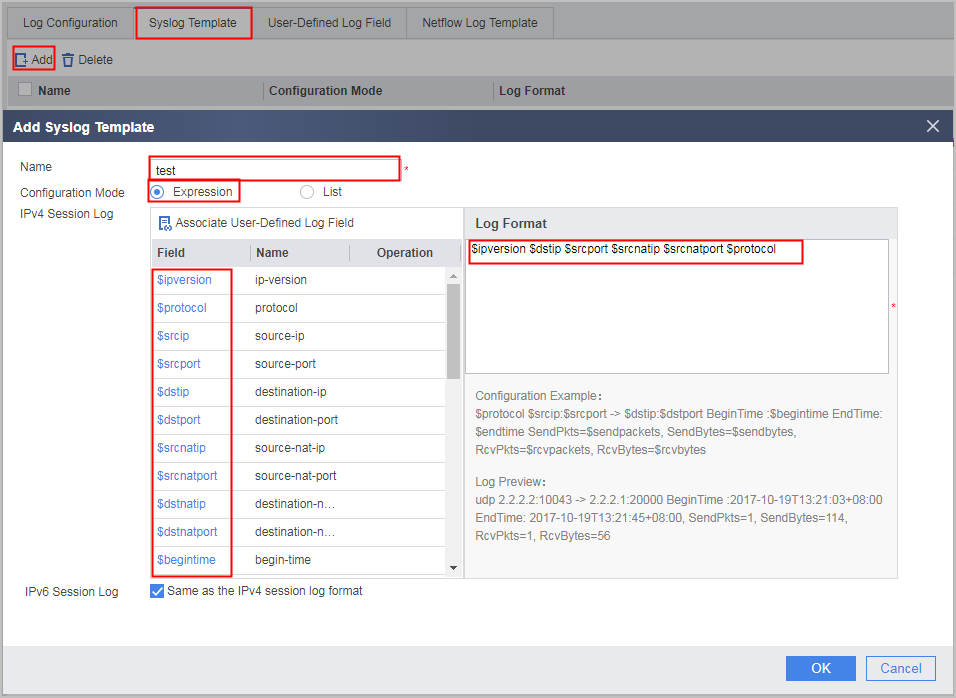
When configuring the URL session log expression, you need to specify the $httptype and $url fields specific to URL session logs.
- Customizing a syslog in list mode
- Select the log fields to be displayed and click Enable corresponding to each field.
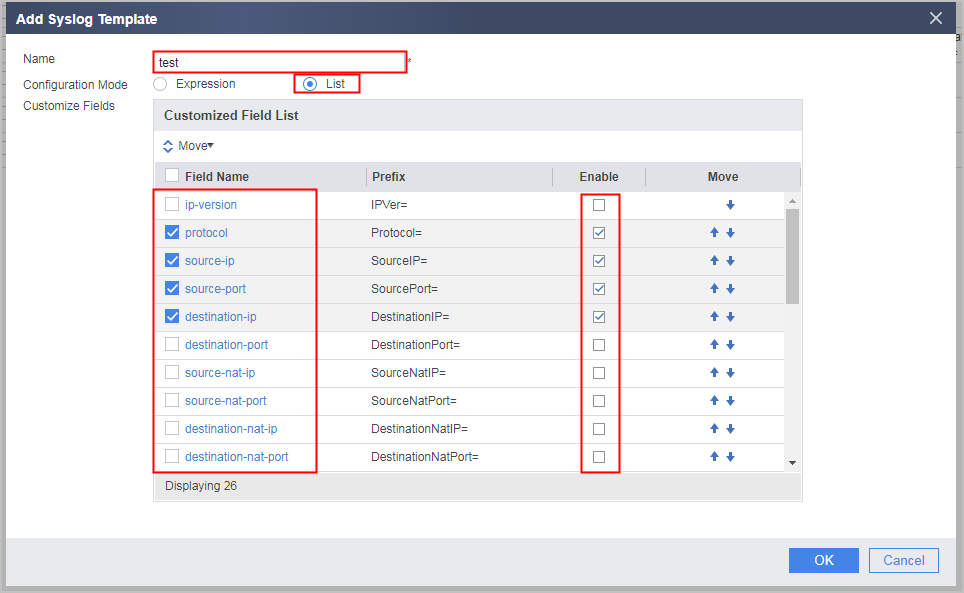
- To modify the field prefix, click the field name and modify the field prefix. For example, the default prefix of the ip-version field is IPVer=, and the content in the log is IPVer=ip-version. You can modify or delete field prefixes. If you delete the field prefixes, the log displays only the field content but not the prefixes.
- Select a field to be moved. And click Move or click the arrow on the right of each field to change the location of the field.
- Choose , set the syslog format to User-defined, and apply the configured syslog template.
- Select the log fields to be displayed and click Enable corresponding to each field.
- Customizing a syslog in expression mode
- Configure the third-party log host and view logs on the host.
Configuration Scripts
The following script uses customizing syslogs in list mode as an example.
#
 sysname FW
#
 firewall log host 1 172.16.0.2 514
 firewall log session log-type syslog
#
nat address-group add1
 mode pat
 route enable
 section 0 1.1.1.10 1.1.1.1.5
#
interface GigabitEthernet 0/0/1
 undo shutdown
 ip address 192.168.0.1 255.255.255.0
#
interface GigabitEthernet 0/0/2
 undo shutdown
 ip address 172.16.0.1 255.255.255.0
#
interface GigabitEthernet 0/0/3
 undo shutdown
 ip address 1.1.1.1 255.255.255.0
#
firewall zone trust
 set priority 85
 add interface GigabitEthernet 0/0/1
#
firewall zone untrust
 set priority 5
 add interface GigabitEthernet 0/0/3
#
firewall zone dmz
 set priority 50
 add interface GigabitEthernet 0/0/2
#
security-policy
 rule name trust_untrust
  session logging
  source-zone trust
  destination-zone untrust
  source-address 192.168.0.0 24
  action permit
#
nat-policy
 rule name policy1
  source-zone trust
  destination-zone untrust
  source-address 192.168.0.0 24
  action source-nat address-group add1
#
 ip route-static 0.0.0.0 0.0.0.0 1.1.1.2
#
session-log template test type syslog
separate semicolon
expression ip-version source-ip destination-ip source-port source-nat-ip source-nat-port protocol
ip-version prefix-characters ipversion=
protocol prefix-characters Protocol=
source-ip prefix-characters Source-IP
firewall log syslog content format template test
#
return