Understanding the Log Sending Mechanism and Key Configuration Points in Hot Standby Networking
Compared with that in the single-node networking, the log sending function in the hot standby networking has special requirements. Before the configuration, you need to understand the log output principle, implementation mode, and configuration key points in the hot standby environment.
Log Sending Mechanism in Hot Standby Networking
To prevent service interruption risks due to FW failure, you can configure two FWs in hot standby mode. If a FW fails, services can be smoothly switched over to another FW, and therefore services are not interrupted.
The log output modes of FWs in hot standby networking are similar to those of a single FW. However, due to the distinctive features of the hot standby networking, you need to consider the following issues:
A specific FW that outputs the logs, especially for session logs that exist on both the active FW and the standby FW, and principles for session log output
Log receiving failure on the log host in the case that a link between the active FW and the log host is faulty, the log host cannot receive the logs output by the active FW, and the standby FW does not output any logs.
After the hot standby networking is established, the FW, on which the session is established, is responsible for outputting the session log. When two FWs work in active/standby mode, the active FW outputs the session logs, and the standby FW receives the backup session logs rather than outputting the session logs. When two FWs work in load balancing mode, once a new session is established on either of the two FWs, the FW outputs the session log after the session is aged.
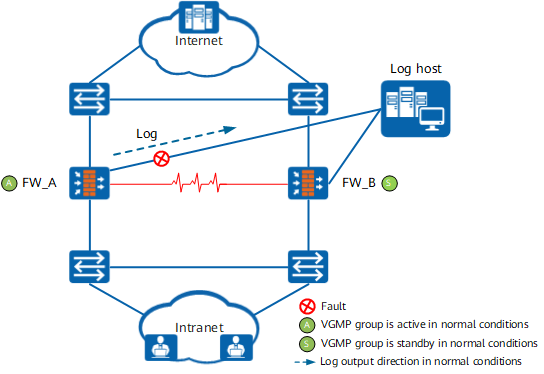
The FW on which the session is established is responsible for outputting the session log. If the link between the active FW and the log host is faulty, the active FW cannot output the session log or the output session log fails to reach the log host. Because the standby FW does not output the session log, the corresponding session log does not reach the log host, although service traffic is not affected, as shown in Figure 1.
To prevent this issue, ensure that the active and standby FWs and the log host are interconnected through secure and stable links. In addition, you can configure the active/standby FW switchover to avoid impacts caused by the link failure.

Evaluate impacts caused by the active/standby FW switchover on uplink and downlink devices and services. Exercise caution when using this mode based on the hot standby networking situation and uplink and downlink link statuses.
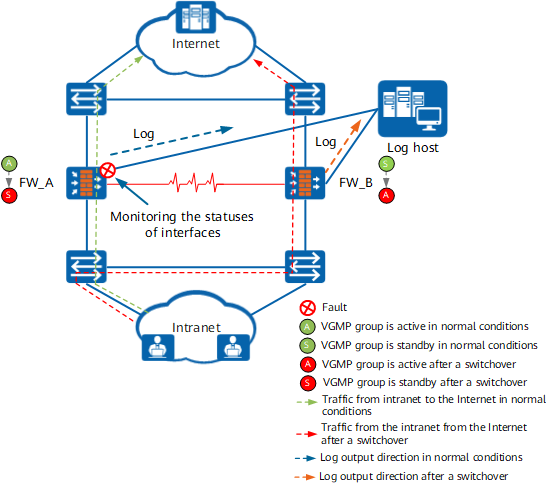
As shown in Figure 2, VGMP group is used to monitor the statuses of interfaces that connect the FWs to the log host. If the interface between the active FW and the eLog is faulty, the active/standby FW switchover is triggered, and FW_B works as the active FW. At this time, all traffic is forwarded by FW_B, and sessions are established on FW_B. Therefore, FW_B outputs the session logs to the log host.
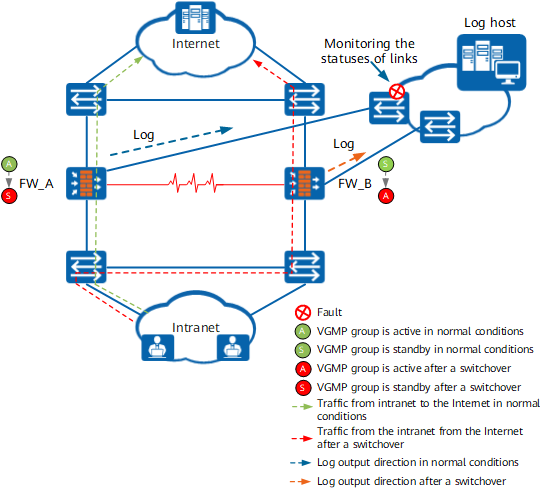
In addition, VGMP group is used to monitor the statuses of links (by monitoring the IP-link status) that connect the FWs to the log host. If the link between the active FW and the log host is faulty, the active/standby FW switchover is triggered, and FW_B works as the active FW. At this time, all traffic is forwarded by FW_B, and sessions are established on FW_B. Therefore, FW_B outputs the session logs to the log host, as shown in Figure 3.
Key Points for Configuring Log Sending in Hot Standby Networking
For the FWs to output logs in hot standby networking, the configuration process is similar to that of a single FW. Pay attention to the following points:
- Most log-related configurations can be automatically backed up. If certain commands cannot be automatically backed up, configure the commands separately on the active and standby FWs. For the commands that can (or cannot) be backed up, see List of Configurations Supporting Backup and Not Supporting Backup.
- Use the VGMP group to monitor the status of the links or interfaces connecting the FWs to a log host to solve the problem that the log host cannot receive logs if one FW fails.
- On the log host, you need to add the IP addresses used by the active and standby FWs to connect to the log host.
Table 1 lists the key log output configurations on the active and standby FW.
| Item | Command | Description |
|---|---|---|
Configure log output. |
||
Specify the log host that interconnects with the active and standby FWs. |
firewall log host host-id ip-address port [ vpn-instance vpn-instance-name ] [ secondary ] [ track ip-link link-name ] |
Configure the log host on the active FW. Pay attention to the correctness of the IP address and port. The configuration on the active FW can be synchronized to the standby FW. Therefore, you do not need to perform the configuration on the standby FW. |
Specifies the log host that interconnects with the active and standby FWs to parse port pre-allocation and incremental allocation logs and specify the source IP address and source port of such logs. |
nat port-block syslog host host-address [ host-port ] source source-name source-address source-port |
Run this command on both active and standby FWs. Note that the IP address and port number must be correct. |
Configure fault monitoring methods. |
||
Configure a VGMP group to monitor the status of the interface connecting a FW to the log host. |
hrp track interface interface-type interface-number |
Run this command on both active and standby FWs. Note that the FWs cannot use the management interface to send logs. |
Configure a VGMP group to monitor the status of the link connecting a FW to the log host. |
hrp track ip-link ip-link-name |
Run this command on both active and standby FWs. The IP-link function must be configured in advance. This command references the name of the configured IP-link. |