Syslogs
This section describes the mechanism for the FW to output customized syslogs to a third-party log host.
Context
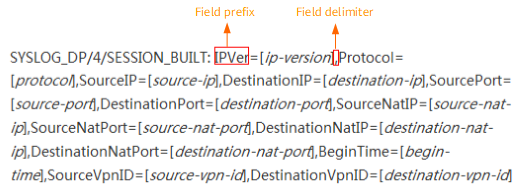
By default, the FW uses the syslog format to send session logs to the log server. Syslogs in the default format include SECLOG/6/SESSION_BUILT, SECLOG/4/PACKET_DENY, SECLOG/6/SESSION_PERIODICALLY, and SECLOG/6/SESSION_TEARDOWN. Logs output in the default format are in the format of "keyword and value". Their contents are fixed and cannot be modified. For example:
In addition to the default format, the FW also supports outputting logs in the MTN format. The content of the output logs is a complete sentence. For example:
172.16.36.196:4439[192.0.2.2:4439] (trust) to 192.0.2.1:80[172.16.36.198:80](untrust)......
- Expression mode: A complete expression is used to define the fields and their sequence in session logs. This configuration method is flexible. You can define different content formats for IPv4 and IPv6 session logs. You can also define different content formats for session logs and URL session logs. You can customize one template or two different templates (and specify different expressions) for session logs and URL session logs.
- List mode: In this mode, you can define the session log format by multiple items, including fields, the sequence of fields, and field prefixes. This mode can only define the same content format for IPv4 and IPv6 session logs. In addition, this
mode defines the content only for session logs but not for URL session logs.
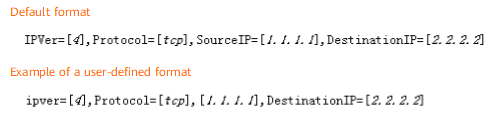
For example, if you configure ip-version prefix-characters ipver= , the ipver= prefix is ipver=. If you configure source-ip prefix-characters none, the source-ip prefix is empty, and only specific content exists. If you do not configure the protocol prefix, the protocol prefix is Protocol= in the default format. Differences between and after the configuration are as follows:
Session Log in Syslog Format |
Supported Session Log Types |
|---|---|
Default format |
|
MTN format |
|
User-defined |
|
