CLI:Sending System Logs to the Log Host Through the Information Center
This section provides an example for configure the FW to output system logs to a log host through the information center.
Networking Requirements
As shown in Figure 1, the FW connects to four eLog servers.
The FW is required to send system logs to the Log servers to meet the following requirements:
- The FW sends notification logs generated by the FIB and IP modules to log server 1 through default channel 2..
- The FW sends all service logs to log server 2 through channel 6. Log server 4 backs up log server 2..
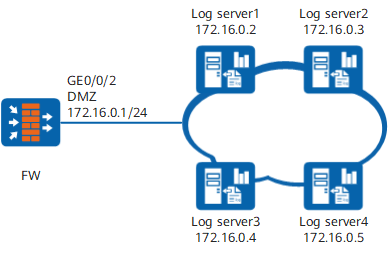
Configuration Roadmap

This example provides only the FW configuration. For the eLog server configuration, see the eLog server product document.
The system time must be set correctly during the initial configuration. Changing the system time during device running will result in incorrect timestamps in historical logs. The time zone of the log server must be the same as that of the FW.
- Set the IP addresses for interfaces and add the interfaces to security zones.
- Configure a security policy.
- Enable the information center.
- Name the information channel.
- Specify the modules from which logs are output.
- Configure log hosts.
Procedure
- Set the IP addresses for interfaces and add the interfaces to security zones.
# Configure an IP address for GE0/0/2.
<FW> system-view
[FW] interface GigabitEthernet 0/0/2
[FW-GigabitEthernet 0/0/2] ip address 172.16.0.1 24
[FW-GigabitEthernet 0/0/2] quit
# Add GE0/0/2 to the DMZ.
[FW] firewall zone dmz
[FW-zone-dmz] add interface GigabitEthernet 0/0/2
[FW-zone-dmz] quit
- Configure a security policy.
# Configure a Local-DMZ interzone security policy.
[FW] security-policy
[FW-policy-security] rule name local_dmz
[FW-policy-security-rule-local_dmz] source-zone local
[FW-policy-security-rule-local_dmz] destination-zone dmz
[FW-policy-security-rule-local_dmz] destination-address 172.16.0.2 32
[FW-policy-security-rule-local_dmz] destination-address 172.16.0.3 32
[FW-policy-security-rule-local_dmz] destination-address 172.16.0.4 32
[FW-policy-security-rule-local_dmz] destination-address 172.16.0.5 32
[FW-policy-security-rule-local_dmz] action permit
[FW-policy-security-rule-local_dmz] quit
[FW-policy-security] quit
- Enable the information center.
[FW] info-center enable - Name the information channel.
[FW] info-center channel 6 name loghost1 - Specify the modules from which logs are output.
[FW] info-center source fib channel loghost log level notification
[FW] info-center source ip channel loghost log level notification
- Configure log hosts.
# Configure Log server 1 as the master log server and Log server 3 as the backup log server to receive logs generated by the FIB and IP modules. Set the log language to English and use log recording tool Local2.
[FW] info-center loghost 172.16.0.2 channel loghost facility local2 language english
[FW] info-center loghost 172.16.0.4 channel loghost facility local2 language english
# Configure Log server 2 as the master log server and Log server 4 as the backup log server to receive logs. Set the log language to English and use log recording tool Local4.
[FW] info-center loghost 172.16.0.3 channel loghost1 facility local4 language english
[FW] info-center loghost 172.16.0.5 channel loghost1 facility local4 language english
Configuration Script
#
 sysname FW
#
 info-center channel 6 name loghost1
 info-center source FIB channel 2 log level notification
 info-center source IP channel 2 log level notification
 info-center loghost 172.16.0.2 facility local2
 info-center loghost 172.16.0.4 facility local2
 info-center loghost 172.16.0.3 channel 6 facility local4
 info-center loghost 172.16.0.5 channel 6 facility local4
#
interface GigabitEthernet 0/0/2
 undo shutdown
 ip address 172.16.0.1 255.255.255.0
#
firewall zone dmz
 set priority 50
 add interface GigabitEthernet 0/0/2
#
security-policy
 rule name local_dmz
  source-zone local
  destination-zone dmz
  destination-address 172.16.0.2 32
  destination-address 172.16.0.3 32
  destination-address 172.16.0.4 32
  destination-address 172.16.0.5 32
  action permit
#
return