Setting the Mail Service
After the SMTP mail server is configured, the device can send information to a specified email box.
Context

The email service function relies on a hard disk. If no hard disk is available, this function is unavailable. This window is not displayed on the Web UI.
The mail service is unavailable in IPv6 scenarios.
The mail service supports only Sina mail, NetEase mail, and Winmail as the sender mailboxes.
After the mail service is enabled, the FW functions as an SMTP client to connect to the SMTP server.
When the device sends information through mails, the device automatically references the mail service parameters, such as email address.
Procedure
- Choose .
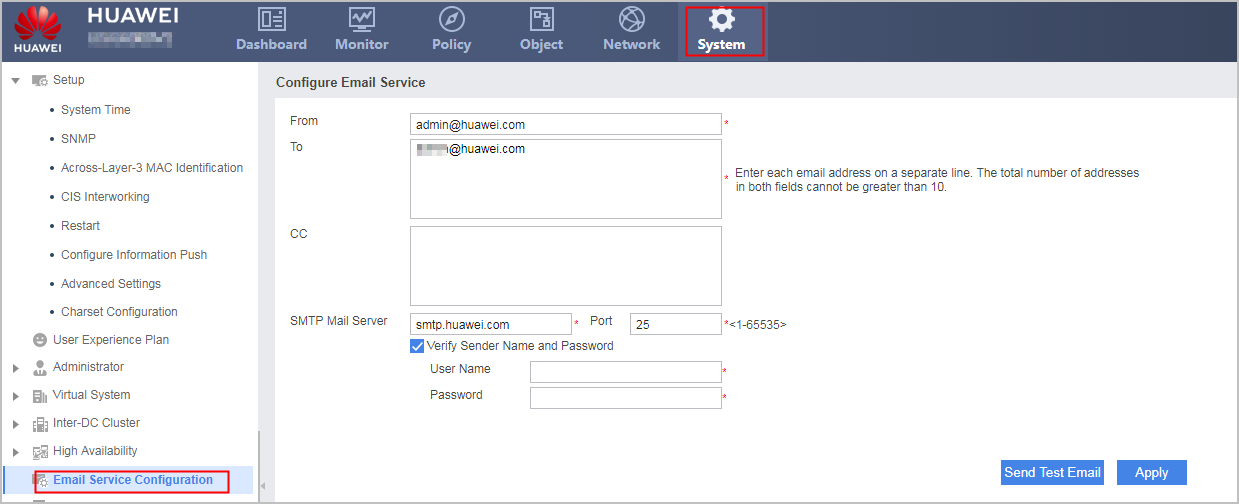
- Configure the mail service.
Parameter
Description
Value
From
Sender address.
Each mail address must contain 6 to 64 characters.
The mail service supports only Sina mail, NetEase mail, and Winmail.
To
Recipient address.
Each mail address must contain 6 to 64 characters.
To send reports to multiple addresses, separate the addresses with line feeds.
Copy To
CC recipient address.
Each mail address must contain 6 to 64 characters.
To copy reports to multiple addresses, separate the addresses with line feeds.
SMTP Mail Server/Port
Domain name, IPv4 address, or port of the mail server.
The default SMTP server port is 25.
NOTE:The device does not support email sending through a forcibly SSL-connected email server, such as Gmail. Commonly used email servers, such as Sina, 163, and Winmail, are recommended.
User Name/Password
User name and password for logging in to the SMTP mail server.
When the SMTP server requires ID authentication, select Verify Sender's Name and Password, and enter the user name and password registered on the mail server.
The value of user name is a case-sensitive string. Its length ranges from 1 to 64. Whether the user name needs to carry the domain name is determined by SMTP mail servers. The user names used to log in to some SMTP mail servers must carry domain names, whereas the user names used to log in to other SMTP mail servers do not need to carry domain names.
When the SMTP service is enabled on the email server, if the server provides an authorization code, enter the authorization code for the password. If the server does not provide an authorization code, enter the email password.
NOTE:When the SMTP mail server requires ID authentication, "sender address" is the mailbox address obtained during the user name registration.
- Click Apply.
Click Send Test Email and log in to the recipient's or CC recipient's mailbox to see whether the test mail is received.
Test emails are sent to test whether email messages can be successfully sent and received. If not, check whether the parameters are correctly configured. Then, check the connectivity between the FW and the SMTP server.