< Home

Configuring 5-Tuple Packet Discarding Statistics Using the Web UI

This section describes how to collect 5-tuple-based packet drop statistics on the web UI for fault analysis.

Context

To configure 5-tuple packet discarding statistics can affect the device performance to some extent, please be cautious.

After locating network problems is complete, please stop collecting packet drop statistics and clear configuration.

Procedure

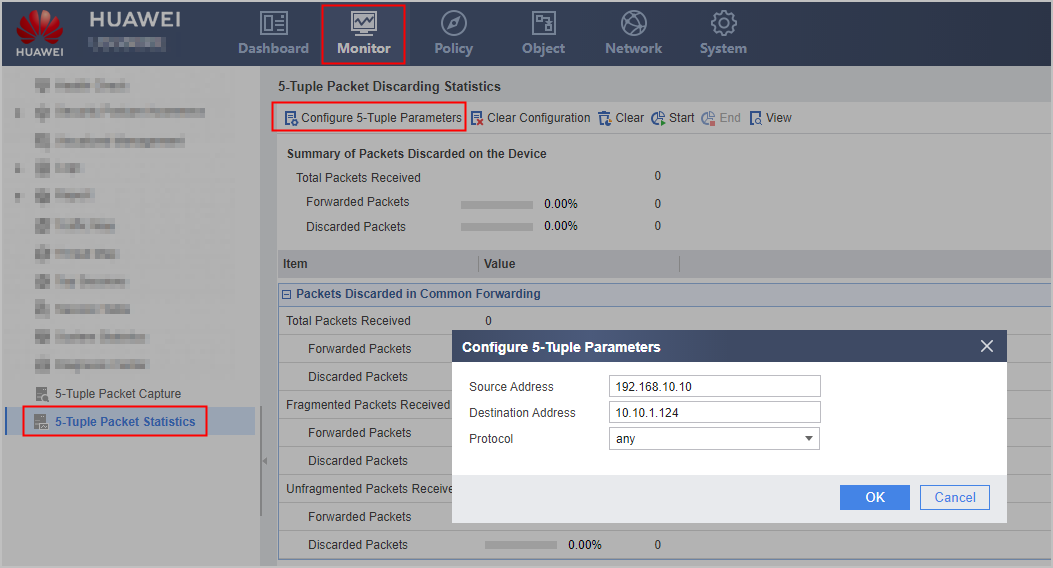
  1. Choose Monitor > 5-Tuple Packet Statistics.
  2. Click Configure 5-Tuple Parameter to set the following parameters. After parameter configuration is complete, click OK.
    Parameter

    Description

    Source Address

    Source IPv4 address of the packets.

    Destination Address

    Destination IPv4 address of the packets.

    Protocol

    Protocol of the packets.

    Protocol Number

    Protocol number of the packets.

    This item is available only when Protocol is set to User-Defined Protocol.

    Source Port

    Source port of the packets.

    This item is available only when Protocol is set to TCP or UDP.

    Destination Port

    Destination port of the packets.

    This item is available only when Protocol is set to TCP or UDP.

  3. Click Start to start to collect packet drop statistics.
  4. Optional: Click End when you need to stop collecting packet drop statistics.

    After the FW stops collecting packet drop statistics, you can reconfigure the 5-tuple-based statistics collection again. In this case, you can view previously collected statistics on the web UI. You can also click Clear to clear the collected packet drop statistics.

  5. Click View. The Statistics Details page displays detailed packet statistics of each flow.

    For the packets with errors, you can click Packet Tracing in the Protocol: Source IP Address:Source Port -> Destination IP Address:Destination Port field. Then the Packet Tracing page is displayed. You can view the packet tracing and diagnosis information. The system provides fault recovery suggestions.

    The Statistics Details page displays statistics of only common forwarding, namely, statistics on the SUP, and the packet tracing function processes only SPU packets.

Result

The following snapshot shows the packet statistics collected in a period of time.
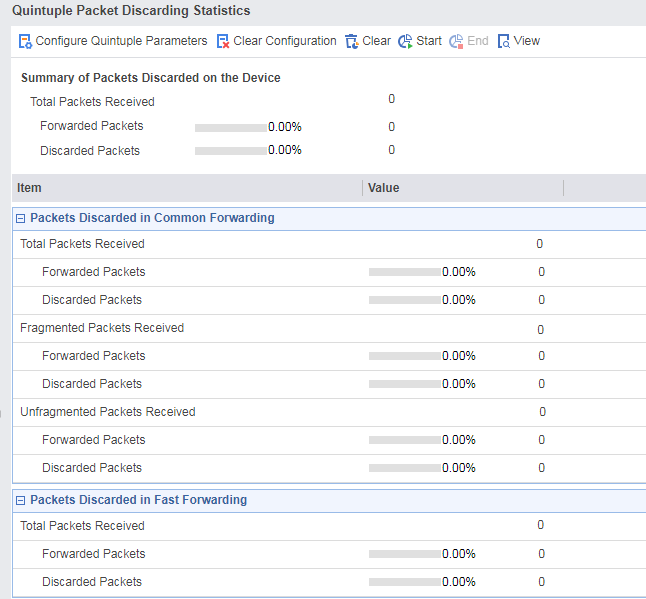


The fields are described as follows:

Field

Meaning

Summary of Packets Discarded on the Device

  • Total number of received packets: indicates the total number of forwarded and discarded packets received by the FW SPU based on the configured 5-tuple.
  • Number of forwarded packets: indicates the total number of packets forwarded by the FW SPU in normal forwarding mode and in hardware fast forwarding mode based on the configured 5-tuple.
  • Number of discarded packets: indicates the total number of packets discarded by the FW SPU in normal forwarding mode and in hardware fast forwarding mode based on the configured 5-tuple.

Statistics Type

The involved packet types are Packets Discarded in Common Forwarding and Packets Discarded in Fast Forwarding.
  • Packets Discarded in Common Forwarding: indicates statistics on the number of packets processed by the SPU CPU.

    • Total Received Packets: indicates statistics on the total number of packets received by the FW SPU (including fragments and non-fragments) based on the configured 5-tuple.
    • Forwarded Packets: indicates statistics on the number of packets forwarded by the FW SPU (including fragments and non-fragments) based on the configured 5-tuple.
    • Discarded Packets: indicates statistics on the number of packets discarded by the FW SPU (including fragments and non-fragments) based on the configured 5-tuple.
    • Received Fragments: indicates statistics on the total number of fragments received by the FW SPU based on the configured 5-tuple.
    • Forwarded Fragments: indicates statistics on the number of fragments forwarded by the FW SPU based on the configured 5-tuple.
    • Discarded Fragments: indicates statistics on the number of fragments discarded by the FW SPU based on the configured 5-tuple.
    • Received Non-fragments: indicates statistics on the total number of non-fragments received by the FW SPU based on the configured 5-tuple.
    • Forwarded Non-fragments: indicates statistics on the number of non-fragments forwarded by the FW SPU based on the configured 5-tuple.
    • Discarded Non-fragments: indicates statistics on the number of non-fragments discarded by the FW SPU based on the configured 5-tuple.
  • Packets Discarded in Fast Forwarding: indicates statistics on packets that are quickly processed by LPU.
    • Total Received Packets: indicates the total number of packets that go through hardware fast forwarding process based on the configured 5-tuple.
    • Forwarded Packets: indicates the total number of packets that go through fast forwarding of the FW LPU based on the configured 5-tuple.
    • Discarded Packets: indicates the total number of packets that are discarded after going through hardware fast forwarding process based on the configured 5-tuple.

Counts

Number of the specified type of packets

Follow-up Procedure

After network fault locating completes, click to clear configuration information for security.

Copyright © Huawei Technologies Co., Ltd.
< Previous topic Next topic >