Overview of Port Mirroring
To capture or analyze session packets for locating network problems without interrupting services, you need to configure the port mirroring function.
The port mirroring function can copy the packets of the designated service interface to the non-service interfaces. When the session is abnormal, you can locate the problem by checking the protocol analyzer connecting to the non-service interface, without affecting normal services. The service interface is termed as the mirrored port. The non-service interface is termed as the mirroring port.
Mirroring is divided into the following types according to the direction in which the packets are copied:
- Upstream mirroring: A mirrored port copies all received packets or the packets matching certain traffic classification conditions to a mirroring port.
- Downstream mirroring: A mirrored port copies all packets to be sent or the packets matching certain traffic classification conditions to a mirroring port.
Figure 1 shows the typical networking of mirroring.
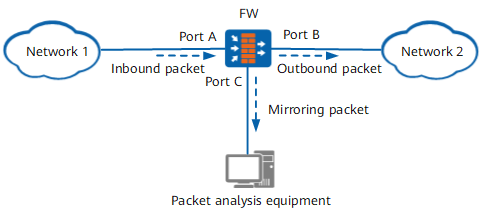
To monitor the packets of Network 1 received by Port A or the packets forwarded from Port B to Network 2, configure Port C as the mirroring port and connect Port C to the packet analysis equipment. Configure mirroring on Port A or Port B to copy the packets received by Port A or forwarded from Port B or the packets matching specific rules of traffic classification to Port C. Then the packet analysis equipment performs analysis.