CLI: Example for Configuring Local Port Mirroring (Configuring MPU CPU-based Port Mirroring)
This section provides an example for configuring the mirrored port to copy sent or received packets to the mirroring port.
Networking Requirements
As shown in Figure 1, to monitor the packets received on GigabitEthernet 0/0/2 from FW_A to FW_B, configure GigabitEthernet 0/0/1 of FW_B as the mirroring port and enable port mirroring on GigabitEthernet 0/0/2. Then all the packets received on GigabitEthernet 0/0/2 are copied to GigabitEthernet 0/0/1. All the mirrored packets are then sent to the packet analysis equipment Host D.
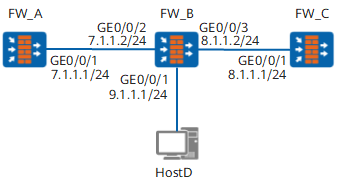
Configuration Roadmap
The configuration roadmap is as follows:
Configure GigabitEthernet 0/0/1 of FW_B as the mirroring port.
Configure GigabitEthernet 0/0/2 of FW_B as the mirrored port and enable port mirroring.
Disable the port mirroring function after locating network problems is complete.
Procedure
- Set an IP address for the interface and add the interface to a security zone. Configure an interzone security policy for basic network communications. The detailed configuration is not mentioned.
- Configure GigabitEthernet 0/0/1 as the mirroring port.
<FW> system-view
[FW] sysname FW_B
[FW_B] observing GigabitEthernet 0/0/1
Info: Do not configure other services on the observing port, to avoid affecting
the port mirroring service
- Enable upstream mirroring on GigabitEthernet 0/0/2.
[FW_B] port-mirroring GigabitEthernet 0/0/2 inbound GigabitEthernet 0/0/1
Warning: Port mirror may affect the system performance, continue? [Y/N]:y
After the previous configurations are complete, all packets received by GigabitEthernet 0/0/2 are mirrored to GigabitEthernet 0/0/1.

This section mirrors all packets received on GigabitEthernet 0/0/2. To mirror packets that comply with certain rules received on GigabitEthernet 0/0/2, configure ACL rules for port mirroring and then run the port-mirroring GigabitEthernet 0/0/2 inbound GigabitEthernet 0/0/1 acl-number acl-number command to reference the configured ACL rules.
- Verify the configuration.
You can view traffic mirroring through the ping command or in other ways. For example, send 10 ping packets from FW_A to GigabitEthernet 0/0/2 of FW_B and all the packets should be received on Host D.
You can view the statistics about the packets on GigabitEthernet 0/0/1.
<FW_B> display interface GigabitEthernet 0/0/1
GigabitEthernet0/0/1 current state : UP
Line protocol current state : UP
Description: GigabitEthernet 0/0/1 Interface
Route Port,The Maximum Transmit Unit is 1500
Internet protocol processing : disabled
IP Sending Frames' Format is PKTFMT_ETHNT_2, Hardware address is 00e0-fc7d-a497
Media type is twisted pair, loopback not set, promiscuous mode not set
100Mb/s-speed mode, full-duplex mode, link type is auto negotiation
Max-bandwidth : 100000 kbps
Last physical up time   : -
Last physical down time : 2018-01-16 20:33:13
Current system time: 2018-01-17 10:08:18
Top 3 input bit rate: 672688 bits/sec at 2018-01-15 11:11:41
                      20872 bits/sec at 2018-01-15 11:11:40
                      17456 bits/sec at 2018-01-14 19:23:00
Top 3 output bit rate: 672000 bits/sec at 2018-01-15 11:11:41
                       19568 bits/sec at 2018-01-15 11:11:40
                       9064 bits/sec at 2018-01-14 11:11:53
Top 3 input packet rate: 8008 packets/sec at 2018-01-15 11:11:41
                         248 packets/sec at 2018-01-15 11:11:40
                         216 packets/sec at 2018-01-14 11:11:56
Top 3 output packet rate: 8000 packets/sec at 2018-01-15 11:11:41
                          232 packets/sec at 2018-01-15 11:11:40
                          80 packets/sec at 2018-01-14 11:11:53
Last 300 seconds input rate: 0 bits/sec, 0 packets/sec
Last 300 seconds output rate: 0 bits/sec, 0 packets/sec
    Input:
      Unicast: 0, Multicast: 0
      Broadcast: 0, JumboOctets: 0
      CRC: 0, Symbol: 0
      Overrun: 0 , InRangeLength: 0
      LongPacket: 0 , Jabber: 0, Alignment: 0
      Fragment: 0, Undersized Frame: 0
      RxPause: 0
    Output:
      Unicast: 10, Multicast: 0
      Broadcast: 0, Jumbo: 0
      Lost: 0, Overflow: 0, Underrun: 0
      TxPause: 0

After locating network problems, please disable the function of port mirroring by running the undo port-mirroring and undo observing-port commands in the system view.
Configuration Scripts
The configuration script of FW_A
#
 sysname FW_A
#
interface GigabitEthernet0/0/1
 ip address 7.1.1.1 255.255.255.0
#
firewall zone trust
 set priority 85
 add interface GigabitEthernet0/0/1
#
return
The configuration script of FW_B
#
 sysname FW_B
#
interface GigabitEthernet0/0/2
 ip address 7.1.1.2 255.255.255.0
#
interface GigabitEthernet0/0/3
 ip address 8.1.1.2 255.255.255.0
#
interface GigabitEthernet0/0/1
 ip address 9.1.1.1 255.255.255.0
#
 observing-port GigabitEthernet 0/0/1
#
 port-mirroring GigabitEthernet0/0/2 inbound GigabitEthernet 0/0/1
#
return
The configuration script of FW_C
#
 sysname FW_C
#
interface GigabitEthernet0/0/1
 ip address 8.1.1.1 255.255.255.0
#
firewall zone trust
 set priority 85
 add interface GigabitEthernet0/0/1
#
return