Adjusting the Report Disk Space Size Using the Web UI
This section describes how to configure reports on the web UI.
Customizing the Storage Space for Reports
The device allocates specific default storage spaces on the hard disk for storing reports from each module. If the storage space is insufficient or you need to reduce the storage space for a certain type of reports, you can customize the storage
space.
- Choose ,Click
 .In Specify Storage Space, manually set the storage space for
the specified type of reports.
.In Specify Storage Space, manually set the storage space for
the specified type of reports.
If you need to restore the default settings, click Restore to default.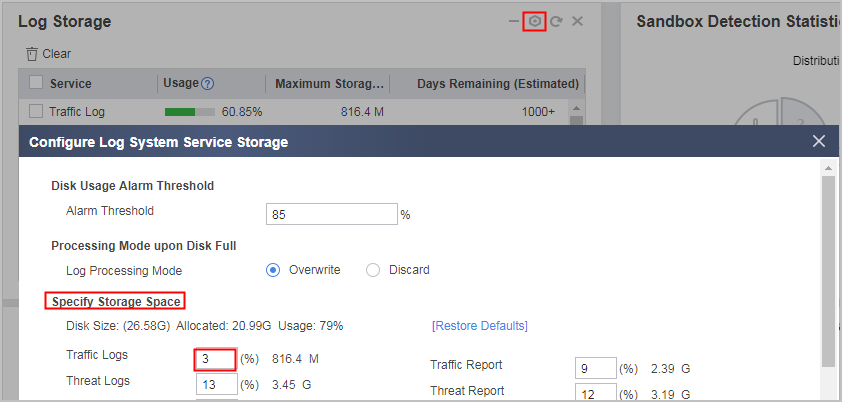
The device allocates storage space for each type of reports. If the report storage space of a module hits or exceeds the specified threshold, the device reports the event. Enter the threshold in the Alarm Threshold area box of Set Disk Usage Alarm Threshold.
When one storage space is full, the device deletes earliest reports to receive new reports. In Processing Mode of Set Log Process Mode Upon Full Disk Space, select a report processing mode for the scenario in which the disk is full.- Overwrite indicates that new reports overwrite the oldest logs in case of insufficient log storage space.
- Discard indicates that the device discards new reports in case of insufficient log storage space.
Manually Clearing Reports
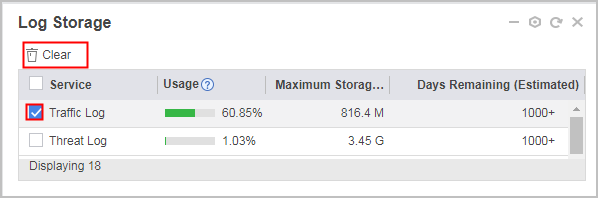
When the storage space of reports from a module hits or exceeds Alarm Threshold, you can manually clear reports to release the disk space.

Reports does not exist after they are cleared. Perform this operation with caution.
- Click Dashboard. In Log Storage, select the service reports to be cleared and click Clear.